All About ASP.NET and ASP.NET Core 2 Hosting BLOG

Tutorial and Articles about ASP.NET and the latest ASP.NET Core

ASP.NET Hosting - ASPHostPortal.com :: How To Migrate Entity Framework Core for Class Library

clock August 9, 2016 18:41 by author Armend

How To Migrate Entity Framework Core for Class Library

In this post I will show you how to migrate EF core for class library projects. We need to pretend our class library is actually a .NET Core app. The trickery begins by updating our class library’s project.json with the following updates:

"buildOptions": {
        "emitEntryPoint": true
    },
    "frameworks": {
        "netcoreapp1.0": { }
    },
    "dependencies": {
        "Microsoft.NETCore.App": {
            "version": "1.0.0",
            "type": "platform"
        },
        "Microsoft.EntityFrameworkCore.Design": "1.0.0-preview2-final",
        "Microsoft.EntityFrameworkCore.SqlServer": "1.0.0",
        "Microsoft.AspNetCore.Identity.EntityFrameworkCore": "1.0.0",
    },
    "tools": {
        "Microsoft.EntityFrameworkCore.Tools": {
            "version": "1.0.0-preview2-final"
        }
    }

The most important parts are the build options at the root level, the Microsoft.EntityFrameworkCore.Design package and theMicrosoft.EntityFrameworkCore.Tools tool.
This part of the workaround is straight from the horse’s mouth and can be found in the docs here: https://docs.efproject.net/en/latest/miscellaneous/cli/dotnet.html#targeting-class-library-projects-is-not-supported

You’ll also need to add a static void main() to complete the .NET Core app charade. Add an empty program.cs to your class library project.

public class Program
{
    public
static void Main(string[] args)
    {
    }
}

Lastly, we need to let our fake app know how to create your DbContext. The tools would normally gather this information from your startup.cs, but since that would be a huge pain to implement, let’s cheat and create an IDbContextFactory instead.
Add the following class to your class library:

public class TemporaryDbContextFactory : IDbContextFactory<PinchContext>
{
    public
PinchContext Create(DbContextFactoryOptions options)
    {
        var
builder = new DbContextOptionsBuilder<PinchContext>();
        builder
.UseSqlServer("Server=(localdb)\\mssqllocaldb;Database=pinchdb;Trusted_Connection=True;MultipleActiveResultSets=true");
        return
new PinchContext(builder.Options);
    }
}

This is just a quick way to let the app know what data provider we’re using and what the connection string is. Just hardcode it, don’t bother with the configuration system, this is only temporary and only used at development time.

About ASPHostPortal.com:

ASPHostPortal.com is The Best, Cheap and Recommended ASP.NET & Linux Hosting. ASPHostPortal.com has ability to support the latest Microsoft, ASP.NET, and Linux technology, such as: such as: WebMatrix, Web Deploy, Visual Studio, Latest ASP.NET Version, Latest ASP.NET MVC Version, Silverlight and Visual Studio Light Switch, Latest MySql version, Latest PHPMyAdmin, Support PHP, etc. Their service includes shared hosting, reseller hosting, and Sharepoint hosting, with speciality in ASP.NET, SQL Server, and Linux solutions. Protection, trustworthiness, and performance are at the core of hosting operations to make certain every website and software hosted is so secured and performs at the best possible level.

Simpan


ASP.NET Hosting - ASPHostPortal.com :: How to call multiple validation group in ASP.NET

clock August 8, 2016 20:15 by author Dan

Recently I had this requirement where in a single button click I need to call multiple Validation groups. The scenario is something like this. I had a ASP.NET page where there were 5 user controls and each had their own validation controls embedded in them. Each user control had its own validation controls and they had their own Validation group defined. All these user controls were placed in a single page which only had two button “Submit” and “Canel”. On click of the “Submit” button all the validation controls in the form should execute.

The problem here is that there are five different validation groups in the same page. To top it all you can only assign one validation group to a button’ ValidationGroup property. If you don’t assign any validation group then on click of the submit button the validation controls which don’t have any validation group defined for them will only be fired. Validation controls which have validation group property defined will not get fired. This is the default behavior of validation controls. So how to call the validation controls of different groups? The answer lies in calling the “Page_ClientValidate” javascript method with the validation group name.

Lets try to understand how this all words with some code.The HTML code of the page looks something like this.

 <table width="100%">

         <tr>

             <td>

                 <asp:TextBox ID="TextBox1"

 runat="server"></asp:TextBox>

                 <asp:RequiredFieldValidator

 ID="RequiredFieldValidator1" runat="server"

 ErrorMessage="RequiredFieldValidator"

 ValidationGroup="Group1" ControlToValidate="TextBox1">

 </asp:RequiredFieldValidator>

             </td>           

         </tr>

         <tr>

             <td>

                 <asp:TextBox ID="TextBox2"

 runat="server"></asp:TextBox>

                 <asp:RequiredFieldValidator

 ID="RequiredFieldValidator2" runat="server"

 ErrorMessage="RequiredFieldValidator"

 ValidationGroup="Group2" ControlToValidate="TextBox2">

 </asp:RequiredFieldValidator>

             </td>
         </tr>

         <tr>

             <td>

                     <asp:TextBox ID="TextBox3" runat="server"></asp:TextBox>                   
<asp:RequiredFieldValidator ID="RequiredFieldValidator3" runat="server" ErrorMessage="RequiredFieldValidator"

 ValidationGroup="Group3" ControlToValidate="TextBox3">

 </asp:RequiredFieldValidator>

             </td>

         </tr>

         <tr>

             <td>
                 <asp:TextBox ID="TextBox4"

 runat="server"></asp:TextBox>

                 <asp:RequiredFieldValidator

 ID="RequiredFieldValidator4" runat="server" ErrorMessage="RequiredFieldValidator" ControlToValidate="TextBox4">

 </asp:RequiredFieldValidator>

             </td>

         </tr>

         <tr>

             <td>

                 <asp:Button ID="btnSubmit" runat="server" Text="Submit" OnClientClick="javascript:return

 validatePage();" />

                 <asp:Button ID="btnCancel" runat="server" Text="Cancel" />

             </td>

         </tr>

 </table>


From the above markup you can make out that there are four required field validators and out of the four validators three have validation group property defined. In such a scenario when you click the submit button only the validator which doesn’t have validation group will be executed i.e. RequiredFiedlValidator4 will only be executed. Since there are more than one validation group assigning button’ ValidationGroup wont work as it will execute only validator controls which belong to the assigned validaiton group. Other validator controls belonging to other validation group won’t execute. Also there is no way to specify multiple validaiton group using the ValidationGroup property of the button control.

The way to solve this problem is to call Page_ClientValidate javascript function. Page_ClientValidate is a javascript function generated by ASP.NET. The function takes validation group name as an argument. The javascript function which gets called when the submit button is clicked is pasted below.

 <script language="javascript" type="text/javascript">

 function validatePage()

 {

     //Executes all the validation controls associated with group1 validaiton Group1.

     var flag = Page_ClientValidate('Group1');

     if (flag)

     //Executes all the validation controls associated with group1 validaiton Group2.

         flag = Page_ClientValidate('Group2');

     if (flag)

     //Executes all the validation controls associated with group1 validaiton Group3.

         flag = Page_ClientValidate('Group3');

     if (flag)

     //Executes all the validation controls which are not associated with any validation group.

         flag = Page_ClientValidate();

     return flag;

 }

 </script>


In the above code you can see the Page_ClientValidate function is called four times, first by passing the first validation group name, second time passing on the second validation group name and so on. If you see the last call to Page_ClientValidate, it is called with an empty argument. When call Page_ClientValidate with no argume/validation group name it executes all the validation controls in the page which don’t have a validation group assigned to them. So if one wants to execute validation controls which are not having any validation group associated with them you can call the Page_ClientValidate without any parameter.

So using Page_ClientValidate javascript function one can execute all the validation controls in the page by passing the validation group name or without any validation group name.

Best ASP.NET Core 1.0 Hosting Recommendation

ASPHostPortal.com provides its customers with Plesk Panel, one of the most popular and stable control panels for Windows hosting, as free. You could also see the latest .NET framework, a crazy amount of functionality as well as Large disk space, bandwidth, MSSQL databases and more. All those give people the convenience to build up a powerful site in Windows server. ASPHostPortal.com offers ASP.NET hosting starts from $1/month only. They also guarantees 30 days money back and guarantee 99.9% uptime. If you need a reliable affordable ASP.NET Hosting, ASPHostPortal.com should be your best choice.


ASP.NET Hosting - ASPHostPortal.com :: How to Create Dynamic menu with SQL Server Database in ASP.NET

clock August 5, 2016 22:44 by author Dan

Hi friends,in this article I will explain about How to Create Dynamic menu is one of the most important parts if a website development. So today I will show you how you can create dynamic css menu with database(SQL Server using in ASP.NET using CSS.

First we will search for the menu which we want to implement dynamically. After this we will create table in which we will add the menu item detail. In this article I have used two table one for parent and other for child table. In this child table contains the reference of parent table.

DBScript:


 CREATE TABLE Parent_Menu (
  ID int IDENTITY,
  ParentMenu_Name varchar(50),
  ParentMenu_URL varchar(150)
)

CREATE TABLE Child_Menu (
  ID int IDENTITY,
  Parent_ID int,
  ChildMenu_Name varchar(50),
  ChildMenu_URL varchar(150)
)

INSERT INTO Parent_Menu (ParentMenu_Name, ParentMenu_URL)
  VALUES ('Home', '#')
INSERT INTO Parent_Menu (ParentMenu_Name, ParentMenu_URL)
  VALUES ('Technology', '#')
INSERT INTO Parent_Menu (ParentMenu_Name, ParentMenu_URL)
  VALUES ('Contact US', '#')

INSERT INTO Child_Menu (Parent_ID, ChildMenu_Name, ChildMenu_URL)
  VALUES (1, 'Home', '~/Home.aspx')
INSERT INTO Child_Menu (Parent_ID, ChildMenu_Name, ChildMenu_URL)
  VALUES (2, 'ASP.NET', '~/Asp_Net.aspx')
INSERT INTO Child_Menu (Parent_ID, ChildMenu_Name, ChildMenu_URL)
  VALUES (2, 'C#', '~/CSharp.aspx')
INSERT INTO Child_Menu (Parent_ID, ChildMenu_Name, ChildMenu_URL)
  VALUES (2, 'MVC', '~/MVC.aspx')


ASP.NET:


<html xmlns="http://www.w3.org/1999/xhtml">
<head runat="server">
    <title>Creating Dynamic CSS Menu From Database SQL Server in ASP.Net Using C#.Net/VB.NET
    </title>
    <style type="text/css">
        .ParentMenu
        {
            font-size: small;
            font-family: Tahoma;
            font-weight: bold;
            padding-left: 6px;
            padding-right: 6px;
            text-align: center;
            background-color: #8B008B;
            color: White;
            border: 1px solid black;
        }
      
        .ParentMenu:hover
        {
            font-family: Tahoma;
            font-weight: bold;
            padding-left: 6px;
            padding-right: 6px;
            text-align: center;
            border: 1px solid black;
            font-size: small;
        }
      
        .ChildMenu
        {
            background-color: #8B008B;
            font-weight: bold;
            font-family: Tahoma;
            padding-top: 4px;
            padding-bottom: 4px;
            padding-right: 5px;
            padding-left: 5px;
            text-align: left;
            font-size: small;
            color: White;
            border: 1px solid black;
        }
        .ChildMenu:hover
        {
            font-weight: bold;
            font-family: Tahoma;
            padding-top: 4px;
            padding-bottom: 4px;
            padding-right: 6px;
            padding-left: 6px;
            text-align: left;
            font-size: small;
            border: 1px solid black;
            background-color: Black;
        }
    </style>
</head>
<body>
    <form id="form1" runat="server">
    <div>
        <asp:Menu DynamicSelectedStyle-Font-Italic="true" ID="dynamicMENU" runat="server"
            Orientation="Horizontal" DynamicVerticalOffset="4" OnMenuItemClick="dynamicMENU_MenuItemClick">
            <StaticMenuItemStyle Width="100" CssClass="ParentMenu" />
            <DynamicMenuItemStyle Width="250" CssClass="ChildMenu" />
        </asp:Menu>
    </div>
    </form>
</body>
</html>


C#.NET:


using System;
using System.Collections.Generic;
using System.Linq;
using System.Web;
using System.Web.UI;
using System.Web.UI.WebControls;
using System.Data;
using System.Configuration;
using System.Data.SqlClient;

public partial class DynamicCSSMenu : System.Web.UI.Page
{
    protected void Page_Load(object sender, EventArgs e)
    {
        if (!IsPostBack)
        {
            GetMenu();
        }
    }

    public void GetMenu()
    {
        DataSet dsParentMenu = getPARENTMENU();
        DataRowCollection drcParentMenu = dsParentMenu.Tables[0].Rows;
        DataSet dsChildMenuAll = getCHILDMENU();
        DataTable drcChildMenuAll = dsChildMenuAll.Tables[0];

        MenuItem mainMENUITEM;
        MenuItem childMENUITEM;
        foreach (DataRow drParentMenu in drcParentMenu)
        {
            mainMENUITEM = new MenuItem(drParentMenu["ParentMenu_Name"].ToString());
            dynamicMENU.Items.Add(mainMENUITEM);
            DataRow[] drcChildMenu = drcChildMenuAll.Select("Parent_ID=" + "'" + drParentMenu["ID"].ToString() + "'");
            foreach (DataRow drSUBMENUITEM in drcChildMenu)
            {
                childMENUITEM = new MenuItem(drSUBMENUITEM["ChildMenu_Name"].ToString());
                mainMENUITEM.ChildItems.Add(childMENUITEM);

                childMENUITEM.NavigateUrl = drSUBMENUITEM["ChildMenu_URL"].ToString();
            }
        }
        mainMENUITEM = new MenuItem("Logout");
        dynamicMENU.Items.Add(mainMENUITEM);
    }

    public DataSet getPARENTMENU()
    {
        SqlConnection myConnection = new SqlConnection(System.Configuration.ConfigurationManager.ConnectionStrings["con"].ToString());
        string str_query = string.Empty;
        str_query = "SELECT * FROM Parent_Menu";
        SqlDataAdapter daPARENT = new SqlDataAdapter(str_query, myConnection);
        DataSet dsTEMP = new DataSet();
        daPARENT.Fill(dsTEMP, "tablePARENT");
        return dsTEMP;
    }

    public DataSet getCHILDMENU()
    {
        SqlConnection myConnection = new SqlConnection(System.Configuration.ConfigurationManager.ConnectionStrings["con"].ToString());
        string str_querychild = string.Empty;
        str_querychild = "SELECT * FROM Child_Menu";
        SqlDataAdapter daCHILD = new SqlDataAdapter(str_querychild, myConnection);
        DataSet dsTEMP = new DataSet();
        daCHILD.Fill(dsTEMP, "tableCHILD");
        return dsTEMP;
    }
    protected void dynamicMENU_MenuItemClick(object sender, MenuEventArgs e)
    {
        Response.Redirect("~/index.aspx");
    }
}


VB.NET:


Imports System.Collections.Generic
Imports System.Linq
Imports System.Web
Imports System.Web.UI
Imports System.Web.UI.WebControls
Imports System.Data
Imports System.Configuration
Imports System.Data.SqlClient

Partial Public Class DynamicCSSMenu
    Inherits System.Web.UI.Page
    Protected Sub Page_Load(sender As Object, e As EventArgs)
        If Not IsPostBack Then
            GetMenu()
        End If
    End Sub

    Public Sub GetMenu()
        Dim dsParentMenu As DataSet = getPARENTMENU()
        Dim drcParentMenu As DataRowCollection = dsParentMenu.Tables(0).Rows
        Dim dsChildMenuAll As DataSet = getCHILDMENU()
        Dim drcChildMenuAll As DataTable = dsChildMenuAll.Tables(0)

        Dim mainMENUITEM As MenuItem
        Dim childMENUITEM As MenuItem
        For Each drParentMenu As DataRow In drcParentMenu
            mainMENUITEM = New MenuItem(drParentMenu("ParentMenu_Name").ToString())
            dynamicMENU.Items.Add(mainMENUITEM)
            Dim drcChildMenu As DataRow() = drcChildMenuAll.[Select]("Parent_ID=" + "'" + drParentMenu("ID").ToString() + "'")
            For Each drSUBMENUITEM As DataRow In drcChildMenu
                childMENUITEM = New MenuItem(drSUBMENUITEM("ChildMenu_Name").ToString())
                mainMENUITEM.ChildItems.Add(childMENUITEM)

                childMENUITEM.NavigateUrl = drSUBMENUITEM("ChildMenu_URL").ToString()
            Next
        Next
        mainMENUITEM = New MenuItem("Logout")
        dynamicMENU.Items.Add(mainMENUITEM)
    End Sub

    Public Function getPARENTMENU() As DataSet
        Dim myConnection As New SqlConnection(System.Configuration.ConfigurationManager.ConnectionStrings("con").ToString())
        Dim str_query As String = String.Empty
        str_query = "SELECT * FROM Parent_Menu"
        Dim daPARENT As New SqlDataAdapter(str_query, myConnection)
        Dim dsTEMP As New DataSet()
        daPARENT.Fill(dsTEMP, "tablePARENT")
        Return dsTEMP
    End Function

    Public Function getCHILDMENU() As DataSet
        Dim myConnection As New SqlConnection(System.Configuration.ConfigurationManager.ConnectionStrings("con").ToString())
        Dim str_querychild As String = String.Empty
        str_querychild = "SELECT * FROM Child_Menu"
        Dim daCHILD As New SqlDataAdapter(str_querychild, myConnection)
        Dim dsTEMP As New DataSet()
        daCHILD.Fill(dsTEMP, "tableCHILD")
        Return dsTEMP
    End Function
    Protected Sub dynamicMENU_MenuItemClick(sender As Object, e As MenuEventArgs)
        Response.Redirect("~/index.aspx")
    End Sub
End Class

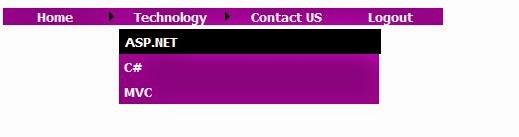
The output of the above code as shown in the below figure.
Best ASP.NET Core 1.0 Hosting Recommendation

ASPHostPortal.com provides its customers with Plesk Panel, one of the most popular and stable control panels for Windows hosting, as free. You could also see the latest .NET framework, a crazy amount of functionality as well as Large disk space, bandwidth, MSSQL databases and more. All those give people the convenience to build up a powerful site in Windows server. ASPHostPortal.com offers ASP.NET hosting starts from $1/month only. They also guarantees 30 days money back and guarantee 99.9% uptime. If you need a reliable affordable ASP.NET Hosting, ASPHostPortal.com should be your best choice.


ASP.NET Hosting - ASPHostPortal.com :: Asp.net Export Excel Show/Hide Loading image

clock August 2, 2016 19:58 by author Armend

This Tip will explain how to hide the loading gif image after the file is downloaded . It  will be helpful when we are using  Response Object to export the excel or any other file format.


Sometimes while  downloading an excel or any file from an Asp application, it might take some time to Generate the File, the delay  depends on many factors( file size, loops, server bandwidth etc ). So we repesent the File Generation process using a rotating GIF image next to the button.
But when we are using Response object we wont get the event after the file is downloaded to the browser, in this case it will be difficult to hide the loading gif which is being shown on the screen

The below steps will guide how to  Show the Gif while Generating and hide it once the file is completly downloaded.

Hide the GIF after download

  • When the download button is clicked, show the loading gif image using onclicentClick event and CSS properties
  • On the Client click event invoke a Javascript method which Contains a  Setinterval  object that moniters  for our cookie (created in c# Response object).
  • In the Server button click Event Create an HttpCookie and append it to the Respone object.
  • So when the File is downloaded completly the Cookie is added to the Page, Now the SetInterval function will capture the cookie and Hides the Loading Gif image.
  • Note: whenever the download button is clicked, previous cookie has to be deleted.

Using the code

protected void btnExportExcel_Click(object sender, EventArgs e)
          {
            DataTable dt = new DataTable();
            dt = GetDataFromDb();
            System.Threading.Thread.Sleep(3000); // for testing purpose to create 3 seconds delay
            //Create a temp GridView
            GridView gv = new GridView();
            gv.AllowPaging = false;
            gv.DataSource = dt;
            gv.DataBind();
            Response.Clear();
            Response.Buffer = true;
            Response.AddHeader("content-disposition", "attachment;filename=ExcelReport.xls");
            Response.Charset = "";
            Response.ContentType = "application/vnd.ms-excel";
            StringWriter sw = new StringWriter();
            HtmlTextWriter hw = new HtmlTextWriter(sw);
            gv.RenderControl(hw);
            // Append cookie
            HttpCookie cookie = new HttpCookie("ExcelDownloadFlag");
            cookie.Value = "Flag";
            cookie.Expires = DateTime.Now.AddDays(1);
            Response.AppendCookie(cookie);
            // end
            Response.Output.Write(sw.ToString());
            Response.Flush();
            Response.End();
        }

HTML/ASPX Code

<table>
            <tr>
                <td>
                    <asp:Button Text="Download" ID="btnExportExcel" OnClientClick="jsShowHideProgress();" runat="server" OnClick="btnExportExcel_Click" />
                </td>
                <td>
                    <img style="display: none" id="imgloadinggif" src="Images/loading.gif" alt="loading.." />
                </td>
            </tr>
        </table>

Javascript Code:

function jsShowHideProgress() {
    setTimeout(function () { document.getElementById('imgloadinggif').style.display = 'block'; }, 200);
    deleteCookie();

    var timeInterval = 500; // milliseconds (checks the cookie for every half second )

    var loop = setInterval(function () {
        if (IsCookieValid())
        { document.getElementById('imgloadinggif').style.display = 'none'; clearInterval(loop) }

    }, timeInterval);
}

// cookies
function deleteCookie() {
    var cook = getCookie('ExcelDownloadFlag');
    if (cook != "") {
        document.cookie = "ExcelDownloadFlag=; Path=/; expires=Thu, 01 Jan 1970 00:00:00 UTC";
    }
}

function IsCookieValid() {
    var cook = getCookie('ExcelDownloadFlag');
    return cook != '';
}

function getCookie(cname) {
    var name = cname + "=";
    var ca = document.cookie.split(';');
    for (var i = 0; i < ca.length; i++) {
        var c = ca[i];
        while (c.charAt(0) == ' ') {
            c = c.substring(1);
        }
        if (c.indexOf(name) == 0) {
            return c.substring(name.length, c.length);
        }
    }
    return "";
}

About ASPHostPortal.com:

ASPHostPortal.com is The Best, Cheap and Recommended ASP.NET & Linux Hosting. ASPHostPortal.com has ability to support the latest Microsoft, ASP.NET, and Linux technology, such as: such as: WebMatrix, Web Deploy, Visual Studio, Latest ASP.NET Version, Latest ASP.NET MVC Version, Silverlight and Visual Studio Light Switch, Latest MySql version, Latest PHPMyAdmin, Support PHP, etc. Their service includes shared hosting, reseller hosting, and Sharepoint hosting, with speciality in ASP.NET, SQL Server, and Linux solutions. Protection, trustworthiness, and performance are at the core of hosting operations to make certain every website and software hosted is so secured and performs at the best possible level.


Cheap ASP.NET 4.5 Hosting

We’re a company that works differently to most. Value is what we output and help our customers achieve, not how much money we put in the bank. It’s not because we are altruistic. It’s based on an even simpler principle. "Do good things, and good things will come to you".

Success for us is something that is continually experienced, not something that is reached. For us it is all about the experience – more than the journey. Life is a continual experience. We see the Internet as being an incredible amplifier to the experience of life for all of us. It can help humanity come together to explode in knowledge exploration and discussion. It is continual enlightenment of new ideas, experiences, and passions


Author Link

 photo ahp banner aspnet-01_zps87l92lcl.png


Corporate Address (Location)

ASPHostPortal
170 W 56th Street, Suite 121
New York, NY 10019
United States

Tag cloud

Sign in