In Asp.Net MVC 5 (Model-View-Controller) there are three options ViewBag, ViewData, and TempData to pass small amount of data from controller to view. In this article i am going to explain what is ViewBag, ViewData and TempData and their use in Asp.Net MVC 5.
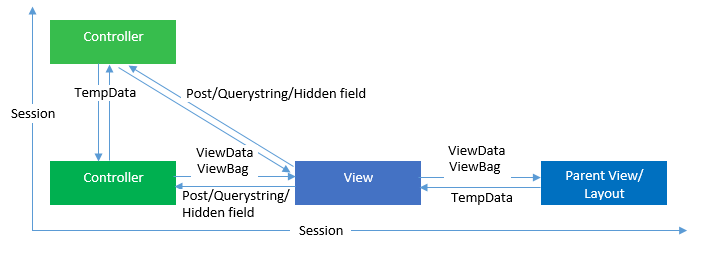
A. ViewData & ViewBag objects.
ViewData is a dictionary object that you put data into, which then becomes available to the view.It is an in-built dictionary object that is derived from ViewDataDictionary class that can be accessed and set with string type key values. It is a used to pass data from Controller to View. ViewData's value become null if redirection occur because its life lies only during current request.

Key points to remember about ViewData.
- ViewData is a dictionary of objects that is derived from ViewDataDictionary class and accessible using strings as keys.
- ViewData requires typecasting for complex data type and it is recommended to check for null values to avoid error.
- ViewData is used to pass small amount of data from controller to view, so it helps to maintain data when moving from controller to view.
- ViewData has short life i.e. Its value becomes null when redirection occurs because its life lies only during current request. This is because the aim of ViewData is to provide a way to transfer/pass data from controllers and views.
- ViewData is faster than ViewBag.
ViewData Example.
In View:
@ViewData["Name"]
ViewBag is dynamic object, meaning we can add properties to it in the controller, and read them later in the view. Its value becomes null when redirection occurs because its life lies only during current request. This is because the aim of ViewBag is to provide a way to transfer/pass data from controllers and views.
ViewBag Example:
In View:
@ViewBag.Name
Similarities between ViewBag & ViewData :
Both the ViewData and ViewBag objects are great for accessing extra data (i.e., outside the data model), between the controller and view. Since views already expect a specific object as their model, this type of data access to extra data, MVC implements it as a property of both views and controllers, making usage and access to these objects easy. Helps to maintain data when you move from controller to view. Used to pass data from controller to corresponding view. Short life means value becomes null when redirection occurs. This is because their goal is to provide a way to communicate between controllers and views. It’s a communication mechanism within the server call.
Difference between ViewBag & ViewData:
- ViewData is a dictionary of objects that is derived from ViewDataDictionary class and accessible using strings as keys.
- ViewBag is a dynamic property that takes advantage of the new dynamic features in C# 4.0.
- ViewData requires typecasting for complex data type and check for null values to avoid error.
- ViewBag doesn’t require typecasting for complex data type.
B. TempData Object.The problem with the ViewData and ViewBag for transferring data from controller to view is that the data is only alive for current request. The data is lost if a redirection takes place i.e. if one Action redirects to another action. But when we need to persist the data between actions/redirection then asp.net MVC offers another dictionary object called TempData for that purpose. It is derived from TempDataDictionary and created on top of session. It will live till the redirected view is fully loaded. “TempData” Helps to maintain data when you move from one controller to other controller or from one action to other action.The benefit is that if you have a chain of multiple redirections it won’t cause TempData to be emptied the values will still be there until you actually use them, then they clear up after themselves automatically.
When to use TempData in ASP.NET MVC ?
Example condition :
I came across this problem where I had a basic list of items and for each if these items I wanted to add a delete action on my controller. I wanted to add some error checking around the delete action so if someone attempted to modify the URL and enter a incorrect parameter into my controller, I wanted to redirect back to the previous controller and notify the user of this mistake. Take this example. I have a Product Controller and the Index Action and View lists all of the products. I have a delete action on the Product Controller which checks if the productId parameter is valid and then removes the product and redirects to the Index action using the RedirectToAction method.
The solution :
When validating the productId, if its NOT valid simply add a new key/value to the TempData object and call the RedirectToAction method. TempData stores data for short periods of time for the current and next HTTP request. In your index view, you can check to see if your key/value pair exists and display a error message. If you refresh the page, you will notice the data from the TempData will be gone. Remember to use RedirectToAction where possible as this is more friendly with Unit Testing rather than using the HttpResponse redirect method.
I hope you have got what is ViewBag, ViewData and TempData in Asp.Net MVC and I hope you will refer this article for your need. Stay tuned and stay connected for more technical updates.