
October 16, 2015 06:42 by
 Dan
Dan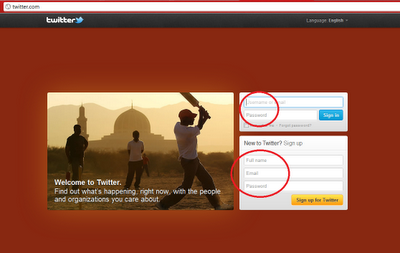
Hi Friends, in this article I will explain about Watermark for Username and Password in JavaScript. I already explained in the previous articles about Marquee tag or How to Scroll Text From left to right or How to Move the Text in HTML,C#/VB.NET:Save the generated pdf directly to the server directory folder without user prompt in ASP.NET and How to open PDF File in Adobe Reader, not in Browser in ASP.NET using C#/VB.NET.

We may see Watermark textboxes in so many sites. Suppose we take the twitter site in login page and signup page it contains Watermark textboxes. Watermark is not working properly for the password if we take the Textmode as Password(TextMode="Password").For that i take the extra textbox txtTempPwd and write the code as following.
Take one web page(.aspx page), Copy and Paste the below code in your web page.
<html xmlns="http://www.w3.org/1999/xhtml">
<head id="Head1" runat="server">
<title>Watermark Textboxs for username and Password Using JavaScript</title>
<script language="javascript" type="text/javascript">
function WaterMark(objtxt, event) {
var defaultText = "Username";
var defaultpwdText = "Password";
// Condition to check textbox length and event type
if (objtxt.id == "txtUserName" || objtxt.id == "txtPwd") {
if (objtxt.value.length == 0 & event.type == "blur") {
//if condition true then setting text color and default text in textbox
if (objtxt.id == "txtUserName") {
objtxt.style.color = "Gray";
objtxt.value = defaultText;
}
if (objtxt.id == "txtPwd") {
document.getElementById("<%= txtTempPwd.ClientID %>").style.display = "block";
objtxt.style.display = "none";
}
}
}
// Condition to check textbox value and event type
if ((objtxt.value == defaultText || objtxt.value == defaultpwdText) & event.type == "focus") {
if (objtxt.id == "txtUserName") {
objtxt.style.color = "black";
objtxt.value = "";
}
if (objtxt.id == "txtTempPwd") {
objtxt.style.display = "none";
document.getElementById("<%= txtPwd.ClientID %>").style.display = "";
document.getElementById("<%= txtPwd.ClientID %>").focus();
}
}
}
</script>
</head>
<body>
<form id="form1" runat="server">
<table>
<tr>
<td><b>UserName:</b></td>
<td>
<asp:TextBox ID="txtUserName" runat="server" Text="Username" Width="150px" ForeColor="Gray" onblur = "WaterMark(this, event);" onfocus = "WaterMark(this, event);" />
</td>
</tr>
<tr>
<td><b>Password:</b></td>
<td>
<asp:TextBox ID="txtTempPwd" Text="Password" runat="server" onfocus="WaterMark(this, event);" Width="150px" ForeColor="Gray" />
<asp:TextBox ID="txtPwd" TextMode="Password" Text="Password" runat="server" Width="150px" Style="display:none" onblur="WaterMark(this, event);"/>
</td>
</tr>
</table>
</form>
</body>
</html>
Then the output like below.
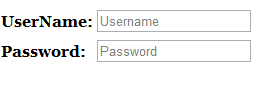
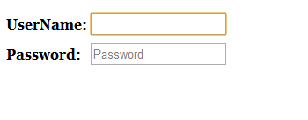
when we click on the textboxes then the text will disappear like below.
Best ASP.NET 4.6 Hosting Recommendation
ASPHostPortal.com provides its customers with Plesk Panel, one of the most popular and stable control panels for Windows hosting, as free. You could also see the latest .NET framework, a crazy amount of functionality as well as Large disk space, bandwidth, MSSQL databases and more. All those give people the convenience to build up a powerful site in Windows server. ASPHostPortal.com offers ASP.NET hosting starts from $1/month only. They also guarantees 30 days money back and guarantee 99.9% uptime. If you need a reliable affordable ASP.NET Hosting, ASPHostPortal.com should be your best choice.
3ee3c283-36b7-4cd9-9cca-8c44c05b1780|0|.0
October 9, 2015 07:00 by
DanThis post explains How to Write Or Read Connection String From ASP.NET Web Config for DB driven Applications. We can either use connectionStrings section or AppSettings and can Write Programmatically At Run Time as well. Sql Server information is usually written inside <configuration>

<configuration>
<connectionStrings>
<add name="MyCon"
connectionString="Data Source=AMITJAIN\SQL;
Initial Catalog=Northwind;User ID=amit;Password=password"
providerName="System.Data.SqlClient" />
</connectionStrings>
</configuration>
Where Data Source is db Server Address, Initial Catalog is DataBase Name. To use Windows Authentication instead of Sql Server Authentication write
<connectionStrings>
<add name="MyCon"
connectionString="Data Source=AMITJAIN\SQL;
Initial Catalog=Northwind;Integrated Security=True"
providerName="System.Data.SqlClient" />
</connectionStrings>
For database attached in App_Data Folder we can write
<connectionStrings>
<add name="con"
connectionString="Data Source=.\SQLEXPRESS;
AttachDbFilename=|DataDirectory|\NORTHWND.MDF;
Integrated Security=True;User Instance=True"
providerName="System.Data.SqlClient" />
</connectionStrings>
USING APPSETTINGS We can also write data in Key Value pairs.
<configuration>
<appSettings>
<add key="con"
value="Data Source=AMITJAIN\SQL;
Initial Catalog=Northwind;
User ID=amit;Password=password"/>
</appSettings>
</configuration>
READING WEB.CONFIG FILE PROGRAMMATICALLY We can write code as mentioned below.
C# CODE
using System.Configuration;
string strConn = ConfigurationManager.ConnectionStrings["MyCon"].ConnectionString;
using System.Configuration;
string strConn = ConfigurationManager.AppSettings["con"].ToString();
VB.NET CODE
Imports System.Configuration
Dim strConn As String = ConfigurationManager.ConnectionStrings("MyCon").ConnectionString
Dim strConn As String = ConfigurationManager.AppSettings("con").ToString()
Best ASP.NET 4.6 Hosting Recommendation
ASPHostPortal.com provides its customers with Plesk Panel, one of the most popular and stable control panels for Windows hosting, as free. You could also see the latest .NET framework, a crazy amount of functionality as well as Large disk space, bandwidth, MSSQL databases and more. All those give people the convenience to build up a powerful site in Windows server. ASPHostPortal.com offers ASP.NET hosting starts from $1/month only. They also guarantees 30 days money back and guarantee 99.9% uptime. If you need a reliable affordable ASP.NET Hosting, ASPHostPortal.com should be your best choice.
0b5f1696-9780-48d1-9d20-67296b1754a4|0|.0
October 1, 2015 19:31 by
DanTo display Please Wait Screen
Add Following line in .aspx file

In head Tag
<head runat="server">
<title>Please Wait Screen</title>
<script language = "javascript">
function showPleaseWait()
{
document.getElementById('PleaseWait').style.display = 'block';
}
</script>
</head>
In Body Tag
<body>
<form id="form1" runat="server">
<div class="helptext" id="PleaseWait" style="display: none; text-align:right; color:White; vertical-align:top;">
<table id="MyTable" bgcolor="red">
<tr>
<td>
<b><font color="white">Please Wait...</font></b>
</td>
</tr>
</table>
<div>
<asp:Button ID="Button1" runat="server" Text="Button" OnClick="Button1_Click" onmouseup="showPleaseWait()"/>
Note: here "Please Wait Screen" display logic is on mouse up event, so whenever heavy task started on button click event, "Please Wait..." Message will be displayed.
Best ASP.NET 4.6 Hosting Recommendation
ASPHostPortal.com provides its customers with Plesk Panel, one of the most popular and stable control panels for Windows hosting, as free. You could also see the latest .NET framework, a crazy amount of functionality as well as Large disk space, bandwidth, MSSQL databases and more. All those give people the convenience to build up a powerful site in Windows server. ASPHostPortal.com offers ASP.NET hosting starts from $1/month only. They also guarantees 30 days money back and guarantee 99.9% uptime. If you need a reliable affordable ASP.NET Hosting, ASPHostPortal.com should be your best choice.
38ebe860-1cd4-43f5-88f3-0b3b893e9f1b|0|.0
September 28, 2015 06:02 by
DanToday, we will explain about SQL Split Function to Split an Input String. Generally when posting an article in a blog, we have to define tags (Like C#.NET, AJAX, ASP.NET,HTML) upon the article. We usually take these tags in a TextBox with separated them by comma(,). To insert these into database we have two ways to do.
First Method using C# :
Using C# you can split the TextBox items and use a for loop to insert into the database. Code is as follow.
string []tags = txtTags.Text.<span class="IL_AD" id="IL_AD10">Trim</span>().Split(',');
/* With for loop */
for (int i=0;i<tags.Count ;i++)
{
/* perform db query with tags[i].ToSting();
}
/* with foreach */
foreach (string i in tags)
{
/* perform db query with i.ToSting();
}
Second SQL Method :
Here in the SQL we pass the whole items of TextBox into SQL function to split it and then insert these into specific table. Lets see how to do this.
CREATE FUNCTION SplitText
(
@Input NVARCHAR(MAX),
@Character CHAR(1)
)
RETURNS @Output TABLE (
Item NVARCHAR(1000)
)
AS
BEGIN
DECLARE @StartIndex INT, @EndIndex INT
SET @StartIndex = 1
IF SUBSTRING(@Input, LEN(@Input) - 1, LEN(@Input)) <> @Character
BEGIN
SET @Input = @Input + @Character
END
WHILE CHARINDEX(@Character, @Input) > 0
BEGIN
SET @EndIndex = CHARINDEX(@Character, @Input)
INSERT INTO @Output(Item)
<span class="IL_AD" id="IL_AD12">SELECT</span> SUBSTRING(@Input, @StartIndex, @EndIndex - 1)
SET @Input = SUBSTRING(@Input, @EndIndex + 1, LEN(@Input))
END
RETURN
END
GO
-- Create a temporary table to insert tags
create #tblTemp
(
Id identity (1,1),
tag nvarchar(50)
)
-- Inserting into tmpTable
insert into #tblTemp (temp) values
SELECT Item FROM dbo.SplitText('ASP.NET,C#.NET,ADO.NET,JavaScript', ',')
-- Seperated by Comma(,). Place any thing according to you.
Execute your SQL batch query to inserting the tags into table.
Best ASP.NET 4.6 Hosting Recommendation
ASPHostPortal.com provides its customers with Plesk Panel, one of the most popular and stable control panels for Windows hosting, as free. You could also see the latest .NET framework, a crazy amount of functionality as well as Large disk space, bandwidth, MSSQL databases and more. All those give people the convenience to build up a powerful site in Windows server. ASPHostPortal.com offers ASP.NET hosting starts from $1/month only. They also guarantees 30 days money back and guarantee 99.9% uptime. If you need a reliable affordable ASP.NET Hosting, ASPHostPortal.com should be your best choice.
5abd3f60-6f5f-4ecd-896e-38af37b8cfe0|0|.0
September 21, 2015 06:26 by
DanIn short, the dll hell problem is solved in .NET by signing the shared assemblies with strong name. Please follow this article, to understand the process of strong naming an assembly.

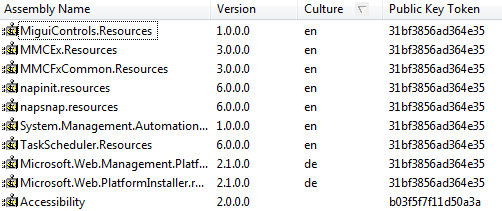
In dot net all the shared assemblies are usually in the GAC. GAC stands for Global Assembly Cache. The path for GAC is C:\[OperatingSystemDirectory]\assembly. For example on my computer the path is C:\WINDOWS\assembly. The image below shows the shared assemblies in the GAC.
Only strong named assemblies can be copied into GAC. Strong named assemblies in .NET has 4 pieces in its name as listed below.
1. Simple Textual Name
2. Version Number
3. Culture
4. Public Key Token
All these four pieces put together, is called as the fully qualified name of the assembly. In the GAC image above Accessibility assembly has a version of 2.0.0.0.
Now consider the example below:
1. I have 2 applications, Application - A1 and Application - A2 which relies on the shared assembly Accessibility.dll (Version 2.0.0.0) as shown in the image below.
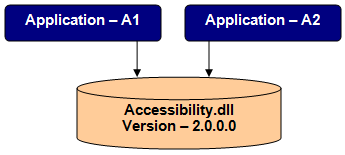
2. Now, I have a latest version of Application - A2 available on the internet.
3. I download the latest version of A2 and install it on my machine.
4. This new installation copies a newer version of Accessibility.dll into the GAC with version 3.0.0.0.
5. So, in the GAC we now have 2 versions of Accessibility.dll.
6. Application - A1 continues to use Accessibility.dll (version 2.0.0.0) and Application - A2 uses Accessibility.dll (version 3.0.0.0)
7. So, now the assemblies are able to reside side by side in the GAC. For this reason dot net assemblies are also said to be supporting side by side execution.
Best ASP.NET 4.6 Hosting Recommendation
ASPHostPortal.com provides its customers with Plesk Panel, one of the most popular and stable control panels for Windows hosting, as free. You could also see the latest .NET framework, a crazy amount of functionality as well as Large disk space, bandwidth, MSSQL databases and more. All those give people the convenience to build up a powerful site in Windows server. ASPHostPortal.com offers ASP.NET hosting starts from $1/month only. They also guarantees 30 days money back and guarantee 99.9% uptime. If you need a reliable affordable ASP.NET Hosting, ASPHostPortal.com should be your best choice.
6c050ea5-e2ca-44cf-804e-fafd99eff649|0|.0
September 11, 2015 06:43 by
DanDateTime difference in Milliseconds
The following asp.net c# example source code demonstrate us how can we get difference in milliseconds between two datetime objects. in this source code, we created a datetime type variable by DateTime.Now property that holds a value that represent the current system date and time. now we initialize a new datatime variable with a value that is two minutes greater than previous datetime variable.
after initializing two datetime variables, we create a timespan object by subtract two datetime object. at last we convert the timespan object into milliseconds. the converted milliseconds is the difference between two datetime objects.
DateTime.Now property gets a datetime object that represent current date and time on web server. DateTime.Subtract() method subtract two datetime objects and return a timespan object. TimeSpan represents a time interval.
datetime-difference-in-milliseconds.aspx
<%@ Page Language="C#" AutoEventWireup="true"%>
<!DOCTYPE html>
<script runat="server">
protected void Button1_Click(object sender, System.EventArgs e)
{
//initialize a datetime variable with current datetime
DateTime now = DateTime.Now;
Label1.Text = "now : " + now.ToString();
//add 2 minutes to current time
DateTime dateAfter2Minutes = now.AddMinutes(2);
TimeSpan ts = dateAfter2Minutes - now;
//total milliseconds difference between two datetime object
int milliseconds = (int)ts.TotalMilliseconds;
Label1.Text += "<br ><br />after two minutes: ";
Label1.Text += dateAfter2Minutes.ToString();
Label1.Text += "<br ><br />smillieconds difference between to datetime object : ";
Label1.Text += milliseconds;
}
</script>
<html xmlns="http://www.w3.org/1999/xhtml">
<head id="Head1" runat="server">
<title>c# example - datetime difference in milliseconds</title>
</head>
<body>
<form id="form1" runat="server">
<div>
<h2 style="color:MidnightBlue; font-style:italic;">
c# example - datetime difference in milliseconds
</h2>
<hr width="550" align="left" color="Gainsboro" />
<asp:Label
ID="Label1"
runat="server"
Font-Size="Large"
Font-Names="Comic Sans MS"
>
</asp:Label>
<br /><br />
<asp:Button
ID="Button1"
runat="server"
Text="get milliseconds difference between two datetime"
OnClick="Button1_Click"
Height="40"
Font-Bold="true"
/>
</div>
</form>
</body>
</html>
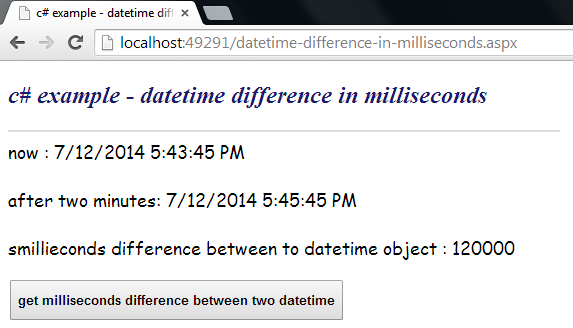
the above image describe this example code better. this output screenshot display that at first line we created a DateTime variable. second line we created another datetime object by adding two minutes with first datetime object. final line shows the difference of two datetime objects in milliseconds. one second equal to one thousand milliseconds.
Best ASP.NET 4.6 Hosting Recommendation
ASPHostPortal.com provides its customers with Plesk Panel, one of the most popular and stable control panels for Windows hosting, as free. You could also see the latest .NET framework, a crazy amount of functionality as well as Large disk space, bandwidth, MSSQL databases and more. All those give people the convenience to build up a powerful site in Windows server. ASPHostPortal.com offers ASP.NET hosting starts from $1/month only. They also guarantees 30 days money back and guarantee 99.9% uptime. If you need a reliable affordable ASP.NET Hosting, ASPHostPortal.com should be your best choice.
1bd663ed-2168-4ad6-a6c1-be756b5a07e2|0|.0
September 7, 2015 06:32 by
Dan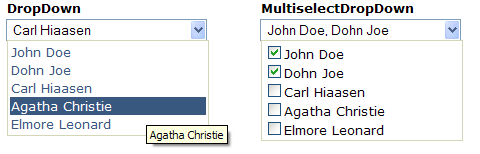
Description
This article discusses about two user controls written in ASP.NET. Working on a project recently, I needed to develop a custom DropDown control with multiselect options in the form of CheckBox. I searched around for something simple, yet useful for my needs, and I wasn't able to find anything, so I developed my own control. Later, I reused the code to create a regular DropDown control (no multiselect checkbox options). The two controls can be merged into one, but I might do that at a later stage. On to the controls.
DropDown
This control can be bound to a IListSource to fetch data to be populated, in addition to the regular Items collection that can be populated from the asp. Here are a few examples of how this control can be used in ASPX.
<%@ Register Src="Controls/DropDown.ascx" TagName="DropDown" TagPrefix="thp" %>
<thp:DropDown ID="DropDown1" runat="server" Width="200">
<Items>
<asp:ListItem Text="Some text" Value="0" Selected="True" />
<asp:ListItem Text="Another option" Value="1" />
</Items>
</thp:DropDown>
<thp:DropDown ID="DropDown2" runat="server" Width="200" DataSourceID="DataSource1"
DataTextField="Name" DataValueField="Id" />
<thp:DropDown ID="DropDown3" runat="server" Width="200"
OnNeedDataSource="DropDown3_NeedDataSource"
DataTextField="Name" DataValueField="Id" OnClientChange="onDropDownChange" />
Here's a screenshot of what the above code would render:
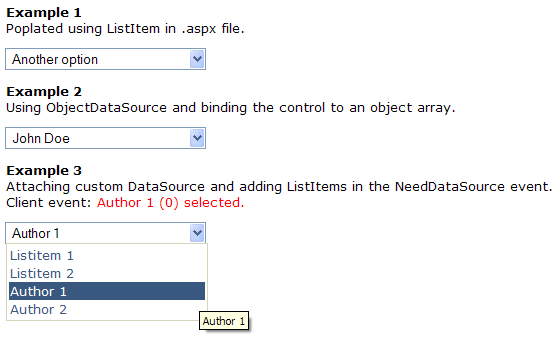
Both controls support the following data events:
- ItemDataBound - Fired after the object has been bound to an Item. The argument passes both the bound object (DataObject) and theListItem.
- NeedDataSource - Fired when there's no DataSourceID specified. This event is helpful when you want to manually populate the controls with your data. See the source code provided for specifics on this, you can use either Items collection or create custom list source (or both).
MultiselectDropDown
The code and usage is exactly as the DropDown control. Here's a screenshot of all of the above scenarios:
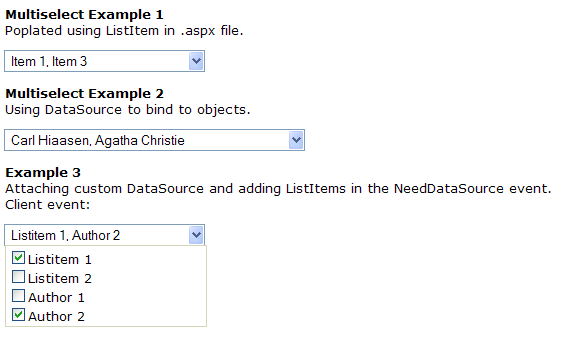
The styling in the attached project uses .skin files in the default theme. You can easily modify these to fit your needs. Everything can be styled.
I hope you find this code useful. I recommend this to anyone that wants to start developing custom controls as it has very important features implemented, such as the IPostBackDataHandler interface to pass data between postbacks in a custom manner. It also features some niceDataBinding examples and how you can use and modify these to perform specific tasks.
Best ASP.NET 4.6 Hosting Recommendation
ASPHostPortal.com provides its customers with Plesk Panel, one of the most popular and stable control panels for Windows hosting, as free. You could also see the latest .NET framework, a crazy amount of functionality as well as Large disk space, bandwidth, MSSQL databases and more. All those give people the convenience to build up a powerful site in Windows server. ASPHostPortal.com offers ASP.NET MVC hosting starts from $1/month only. They also guarantees 30 days money back and guarantee 99.9% uptime. If you need a reliable affordable ASP.NET Hosting, ASPHostPortal.com should be your best choice.
c15a7d84-43a0-4d65-8bed-d2e4128d985a|0|.0
August 31, 2015 06:07 by
DanFor those who’re following the ASP.NET Movies tutorial from Microsoft and you get to the stage where you are supposed to look at the Movies.mdf data file, you may encounter some problems. There are quite a few, and these issues aren’t unique to the movies sample and can happen to anyone trying to create projects in this way. Here are a list of problems and solutions.

Problem: The database ‘…MVCMOVIE\MVCMOVIE\APP_DATA\MOVIES.MDF’ cannot be opened because it is version 706. This server supports version 655 and earlier. A downgrade path is not supported.
Solution: [It’s likely you’re running Visual Studio Web Developer or VS2010]
- You need to install the SQL Server Data Tools and LocalDB.
- Verify the MovieDBContext connection string specified on the previous page of the tutorial.
Problem: “InvalidOperation Exception was unhandled by user code” The supplied SqlConnection does not specify an initial catalog.
Solution: [It’s likely you’re running Visual Studio Web Developer or VS2010]
- You need to install the SQL Server Data Tools and LocalDB.
- Verify the MovieDBContext connection string specified on the previous page of the tutorial. Or
- You might get away with just adding “Initial Catalog=Movies;” into the connection string.
Problem: The App_Data folder in the solution explorer didn’t contain the .mdf file
Solution:
- In the Solution Explorer, click ‘show all files’.
- Then click the refresh button.
- Then expand the App_Data folder
Problem: The App_Data folder still doesn’t show anything.
Solution:
- F5 (Debug) the solution.
- Navigate to <location>/Movies in IE- this step populates the database. You could also try using update-database in nuget package manager console.
- Go back to visual studio and refresh the App_Data folder.
– This solution applies to other projects, if your .mdf isn’t there or the tables aren’t there, just try navigating to the main DbSet controller class first. This is because the migrations to code first changes are lazily applied. You can write some code in your startup that ensures all pending migrations are added to the database before any other code is run, which is generally handy anyway. I’ll be covering this in another blog post soon.
Best ASP.NET 4.6 Hosting Recommendation
ASPHostPortal.com provides its customers with Plesk Panel, one of the most popular and stable control panels for Windows hosting, as free. You could also see the latest .NET framework, a crazy amount of functionality as well as Large disk space, bandwidth, MSSQL databases and more. All those give people the convenience to build up a powerful site in Windows server. ASPHostPortal.com offers ASP.NET MVC hosting starts from $1/month only. They also guarantees 30 days money back and guarantee 99.9% uptime. If you need a reliable affordable ASP.NET Hosting, ASPHostPortal.com should be your best choice.
094fccdf-8dbe-4dc3-b255-858c68ffdac1|0|.0
August 13, 2015 09:12 by
Dan
Nowadays, anybody can afford to order a feature-packed web hosting plan for next to nothing; however, affordable price is not the only criterion which should be considered when purchasing web hosting services. The basics of what you should look for in choosing a web hosting company, not just concentrating on the best price and features, but also on reliability and honesty. You're investing your money and effort into finding paying customers and you wouldn't like to lose them in order to save a few dollars per month on a web hosting service. ASPHostPortal.com is reliable and honest ASP.NET hosting provider for you. Today, we offer ASP.NET 4.6 hosting with excellent service and responsive support.
ASP.NET is a web application framework developed and marketed by Microsoft to allow programmers to build dynamic web sites. It allows you to use a full featured programming language such as C# or VB.NET to build web applications easily. ASP.NET is in the process of being re-implemented as a modern and modular web framework, together with other frameworks like Entity Framework. The new framework will make use of the new open-source .NET Compiler Platform and be cross platform. ASP.NET MVC, ASP.NET Web API, and ASP.NET Web Pages will merge into a unified MVC 6.
ASP.NET 4.6 is an umbrella term used to describe updates existing Frameworks such as ASP.NET Web Forms/ MVC 5/ Web API 2 etc. You can build Web Apps using these Frameworks on the standard, desktop-enabled .NET Framework model. Apart from working on ASP.NET 5, we are also working on updating Frameworks in ASP.NET 4.6. You can expect changes around supporting platform updates. These includes updates in .NET for .NET Compiler Platform (Roslyn) and hosting changes in IIS to support HTTP/2.
ASPHostPortal.com serve people since 2008 and we know how to deliver Powerful, Fast and Reliable ASP.NET 4.6 Hosting with the Superior Customer Support. Fully managed and monitored around the clock, our servers run on Windows Operating system with lots of memory (RAM) and up multiple Quad-Core Xeon CPU's, utilizing power of the Cloud Services. Their ASP.NET 4.6 Hosting plans come with up to 99.99% uptime and 30-Day Full Money Back Guarantee. To learn more about ASP.NET 4.6 Hosting, please visit http://asphostportal.com/ASPNET-46-Hosting
About ASPHostPortal.com :
ASPHostPortal.com is The Best, Cheap and Recommended ASP.NET & Linux Hosting. ASPHostPortal.com has ability to support the latest Microsoft, ASP.NET, and Linux technology, such as: such as: WebMatrix, WebDeploy, Visual Studio 2015, .NET 5/ASP.NET 4.5.2, ASP.NET MVC 6.0/5.2, Silverlight 6 and Visual Studio Lightswitch, Latest MySql version, Latest PHPMyAdmin, Support PHP 5.x, etc. Their service include shared hosting, reseller hosting, and sharepoint hosting, with speciality in ASP.NET, SQL Server, and Linux solutions. Protection, trustworthiness, and performance are on the core of hosting operations to make certain every website and software hosted is so secured and performs at the best possible level.
cde97dff-ed30-4941-8c90-05fa34b87862|0|.0