
July 29, 2013 10:50 by
 Mike
Mike
SQL Server 2008 Reporting Services (SRRS) is a powerful solution that enables the authoring, management, and delivery of both paper-oriented reports and interactive Web-based reports. With SQL Reporting Services, organizations can create reports to be published to the Report Server using Microsoft or third-party design tools that use Report Definition Language (RDL), an XML-based industry standard. Report definitions and resources are published and managed as Web services and users can view reports in Web-based formats or via email.
As soon as you install SSRS 2008 R2, in your server and hit http:///reports, by default the the system administrators get access to the report manager. But if you wish to let other people see the reports that you deploy, you need to explicitly provide access to these reports. Providing access to reports is very simple and can be done at an item level( report level) or a folder level.
Let’s look at a very simple example. I have installed a SSRS 2008 R2 report server, on my local machine and have created a folder called Sandbox, in which i have added a report called Hello World.

By Default all admins in the system can access this report. Lets say, we add more reports to this folder and we need to grant access to these reports.
This can be done, by clicking on Folder Settings and then clicking on security.
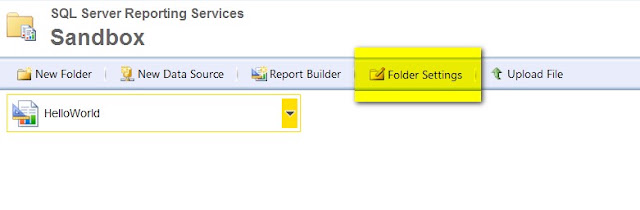

Click on New role assignment. This is the place where you define your role assignments.
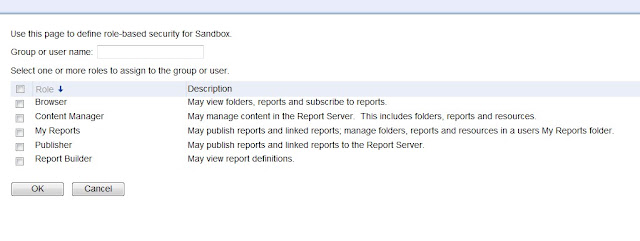
If you need to grant all users of your domain access, then you may need to add 'Domain\DomainUSERS' and assign appropriate roles.
There are mainly 5 types of roles, that you can assign to an user or a group.
These roles are:
a. Browser
b. Content Manager
c. My Reports
d. Publisher
e. Report Builder.
Descriptions for each of these roles are provided in the UI itself. If you wish to add just a particular user of your domain for your report, type the username and select the appropriate role for the same.
Click OK, and your security is set.
8fd7031a-af6b-4a16-a0aa-7f1a2a88d1fd|0|.0