
November 11, 2016 10:31 by
 Dan
Dan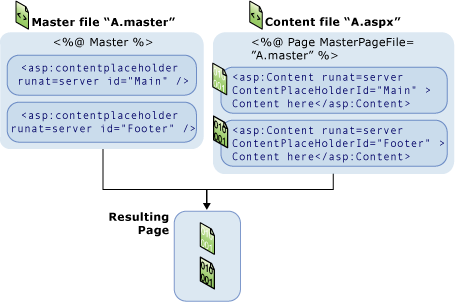
According to venkataspinterview blog, What are Master Pages in ASP.NET? or What is a Master Page? ASP.NET master pages allow you to create a consistent layout for the pages in your application. A single master page defines the look and feel and standard behavior that you want for all of the pages (or a group of pages) in your application. You can then create individual content pages that contain the content you want to display. When users request the content pages, they merge with the master page to produce output that combines the layout of the master page with the content from the content page.
What are the 2 important parts of a master page?
The following are the 2 important parts of a master page
1. The Master Page itself
2. One or more Content Pages
Can Master Pages be nested?
Yes, Master Pages be nested.
What is the file extension for a Master Page?
.master
How do you identify a Master Page?
The master page is identified by a special @ Master directive that replaces the @ Page directive that is used for ordinary .aspx pages.
Can a Master Page have more than one ContentPlaceHolder?
Yes, a Master Page can have more than one ContentPlaceHolder
What is a ContentPlaceHolder?
ContentPlaceHolder is a region where replaceable content will appear.
How do you bind a Content Page to a Master Page?
MasterPageFile attribute of a content page's @ Page directive is used to bind a Content Page to a Master Page.
Can the content page contain any other markup outside of the Content control?
No.
What are the advantages of using Master Pages?
1. They allow you to centralize the common functionality of your pages so that you can make updates in just one place.
2. They make it easy to create one set of controls and code and apply the results to a set of pages. For example, you can use controls on the master page to create a menu that applies to all pages.
3. They give you fine-grained control over the layout of the final page by allowing you to control how the placeholder controls are rendered.
4. They provide an object model that allows you to customize the master page from individual content pages.
What are the 3 levels at which content pages can be attached to Master Page?
At the page level - You can use a page directive in each content page to bind it to a master page
At the application level - By making a setting in the pages element of the application's configuration file (Web.config), you can specify that all ASP.NET pages (.aspx files) in the application automatically bind to a master page.
At the folder level - This strategy is like binding at the application level, except that you make the setting in a Web.config file in one folder only. The master-page bindings then apply to the ASP.NET pages in that folder.
What is @MasterType directive used for?
@MasterType directive is used to create a strongly typed reference to the master page.
Are controls on the master page accessible to content page code?
Yes, controls on the master page are accessible to content page code.
At what stage of page processing master page and content page are merged?
During the initialization stage of page processing, master page and content page are merged.
Can you dynaimically assign a Master Page?
Yes, you can assign a master page dynamically during the PreInit stage using the Page class MasterPageFile property as shown in the code sample below.
void Page_PreInit(Object sender, EventArgs e)
{
this.MasterPageFile = "~/MasterPage.master";
}
Can you access non public properties and non public methods of a master page inside a content page?
No, the properties and methods of a master page must be public in order to access them on the content page.
From the content page code how can you reference a control on the master page?
Use the FindControl() method as shown in the code sample below.
void Page_Load()
{
// Gets a reference to a TextBox control inside
// a ContentPlaceHolder
ContentPlaceHolder ContPlaceHldr = (ContentPlaceHolder)Master.FindControl ("ContentPlaceHolder1");
if(ContPlaceHldr != null)
{
TextBox TxtBox = (TextBox)ContPlaceHldr.FindControl("TextBox1");
if(TxtBox != null)
{
TxtBox.Text = "TextBox Present!";
}
}
// Gets a reference to a Label control that not in
// a ContentPlaceHolder
Label Lbl = (Label)Master.FindControl("Label1");
if(Lbl != null)
{
Lbl.Text = "Lable Present";
}
}
Can you access controls on the Master Page without using FindControl() method?
Yes, by casting the Master to your MasterPage as shown in the below code sample.
protected void Page_Load(object sender, EventArgs e)
{
MyMasterPage MMP = this.Master;
MMP.MyTextBox.Text = "Text Box Found";
}
Best ASP.NET Hosting Recommendation
ASPHostPortal.com provides its customers with Plesk Panel, one of the most popular and stable control panels for Windows hosting, as free. You could also see the latest .NET framework, a crazy amount of functionality as well as Large disk space, bandwidth, MSSQL databases and more. All those give people the convenience to build up a powerful site in Windows server. ASPHostPortal.com offers ASP.NET hosting starts from $1/month only. They also guarantees 30 days money back and guarantee 99.9% uptime. If you need a reliable affordable ASP.NET Hosting, ASPHostPortal.com should be your best choice
856aa8e8-4520-4b3b-80d9-4b8acb23ac55|0|.0
November 8, 2016 08:05 by
Dan
ASPHostPortal.com serve people since 2008 and we know how to deliver Powerful, Fast and Reliable Windows Server 2016 Hosting with the Superior Customer Support. Our superior servers are housed in 12 different countries with up to 1000MB/s connection and Cisco Hardware Firewalls. Fully managed and monitored around the clock, our servers run on Windows Operating system with lots of memory (RAM) and up multiple Quad-Core Xeon CPU's, utilizing power of the Cloud Services. Our Windows Server 2016 Hosting plans come with up to 99.99% uptime and 30-Day Full Money Back Guarantee.
Windows Server 2016 is a server operating system developed by Microsoft as part of the Windows NT family of operating systems, developed concurrently with Windows 10. The first early preview version (Technical Preview) became available on October 1, 2014 together with the first technical preview of System Center.
Securely deploy and run your existing applications on Windows Server 2016 to transform them into new cloud-native models. Help developers to innovate and create on-premises and cloud applications using the latest technology—containers, microservices, and Nano Server.
ASPHostPortal.com offers Windows Server 2016 Hosting with expert team support. We offer Windows Server 2016 hosting with affordable price, a lot of features, 99.99% uptime guarantee, 24/7 support, and 30 days money back guarantee. We strive to make sure that all customers have the finest web-hosting experience as possible. To learn more about our Windows Server 2016 Hosting, please visit http://asphostportal.com/Windows-Server-2016-Hosting.aspx
About ASPHostPortal.com:
ASPHostPortal.com is The Best, Cheap and Recommended ASP.NET & Linux Hosting. ASPHostPortal.com has ability to support the latest Microsoft, ASP.NET, and Linux technology, such as: such as: WebMatrix, Web Deploy, Visual Studio, Latest ASP.NET Version, Latest ASP.NET MVC Version, Silverlight and Visual Studio Light Switch, Latest MySql version, Latest PHPMyAdmin, Support PHP, etc. Their service includes shared hosting, reseller hosting, and Sharepoint hosting, with speciality in ASP.NET, SQL Server, and Linux solutions. Protection, trustworthiness, and performance are at the core of hosting operations to make certain every website and software hosted is so secured and performs at the best possible level.
0eefd471-9861-40a9-8595-214d7387ec8e|0|.0
November 4, 2016 11:25 by
Dan
Based on ASP.NET Corner blog. I have two columns Name and Age in my Table(MyTable). From the MyTable I want to delete only duplicate records. So the below Query will help you to delete or remove the duplicate rows from the MyTable.
Below is MyTable output:
SELECT * FROM MyTable
Current output:
Name Age
vijay 30
antony 40
Aruna 28
antony 40
chander35
mark 42
vijay 30
Remove duplicate rows from the table:
The below query will help you to delete duplicate row from your table. Here we used Row_Number() function and PARTITION BY key words to remove the duplicate rows.
DELETE SUB FROM
(SELECT ROW_NUMBER() OVER (PARTITION BY Name, Age ORDER BY Name) cnt
FROM MyTable) SUB
WHERE SUB.Cnt > 1
After the query execution the output is:
Name Age
Aruna 28
antony 40
chander 35
mark 42
vijay 30
How to use Row_Number in SQL Select query:
SELECT ROW_NUMBER() OVER(ORDER BY Age) FROM mytable
Best ASP.NET Hosting Recommendation
ASPHostPortal.com provides its customers with Plesk Panel, one of the most popular and stable control panels for Windows hosting, as free. You could also see the latest .NET framework, a crazy amount of functionality as well as Large disk space, bandwidth, MSSQL databases and more. All those give people the convenience to build up a powerful site in Windows server. ASPHostPortal.com offers ASP.NET hosting starts from $1/month only. They also guarantees 30 days money back and guarantee 99.9% uptime. If you need a reliable affordable ASP.NET Hosting, ASPHostPortal.com should be your best choice
ca271622-51b9-4ff3-b78b-d565686de82d|0|.0
October 25, 2016 09:15 by
Dan
ASPHostPortal.com is a web hosting provider dedicated to providing high quality Docker hosting at an affordable price. We care for the clients, ensuring each and every client is more than just satisfied day in and day out. We only use the best hardware, super fast network, covered by 24/7 Support Team. We have 12 world class data centers, located on 12 different countries. Each of locations will provide with amazing performance. Today, we offer high quality Docker hosting at cheap rate.
Docker is the world’s leading software containerization platform. Docker enables developers and IT admins to build, ship and run any application, anywhere. Docker's commercial solutions provide an out of the box CaaS environment that gives IT Ops teams security and control over their environment, while enabling developers to build applications in a self service way. With a clear separation of concerns and robust tooling, organizations are able to innovate faster, reduce costs and ensure security.
Docker gives teams the choice to leverage any infrastructure whether in the cloud, on VMs or baremetal servers allowing companies to make the best business decision for them. Docker containers spin up and down in seconds, making it easy to scale application services to satisfy peak customer demand, and then reduce running containers when demand ebbs.
ASPHostPortal.com offers Docker Hosting with expert team support. We offer Docker hosting with affordable price, a lot of features, 99.99% uptime guarantee, 24/7 support, and 30 days money back guarantee. We strive to make sure that all customers have the finest web-hosting experience as possible. To learn more about our Docker Hosting, please visit http://asphostportal.com/Docker-Hosting.aspx
About ASPHostPortal.com:
ASPHostPortal.com is The Best, Cheap and Recommended ASP.NET & Linux Hosting. ASPHostPortal.com has ability to support the latest Microsoft, ASP.NET, and Linux technology, such as: such as: WebMatrix, Web Deploy, Visual Studio, Latest ASP.NET Version, Latest ASP.NET MVC Version, Silverlight and Visual Studio Light Switch, Latest MySql version, Latest PHPMyAdmin, Support PHP, etc. Their service includes shared hosting, reseller hosting, and Sharepoint hosting, with speciality in ASP.NET, SQL Server, and Linux solutions. Protection, trustworthiness, and performance are at the core of hosting operations to make certain every website and software hosted is so secured and performs at the best possible level.
67d8f07c-5153-4ee5-a93c-93ef6d855067|0|.0
October 21, 2016 12:11 by
Dan
According to ASP.NET Corner blog, Some time we need to restart the IIS to certain configuration changes take effect in the IIS server. There are different methods available to reset or restart the IIS. The below example will help you to restart IIS in command line.
How to restart IIS in command line:
From the Start menu, click Run and type iisreset . This is the simplest method to restart the IIS. The below list will help you to do other works in IIS.
To restart IIS using the IIS Restart command-line utility
1. From the Start menu, click Run.
2. In the Open box, type cmd, and click OK.
3. At the command prompt, type iisreset , and press ENTER.
The below examples for other way of managing IIS
• iisreset /stop – Stop the IIS services
• iisreset /start – Start the IIS services
• IISreset /restart - Stop and then restart all Internet services.
• iisreset /status - will show the current status of IIS
• iisreset /noforce - will prevent the server from forcing close applications and process. This can cause IIS to reset slower but is more graceful.
• iisreset /disable - this command disables IIS and prevents all iisreset calls from executing
• iisreset /enable - to re-enable the IIS Admin service
• iisreset /REBOOT - Reboot the computer.
• iisreset /REBOOTONERROR - Reboot the computer if an error occurs when starting, stopping, or restarting Internet services.
• iisreset /NOFORCE - Do not forcefully terminate Internet services if attempting to stop them gracefully fails.
Best ASP.NET Hosting Recommendation
ASPHostPortal.com provides its customers with Plesk Panel, one of the most popular and stable control panels for Windows hosting, as free. You could also see the latest .NET framework, a crazy amount of functionality as well as Large disk space, bandwidth, MSSQL databases and more. All those give people the convenience to build up a powerful site in Windows server. ASPHostPortal.com offers ASP.NET hosting starts from $1/month only. They also guarantees 30 days money back and guarantee 99.9% uptime. If you need a reliable affordable ASP.NET Hosting, ASPHostPortal.com should be your best choice.
9b2d529f-226b-4f62-b1e7-d71dac70a0e2|0|.0
October 11, 2016 19:48 by
Dan
ASPHostPortal.com was established on the goal to provide high quality hosting services for everyone. We care for the clients, ensuring each and every client is more than just satisfied day in and day out. Our company is passionate about hosting and strive to deliver an excellent level of service to each customer. Now, we offer reliable Drupal 8.2 hosting with good server performance.
Drupal 8.2 is a minor version (feature release) of Drupal 8 and is ready for use on production sites. This minor release provides new improvements and functionality without breaking backward compatibility (BC) for public APIs. Note that there may be changes in internal APIs and experimental modules that require updates to contributed and custom modules and themes per Drupal core's backwards compatibility and experimental module policies.
Place Block is the new Drupal 8.2.x feature allows the user to place a block on any page and see the region where it will be displayed, without having to navigate to a backend administration form.
ASPHostPortal.com is set up with an aim to serve customers in an excellent manner by providing them quality service. We offer Drupal 8.2 hosting with affordable price, a lot of features, 99.99% uptime guarantee, 24/7 support, and 30 days money back guarantee. We strive to make sure that all customers have the finest web-hosting experience as possible. To learn more about our Drupal 8.2 Hosting, please visit http://asphostportal.com/Drupal-Hosting.aspx
About ASPHostPortal.com:
ASPHostPortal.com is The Best, Cheap and Recommended ASP.NET & Linux Hosting. ASPHostPortal.com has ability to support the latest Microsoft, ASP.NET, and Linux technology, such as: such as: WebMatrix, Web Deploy, Visual Studio, Latest ASP.NET Version, Latest ASP.NET MVC Version, Silverlight and Visual Studio Light Switch, Latest MySql version, Latest PHPMyAdmin, Support PHP, etc. Their service includes shared hosting, reseller hosting, and Sharepoint hosting, with speciality in ASP.NET, SQL Server, and Linux solutions. Protection, trustworthiness, and performance are at the core of hosting operations to make certain every website and software hosted is so secured and performs at the best possible level.
ba5c1ac6-2902-4744-8d1f-e8f824e34788|0|.0
October 7, 2016 22:26 by
Dan
If a class have multiple methods by same name but different parameters, it is known as Method Overloading.
string sum(int A)
string sum(int A, int B)
C# no need to use any keyword while overloading a method either in same class or in derived class.
While overloading methods, a rule to follow is the overloaded methods must differ either in number of arguments they take or the data type of at least one argument.
Example
using System;
namespace MethodOverloading
{
class Class1
{
public int Sum(int A, int B)
{
return A + B;
}
public float Sum(int A, float B)
{
return A + B;
}
}
class MainClass
{
static void Main()
{
Class1 obj = new Class1();
Console.WriteLine(obj.Sum(20, 30));
Console.WriteLine(obj.Sum(20, 15.70f));
Console.Read();
}
}
}
Best ASP.NET Hosting Recommendation
ASPHostPortal.com provides its customers with Plesk Panel, one of the most popular and stable control panels for Windows hosting, as free. You could also see the latest .NET framework, a crazy amount of functionality as well as Large disk space, bandwidth, MSSQL databases and more. All those give people the convenience to build up a powerful site in Windows server. ASPHostPortal.com offers ASP.NET hosting starts from $1/month only. They also guarantees 30 days money back and guarantee 99.9% uptime. If you need a reliable affordable ASP.NET Hosting, ASPHostPortal.com should be your best choice.
d73a6f44-882b-46b9-9244-ed775a0d2632|0|.0
October 4, 2016 23:09 by
Dan
ASPHostPortal.com has provided reliable Windows ASP.NET hosting plans, at the lowest prices, for the best services possible, on fastest nodes ever. We strongly believe in high quality standards and Hence, the customer will always find our services better than every other host in this industry. We provide Windows ASP.NET hosting plans on high performance servers and high-speed internet connection in the world. Now, we offer reliable ASP.NET Core 1.0.1 hosting with Best 24/7 customer support.
Microsoft this week released updates to ASP.NET Core, .NET Core and Entity Framework Core that consisted mainly of a growing list of fixes. Among the fix rollup is one that plugs up a potential security breakdown within ASP.NET Core. Microsoft details the issue in a TechNet security bulletin that was released at the same time.
According to the bulletin, the issue affects "the public version of ASP.NET Core MVC 1.0.0 whereView Components could receive incorrect information, including details of the current authenticated user." The bulletin goes on to explain that "If a View Component depends on the vulnerable code and makes decisions based on the current user, then the View Component could make incorrect decisions that result in elevation of privilege."
ASPHostPortal.com is set up with an aim to serve customers in an excellent manner by providing them quality service. We offer ASP.NET Core 1.0.1 hosting with affordable price, a lot of features, 99.99% uptime guarantee, 24/7 support, and 30 days money back guarantee. We strive to make sure that all customers have the finest web-hosting experience as possible. To learn more about our ASP.NET Core 1.0.1 Hosting, please visit http://asphostportal.com/ASPNET-Core-1-0-Hosting.aspx
About ASPHostPortal.com:
ASPHostPortal.com is The Best, Cheap and Recommended ASP.NET & Linux Hosting. ASPHostPortal.com has ability to support the latest Microsoft, ASP.NET, and Linux technology, such as: such as: WebMatrix, Web Deploy, Visual Studio, Latest ASP.NET Version, Latest ASP.NET MVC Version, Silverlight and Visual Studio Light Switch, Latest MySql version, Latest PHPMyAdmin, Support PHP, etc. Their service includes shared hosting, reseller hosting, and Sharepoint hosting, with speciality in ASP.NET, SQL Server, and Linux solutions. Protection, trustworthiness, and performance are at the core of hosting operations to make certain every website and software hosted is so secured and performs at the best possible level.
39cb1ecc-9765-4d85-95ec-8f7efed8ef8b|0|.0
October 3, 2016 20:23 by
Dan
It is not good to execute multiple db request for loading single page. Review your database code to see if you have request paths that go to the database more than once. Each of those round-trips decreases the number of requests per second your application can serve. By returning multiple resultsets in a single database request, you can cut the total time spent communicating with the database.
In order to improve performance you should execute single stored proc and bring multiple resultset in to single db request. In this article i will explain you how to avoid multiple database request and how to bring multiple resultset into single db request.
Consider a scenario of loading a Product Page, which displays
- Product Information and
- Product Review Information
In order to bring 2 database request in single db request, your sql server stored proc should be declared as below.
SQL Server Stored Proc
CREATE PROCEDURE GetProductDetails
@ProductId bigint,
AS
SET NOCOUNT ON
--Product Information
Select ProductId,
ProductName,
ProductImage,
Description,
Price
From Product
Where ProductId = @ProductId
--Product Review Information
Select ReviewerName,
ReviewDesc,
ReviewDate
From ProductReview
Where ProductId = @ProductId
Asp.net, C# Code to bring multiple db request into single db request
Code Inside Data Access Class Library (DAL)
public DataSet GetProductDetails()
{
SqlCommand cmdToExecute = new SqlCommand();
cmdToExecute.CommandText = "GetProductDetails";
cmdToExecute.CommandType = CommandType.StoredProcedure;
DataSet dsResultSet = new DataSet();
SqlDataAdapter adapter = new SqlDataAdapter(cmdToExecute);
try
{
var conString = System.Configuration.ConfigurationManager.ConnectionStrings["ConnStr"];
string strConnString = conString.ConnectionString;
SqlConnection conn = new SqlConnection(strConnString);
cmdToExecute.Connection = conn;
cmdToExecute.Parameters.Add(new SqlParameter("@ ProductId", SqlDbType.BigInt, 8, ParameterDirection.Input, false, 19, 0, "", DataRowVersion.Proposed, _productId));
//Open Connection
conn.Open();
// Assign proper name to multiple table
adapter.TableMappings.Add("Table", "ProductInfo");
adapter.TableMappings.Add("Table1", "ProductReviewInfo");
adapter.Fill(dsResultSet);
return dsResultSet;
}
catch (Exception ex)
{
// some error occured.
throw new Exception("DB Request error.", ex);
}
finally
{
conn.Close();
cmdToExecute.Dispose();
adapter.Dispose();
}
}
Code Inside Asp.net .aspx.cs page
protected void Page_Load(object sender, EventArgs e)
{
if (Request.QueryString[ProductId] != null)
{
long ProductId = Convert.ToInt64(Request.QueryString[ProductId].ToString());
DataSet dsData = new DataSet();
//Assuming you have Product class in DAL
ProductInfo objProduct = new ProductInfo();
objProduct.ProductId = ProductId;
dsData = objProduct.GetProductDetails();
DataTable dtProductInfo = dsData.Tables["ProductInfo"];
DataTable dtProductReviews = dsData.Tables["ProductReviewInfo"];
//Now you have data table containing information
//Make necessary assignment to controls
.....
.....
.....
.....
.....
}
}
Hope above code gave you basic idea of why it is important to avoid multiple db request and how to bring multiple recordset with single db request.
Best ASP.NET Hosting Recommendation
ASPHostPortal.com provides its customers with Plesk Panel, one of the most popular and stable control panels for Windows hosting, as free. You could also see the latest .NET framework, a crazy amount of functionality as well as Large disk space, bandwidth, MSSQL databases and more. All those give people the convenience to build up a powerful site in Windows server. ASPHostPortal.com offers ASP.NET hosting starts from $1/month only. They also guarantees 30 days money back and guarantee 99.9% uptime. If you need a reliable affordable ASP.NET Hosting, ASPHostPortal.com should be your best choice.
b39de5a1-5020-4bae-adc8-37b4aa18a210|0|.0
September 30, 2016 19:48 by
Dan
I want to configure my web config connection string in my aspx page. That mean I want to change my web.config file dynamically. User can change the connection string any time without touching the server. For that the below asp.net c# code will help you to change connection string , appsetting information and ect.. in dynamically.
private void SetConfigSettings()
{
try
{
// App setting settings
System.Configuration.Configuration config = System.Web.Configuration.WebConfigurationManager.OpenWebConfiguration("~");
//APPsetting value change
System.Configuration.KeyValueConfigurationElement setting = config.AppSettings.Settings["SupportFormat"];
if (null != setting)
config.AppSettings.Settings["SupportFormat"].Value = txtFormat.Text.Trim();
//APPsetting value change
System.Configuration.KeyValueConfigurationElement Pathsetting = config.AppSettings.Settings["Path"];
if (null != Pathsetting)
config.AppSettings.Settings["Path"].Value = txtPath.Text.Trim();
//Connection string changes
string newConnectionString = "Data Source=" + txtServer.Text + ";Initial Catalog='" + txtDatabaseName.Text.Replace("'", "") + "';User ID=" + txtUserName.Text + ";Password=" + txtPassword.Text + ";Persist Security Info=True;";
//Configuration openWebConfiguration = WebConfigurationManager.OpenWebConfiguration("~");
ConnectionStringsSection sections = config.GetSection("connectionStrings") as ConnectionStringsSection;
if (sections != null)
{
sections.ConnectionStrings["ConString"].ConnectionString = newConnectionString;
ConfigurationManager.RefreshSection("ConString");
}
config.Save();
lblMSG.Text = "Updated successfully!!!";
lblMSG.ForeColor = Color.Green;
}
catch (System.Exception exc)
{
lblMSG.Text = exc.Message;
lblMSG.ForeColor = Color.Red;
}
}
Best ASP.NET Hosting Recommendation
ASPHostPortal.com provides its customers with Plesk Panel, one of the most popular and stable control panels for Windows hosting, as free. You could also see the latest .NET framework, a crazy amount of functionality as well as Large disk space, bandwidth, MSSQL databases and more. All those give people the convenience to build up a powerful site in Windows server. ASPHostPortal.com offers ASP.NET hosting starts from $1/month only. They also guarantees 30 days money back and guarantee 99.9% uptime. If you need a reliable affordable ASP.NET Hosting, ASPHostPortal.com should be your best choice.
c0b86683-7809-4df3-8035-39947409dd0b|0|.0