All About ASP.NET and ASP.NET Core 2 Hosting BLOG

Tutorial and Articles about ASP.NET and the latest ASP.NET Core

ASP.NET Core 1.0 Hosting - ASPHostPortal.com :: Asp.Net Repeater with Paging and Sorting Example in C#, VB.NET

clock August 29, 2016 21:26 by author Dan

Introduction:

Here I will explain how to implement paging and sorting in repeater control in asp.net using c#, vb.net with example or asp.net repeater control with paging and sorting in c#, vb.net with example or asp.net repeater paging with numbers and sort columns with example in c#, vb.net. To implement paging and sorting in asp.net repeater control we need to write custom logic because we don’t have any properties available for enabling pagination and sorting for repeater control.

Description:
 
In previous articles I explained asp.net repeater with paging example, Repeater Control Example in asp.net, sort columns in repeater control in asp.net, jQuery load more data in repeater on button click in asp.net, asp.net scrollable repeater with fixed header, use of using statement in c# and many articles relating to asp.net, css, c#, vb.net and jQuery. Now I will explain how to implement paging and sorting in repeater control in asp.net using c#, vb.net with example.

To implement pagination and sorting in repeater control in asp.net using c#, vb.net first write the code following code in your aspx page

<html xmlns="http://www.w3.org/1999/xhtml">
<head id="Head1" runat="server">
<title>Asp.Net Repeater Control with Paging & Sorting in C#, VB.NET</title>
<style type="text/css">
.hrefclass
{
color:White;
font-weight:bold;
}
</style>
</head>
<body>
<form id="form1" runat="server">
<div>
<asp:Repeater ID="rptUserData" runat="server" OnItemCommand="rptUserData_ItemCommand">
<HeaderTemplate>
<table id="tbDetails" style="width:500px; border-collapse: collapse;" border="1" cellpadding="5" cellspacing="0" >
<tr style="background-color: #df5015; height: 30px;"
align="left">
<th>
<asp:LinkButton ID="lnkUserId" runat="server" CommandName="UserId" CssClass="hrefclass">UserId</asp:LinkButton></th>
<th>
<asp:LinkButton ID="lnkUserName" runat="server" CommandName="UserName" CssClass="hrefclass">UserName</asp:LinkButton></thalign>
<th>
<asp:LinkButton ID="lnkEducation" runat="server" CommandName="Education" CssClass="hrefclass">Education</asp:LinkButton></th>
</tr>
</HeaderTemplate>
<ItemTemplate>
<tr style="height: 25px;">
<td >
<%#Eval("UserId").ToString()%>
</td>
<td >
<%#Eval("UserName").ToString()%>
</td>
<td>
<%#Eval("Education").ToString()%>
</td>
</tr>
</ItemTemplate>
<FooterTemplate>
</table>
</FooterTemplate>
</asp:Repeater>
</div><br />
<asp:Repeater ID="rptPaging" runat="server" onitemcommand="rptPaging_ItemCommand">
<ItemTemplate>
<asp:LinkButton ID="lnkPage"
style="padding:8px; margin:2px; background:#B34C00; border:solid 1px #666; color:#fff; font-weight:bold"
CommandName="Page" CommandArgument="<%# Container.DataItem %>"
runat="server" Font-Bold="True"><%# Container.DataItem %>
</asp:LinkButton>
</ItemTemplate>
</asp:Repeater>
</form>
</body>
</html>


Now open code behind file and write following code

C# Code

using System;
using System.Collections;
using System.Data;
using System.Web.UI.WebControls;

public partial class RepeaterwithPagingSorting : System.Web.UI.Page
{
protected void Page_Load(object sender, EventArgs e)
{
if (!IsPostBack)
{
//Set View State Value for Initial Sort Order
ViewState["Column"] = "UserId";
ViewState["Sortorder"] = "ASC";
BindRepeater();
}
}
// Binding Repeater Control with Paging and Sorting
private void BindRepeater()
{
DataTable dt = new DataTable();
dt.Columns.Add("UserId", typeof(Int32));
dt.Columns.Add("UserName", typeof(string));
dt.Columns.Add("Education", typeof(string));
dt.Rows.Add(1, "Suresh Dasari", "B.Tech");
dt.Rows.Add(2, "Rohini Dasari", "Msc");
dt.Rows.Add(3, "Madhav Sai", "MS");
dt.Rows.Add(4, "Praveen", "B.Tech");
dt.Rows.Add(6, "Sateesh", "MD");
dt.Rows.Add(7, "Mahesh Dasari", "B.Tech");
dt.Rows.Add(8, "Mahendra", "CA");
DataView dvData = new DataView(dt);
PagedDataSource pageds = new PagedDataSource();
DataView dv = new DataView(dt);
//Sorting Filter
dv.Sort = ViewState["Column"] + " " + ViewState["Sortorder"];
pageds.DataSource = dv;
pageds.AllowPaging = true;
pageds.PageSize = 3;
if (ViewState["PageNumber"] != null)
pageds.CurrentPageIndex = Convert.ToInt32(ViewState["PageNumber"]);
else
pageds.CurrentPageIndex = 0;
if (pageds.PageCount > 1)
{
rptPaging.Visible = true;
ArrayList pages = new ArrayList();
for (int i = 0; i < pageds.PageCount; i++)
pages.Add((i + 1).ToString());
rptPaging.DataSource = pages;
rptPaging.DataBind();
}
else
{
rptPaging.Visible = false;
}


rptUserData.DataSource = pageds;
rptUserData.DataBind();
}
// Bind Data for Column Sort
protected void rptUserData_ItemCommand(object source, RepeaterCommandEventArgs e)
{
if (e.CommandName == ViewState["Column"].ToString())
{
if (ViewState["Sortorder"].ToString() == "ASC")
ViewState["Sortorder"] = "DESC";
else
ViewState["Sortorder"] = "ASC";
}
else
{
ViewState["Column"] = e.CommandName;
ViewState["Sortorder"] = "ASC";
}
BindRepeater();
}
// Binding Data on Page Item Change
protected void rptPaging_ItemCommand(object source, RepeaterCommandEventArgs e)
{
ViewState["PageNumber"] = Convert.ToInt32(e.CommandArgument) - 1;
BindRepeater();
}
}


VB.NET Code

Imports System.Collections
Imports System.Data
Imports System.Web.UI.WebControls

Partial Class VBCode
Inherits System.Web.UI.Page
Protected Sub Page_Load(ByVal sender As Object, ByVal e As EventArgs) Handles Me.Load
If Not IsPostBack Then
'Set View State Value for Initial Sort Order
ViewState("Column") = "UserId"
ViewState("Sortorder") = "ASC"
BindRepeater()
End If
End Sub
' Binding Repeater Control with Paging and Sorting
Private Sub BindRepeater()
Dim dt As New DataTable()
dt.Columns.Add("UserId", GetType(Int32))
dt.Columns.Add("UserName", GetType(String))
dt.Columns.Add("Education", GetType(String))
dt.Rows.Add(1, "Suresh Dasari", "B.Tech")
dt.Rows.Add(2, "Rohini Dasari", "Msc")
dt.Rows.Add(3, "Madhav Sai", "MS")
dt.Rows.Add(4, "Praveen", "B.Tech")
dt.Rows.Add(6, "Sateesh", "MD")
dt.Rows.Add(7, "Mahesh Dasari", "B.Tech")
dt.Rows.Add(8, "Mahendra", "CA")
Dim dvData As New DataView(dt)
Dim pageds As New PagedDataSource()
Dim dv As New DataView(dt)
'Sorting Filter
dv.Sort = ViewState("Column") + " " + ViewState("Sortorder")
pageds.DataSource = dv
pageds.AllowPaging = True
pageds.PageSize = 3
If ViewState("PageNumber") IsNot Nothing Then
pageds.CurrentPageIndex = Convert.ToInt32(ViewState("PageNumber"))
Else
pageds.CurrentPageIndex = 0
End If
If pageds.PageCount > 1 Then
rptPaging.Visible = True
Dim pages As New ArrayList()
For i As Integer = 0 To pageds.PageCount - 1
pages.Add((i + 1).ToString())
Next
rptPaging.DataSource = pages
rptPaging.DataBind()
Else
rptPaging.Visible = False
End If

rptUserData.DataSource = pageds
rptUserData.DataBind()
End Sub
' Bind Data for Column Sort
Protected Sub rptUserData_ItemCommand(ByVal source As Object, ByVal e As RepeaterCommandEventArgs)
If e.CommandName = ViewState("Column").ToString() Then
If ViewState("Sortorder").ToString() = "ASC" Then
ViewState("Sortorder") = "DESC"
Else
ViewState("Sortorder") = "ASC"
End If
Else
ViewState("Column") = e.CommandName
ViewState("Sortorder") = "ASC"
End If
BindRepeater()
End Sub
' Binding Data on Page Item Change
Protected Sub rptPaging_ItemCommand(ByVal source As Object, ByVal e As RepeaterCommandEventArgs)
ViewState("PageNumber") = Convert.ToInt32(e.CommandArgument) - 1
BindRepeater()
End Sub
End Class

Best ASP.NET Hosting Recommendation

ASPHostPortal.com provides its customers with Plesk Panel, one of the most popular and stable control panels for Windows hosting, as free. You could also see the latest .NET framework, a crazy amount of functionality as well as Large disk space, bandwidth, MSSQL databases and more. All those give people the convenience to build up a powerful site in Windows server. ASPHostPortal.com offers ASP.NET hosting starts from $1/month only. They also guarantees 30 days money back and guarantee 99.9% uptime. If you need a reliable affordable ASP.NET Hosting, ASPHostPortal.com should be your best choice.


ASP.NET Core 1.0 Hosting - ASPHostPortal.com :: Easy Steps to Modify Your ASP.NE Controls at Runtime

clock August 26, 2016 22:48 by author Dan

Lets say you are working in a fairly large asp.net application. Now because of situation (or clients request) you want to change all the textbox or button control to some server control or user control. This can be very very tedious JOB if you are using Asp.net 1.X. But if you are using Asp.net 2.0 , there is a very easy way to get this done using tagMapping

it’s a way to turn all instances of a type into another type at compile time. In human language it means that it can turn all e.g. System.Web.UI.WebControls.Textbox (in our example ) instances in the entire website into another control.That is so cool that I had to do a little example. I’ve created a very simple control that inherits from a TextBox and overrides the Text property so that it HTML encodes the text. I placed it in the App_Code folder and called it SafeTextBox.

using System;
using System.Data;
using System.Configuration;
using System.Web;
using System.Web.Security;
using System.Web.UI;
using System.Web.UI.WebControls;
using System.Web.UI.WebControls.WebParts;
using System.Web.UI.HtmlControls;
///
/// Summary description for SafeTextBox
///
public class SafeTextBox : System.Web.UI.WebControls.TextBox
{
    public override string Text
    {
        get
        {
            return base.Text;
        }
        set
        {
            base.Text = System.Web.HttpUtility.HtmlEncode(value);
        }
    }
}


Then I needed to hook the tag mapping up in the web.config to convert all the text boxes into SafeTextBox instances. It simply converts all TextBox instances on the entire site. Here is what’s needed in the web.config:

<pages> <tagMapping> <add tagType="System.Web.UI.WebControls.TextBox" mappedTagType="SafeTextBox"/> </tagMapping> </pages>

After we add the following line of code in the web.config file all the TextBox control will be mapped to the TextBox.

Best ASP.NET Hosting Recommendation

ASPHostPortal.com provides its customers with Plesk Panel, one of the most popular and stable control panels for Windows hosting, as free. You could also see the latest .NET framework, a crazy amount of functionality as well as Large disk space, bandwidth, MSSQL databases and more. All those give people the convenience to build up a powerful site in Windows server. ASPHostPortal.com offers ASP.NET hosting starts from $1/month only. They also guarantees 30 days money back and guarantee 99.9% uptime. If you need a reliable affordable ASP.NET Hosting, ASPHostPortal.com should be your best choice.


ASPHostPortal.com Announces Umbraco 7.5.0 Hosting Solution

clock August 23, 2016 20:23 by author Dan


ASPHostPortal.com provides Umbraco 7.5.0 hosting plans on high performance servers and high-speed internet connection in the world. Every server is equipped with at least 2x Intel Xeon Quad-Core processors and massive amounts of memory. We are using SSD's for storage, which provides much higher performance in terms of I/O and data transfer speed. The servers are connected to the network using multiple 1Gbps ports (bond network). So, customers don't have to worry about the speed of their website.

Umbraco has been designed to make people as productive as possible. This means it's fast, beautiful and easy to use so people can focus on getting their message out to their peers, not how the technology works.

With Umbraco, people can get a partner that ready to help where ever they're located. Their network of more than 250 Umbraco Partners has been through their rigorous training and certification program to ensure that when they give them their stamp of approval it's serious business.

ASPHostPortal.com offers Umbraco 7.5.0 Hosting with reliable server performance. We offer this new technology with affordable price, 24/7 support team, a lot of ASP.NET features, daily backup service, and 1-click installation. We have always tried to ensure that all customers get the best web hosting experience as fully as possible. To learn more about our Umbraco 7.5.0 Hosting, please visit http://asphostportal.com/Umbraco-Hosting

About ASPHostPortal.com:
ASPHostPortal.com is The Best, Cheap and Recommended ASP.NET & Linux Hosting. ASPHostPortal.com has ability to support the latest Microsoft, ASP.NET, and Linux technology, such as: such as: WebMatrix, Web Deploy, Visual Studio, Latest ASP.NET Version, Latest ASP.NET MVC Version, Silverlight and Visual Studio Light Switch, Latest MySql version, Latest PHPMyAdmin, Support PHP, etc. Their service includes shared hosting, reseller hosting, and Sharepoint hosting, with speciality in ASP.NET, SQL Server, and Linux solutions. Protection, trustworthiness, and performance are at the core of hosting operations to make certain every website and software hosted is so secured and performs at the best possible level.


ASP.NET Core 1.0 Hosting - ASPHostPortal.com :: Easy step to make custom config section in ASP.NET

clock August 22, 2016 21:45 by author Dan

You can extend ASP.NET configuration settings with XML configuration elements of your own. To do this, you create a custom configuration section handler. The handler must be a .NET Framework class that inherits from the System.Configuration.ConfigurationSection class. The section handler interprets and processes the settings that are defined in XML configuration elements in a specific section of a Web.config file. You can read and write these settings through the handler's properties.

using System;
using System.Collections.Generic;
using System.Configuration;
using System.Linq;
using System.Web;
namespace CustomConfigSection
{
    public class LoginRedirectByRoleSection : ConfigurationSection
    {
        [ConfigurationProperty("roleRedirects")]
    public RoleRedirectCollection RoleRedirects
        {
    get
            {
    return (RoleRedirectCollection)this["roleRedirects"];
            }
    set
            {
    this["roleRedirects"] = value;
            }
        }
    }
    public class RoleRedirect : ConfigurationElement
    {
        [ConfigurationProperty("role", IsRequired = true)]
    public string Role
        {
    get
            {
    return (string)this["role"];
            }
    set
            {
    this["role"] = value;
            }
        }
        [ConfigurationProperty("url", IsRequired = true)]
    public string Url
        {
    get
            {
    return (string)this["url"];
            }
    set
            {
    this["url"] = value;
            }
        }
    }
    public class RoleRedirectCollection : ConfigurationElementCollection
    {
    public RoleRedirect this[int index]
        {
    get
            {
    return (RoleRedirect)BaseGet(index);
            }
        }
    public RoleRedirect this[object key]
        {
    get
            {
    return (RoleRedirect)BaseGet(key);
            }
        }
    protected override ConfigurationElement CreateNewElement()
        {
    return new RoleRedirect();
        }
    protected override object GetElementKey(ConfigurationElement element)
        {
    return ((RoleRedirect)element).Role;
        }
    }
}


<configSections>
    <section name="loginRedirectByRole" type="CustomConfigSection.LoginRedirectByRoleSection,CustomConfigSection" allowLocation="true" allowDefinition="Everywhere" />
    </configSections>
    <loginRedirectByRole>
    <roleRedirects>
    <add role="Administrator" url="~/Admin/Default.aspx" />
    <add role="User" url="~/User/Default.aspx" />
    </roleRedirects>
    </loginRedirectByRole>


using System;
using System.Collections.Generic;
using System.Configuration;
using System.Linq;
using System.Web;
using System.Web.Security;
using System.Web.UI;
using System.Web.UI.WebControls;
using CustomConfigSection;
namespace CustomConfigSection
{
    public partial class WebForm1 : System.Web.UI.Page
    {
    protected void Page_Load(object sender, EventArgs e)
        {
           LoginRedirectByRoleSection roleRedirectSection = (LoginRedirectByRoleSection)ConfigurationManager.GetSection("loginRedirectByRole");
    foreach (RoleRedirect roleRedirect in roleRedirectSection.RoleRedirects)
            {
    if (Roles.IsUserInRole("", roleRedirect.Role))
                {
                    Response.Redirect(roleRedirect.Url);
                }
            }
        }
    }
}

Best ASP.NET Hosting Recommendation

ASPHostPortal.com provides its customers with Plesk Panel, one of the most popular and stable control panels for Windows hosting, as free. You could also see the latest .NET framework, a crazy amount of functionality as well as Large disk space, bandwidth, MSSQL databases and more. All those give people the convenience to build up a powerful site in Windows server. ASPHostPortal.com offers ASP.NET hosting starts from $1/month only. They also guarantees 30 days money back and guarantee 99.9% uptime. If you need a reliable affordable ASP.NET Hosting, ASPHostPortal.com should be your best choice.


ASP.NET Core 1.0 Hosting - ASPHostPortal.com :: 7 Ways To Boost Your ASP.NET Performance

clock August 12, 2016 23:59 by author Dan

ASP.NET is a web application server framework that has been designed to make the process of website development easier , especially for the creation of dynamic web pages . It is important to understand the usefulness of ASP.NET applications in building efficient , robust and reliable .

Below are my top 7 tips to improving ASP.net application Performance :

1 . Use HTTPServerUtility.Transfer instead of Response.Redirect

Redirect 's are also very chatty . They should only be used when you are transferring people to another physical web server . For any transfers within your server , use . Transfer! You will save a lot of needless HTTP requests.

2 . Always check Page.IsValid when using Validator Controls

So you've dropped on some validator controls , and you think your good to go Because ASP.net does everything for you ! Right ? Wrong ! All that happens if bad the data is received is the IsValid flag is set to false . So the make sure you check Page.IsValid before processing your forms !

3 . Deploy with Release Build

Make sure you use the Release Build mode and not Debug Build when you deploy your site to production . If you think this does not matter , think again . By running in debug mode , you are creating PDB 's and cranking up the timeout . Deploy Release mode and you will see the speed improvements .

4 . Pre - Compiling ASP.NET Application

When compiling an ASP.NET application project , a single assembly is created to hold all the application 's code but the web pages ( . Aspx ) and user controls ( . Ascx ) not compiled and be deployed as it is . In the first request ASP.NET dynamically compiles the web pages and user control and places the compiled files in the ASP.NET temporary files folder .

To reduce the time of the first request a web application can be pre-compiled , Including all the code , pages , and user controls , by using the ASP.NET compilation tool ( Aspnet_compiler.exe ) . Running this tool in production servers can reduce the delay users experience on first requests .

a. Open a command prompt in your production server .
b. Navigate to the % windir % Microsoft.Net folder
c. Navigate to either the Framework or Framework64 According to the configuration of the web application 's application pool .
d. Navigate to the framework version 's folder .
e. Enter the following command to start the compilation

Aspnet_compiler.exe - v / FullPathOfYourWebApplication

5 . Disable Session State

Disable Session State if you're not going to use it . By default it 's on . You can actually turn this off for specific pages, instead of for every page :

< % @ Page language = " c # " Codebehind = " WebForm1.aspx.cs "

AutoEventWireup = "false " Inherits = " WebApplication1.WebForm1 "

">EnableSessionState = "false " % >


mode value to Off. ">You can also disable it across the application in the web.config by setting the value to Off mode .

6 . Repeater Control Good, DataList, DataGrid, and DataView controls Bad

Asp.net is a great platform , unfortunately a lot of the controls that were developed are heavy in html , and create not the greatest scaleable html from a performance standpoint . ASP.net repeater control is awesome ! Use it ! You might write more code , but you will thank me in the long run !

7 . Create Per -Request Cache

Use HTTPContect.Items to add single page load to create a per - request caching.

Best ASP.NET Core 1.0 Hosting Recommendation

ASPHostPortal.com provides its customers with Plesk Panel, one of the most popular and stable control panels for Windows hosting, as free. You could also see the latest .NET framework, a crazy amount of functionality as well as Large disk space, bandwidth, MSSQL databases and more. All those give people the convenience to build up a powerful site in Windows server. ASPHostPortal.com offers ASP.NET hosting starts from $1/month only. They also guarantees 30 days money back and guarantee 99.9% uptime. If you need a reliable affordable ASP.NET Hosting, ASPHostPortal.com should be your best choice.


ASPHostPortal.com Announces Entity Framework Core 1.0 Hosting Solution

clock August 9, 2016 20:15 by author Dan

ASPHostPortal.com has served people since 2008 and we know how to deliver Powerful, Fast and Reliable Entity Framework Core 1.0 Hosting with the Superior Customer Support. Our superior servers are housed in 12 different countries with up to 1000 MB/s connection and Cisco Hardware Firewalls. Fully managed and monitored around the clock, our servers run on Windows Operating system with lots of memory (RAM) and up multiple Quad-Core Xeon CPU's, utilizing the power of the Cloud Services. Our Entity Framework Core 1.0 Hosting plans come with up to 99.99% uptime and 30-Day Full Money Back Guarantee.

Entity Framework (EF) is a popular data access technology for .NET applications. Entity Framework Core 1.0 (EF Core) is Microsoft’s reboot of Entity Framework for the new “mobile first, cloud first” world. According to the roadmap, EF Core will become the official version at some point in the future when the team feels that they have a critical mass of important ORM features implemented.

With EF Core, data access is performed using a model. A model is made up of entity classes and a derived context that represents a session with the database, allowing you to query and save data. You can generate a model from an existing database, hand code a model to match your database, or use EF Migrations to create a database from your model (and evolve it as your model changes over time).

ASPHostPortal.com offers Entity Framework Core 1.0 Hosting with affordable price. We support this new technology with great server performance, a lot of ASP.NET features, daily backup service, 24/7 support, and easy installation. We strive to make sure that all customers have the finest web-hosting experience as possible. To learn more about
our Entity Framework Core 1.0 Hosting, please visit http://asphostportal.com/Entity-Framework-Core-1-0-Hosting

About ASPHostPortal.com:

ASPHostPortal.com is The Best, Cheap and Recommended ASP.NET & Linux Hosting. ASPHostPortal.com has ability to support the latest Microsoft, ASP.NET, and Linux technology, such as: such as: WebMatrix, Web Deploy, Visual Studio, Latest ASP.NET Version, Latest ASP.NET MVC Version, Silverlight and Visual Studio Light Switch, Latest MySql version, Latest PHPMyAdmin, Support PHP, etc. Their service includes shared hosting, reseller hosting, and Sharepoint hosting, with speciality in ASP.NET, SQL Server, and Linux solutions. Protection, trustworthiness, and performance are at the core of hosting operations to make certain every website and software hosted is so secured and performs at the best possible level.


ASP.NET Hosting - ASPHostPortal.com :: How to call multiple validation group in ASP.NET

clock August 8, 2016 20:15 by author Dan

Recently I had this requirement where in a single button click I need to call multiple Validation groups. The scenario is something like this. I had a ASP.NET page where there were 5 user controls and each had their own validation controls embedded in them. Each user control had its own validation controls and they had their own Validation group defined. All these user controls were placed in a single page which only had two button “Submit” and “Canel”. On click of the “Submit” button all the validation controls in the form should execute.

The problem here is that there are five different validation groups in the same page. To top it all you can only assign one validation group to a button’ ValidationGroup property. If you don’t assign any validation group then on click of the submit button the validation controls which don’t have any validation group defined for them will only be fired. Validation controls which have validation group property defined will not get fired. This is the default behavior of validation controls. So how to call the validation controls of different groups? The answer lies in calling the “Page_ClientValidate” javascript method with the validation group name.

Lets try to understand how this all words with some code.The HTML code of the page looks something like this.

 <table width="100%">

         <tr>

             <td>

                 <asp:TextBox ID="TextBox1"

 runat="server"></asp:TextBox>

                 <asp:RequiredFieldValidator

 ID="RequiredFieldValidator1" runat="server"

 ErrorMessage="RequiredFieldValidator"

 ValidationGroup="Group1" ControlToValidate="TextBox1">

 </asp:RequiredFieldValidator>

             </td>           

         </tr>

         <tr>

             <td>

                 <asp:TextBox ID="TextBox2"

 runat="server"></asp:TextBox>

                 <asp:RequiredFieldValidator

 ID="RequiredFieldValidator2" runat="server"

 ErrorMessage="RequiredFieldValidator"

 ValidationGroup="Group2" ControlToValidate="TextBox2">

 </asp:RequiredFieldValidator>

             </td>
         </tr>

         <tr>

             <td>

                     <asp:TextBox ID="TextBox3" runat="server"></asp:TextBox>                   
<asp:RequiredFieldValidator ID="RequiredFieldValidator3" runat="server" ErrorMessage="RequiredFieldValidator"

 ValidationGroup="Group3" ControlToValidate="TextBox3">

 </asp:RequiredFieldValidator>

             </td>

         </tr>

         <tr>

             <td>
                 <asp:TextBox ID="TextBox4"

 runat="server"></asp:TextBox>

                 <asp:RequiredFieldValidator

 ID="RequiredFieldValidator4" runat="server" ErrorMessage="RequiredFieldValidator" ControlToValidate="TextBox4">

 </asp:RequiredFieldValidator>

             </td>

         </tr>

         <tr>

             <td>

                 <asp:Button ID="btnSubmit" runat="server" Text="Submit" OnClientClick="javascript:return

 validatePage();" />

                 <asp:Button ID="btnCancel" runat="server" Text="Cancel" />

             </td>

         </tr>

 </table>


From the above markup you can make out that there are four required field validators and out of the four validators three have validation group property defined. In such a scenario when you click the submit button only the validator which doesn’t have validation group will be executed i.e. RequiredFiedlValidator4 will only be executed. Since there are more than one validation group assigning button’ ValidationGroup wont work as it will execute only validator controls which belong to the assigned validaiton group. Other validator controls belonging to other validation group won’t execute. Also there is no way to specify multiple validaiton group using the ValidationGroup property of the button control.

The way to solve this problem is to call Page_ClientValidate javascript function. Page_ClientValidate is a javascript function generated by ASP.NET. The function takes validation group name as an argument. The javascript function which gets called when the submit button is clicked is pasted below.

 <script language="javascript" type="text/javascript">

 function validatePage()

 {

     //Executes all the validation controls associated with group1 validaiton Group1.

     var flag = Page_ClientValidate('Group1');

     if (flag)

     //Executes all the validation controls associated with group1 validaiton Group2.

         flag = Page_ClientValidate('Group2');

     if (flag)

     //Executes all the validation controls associated with group1 validaiton Group3.

         flag = Page_ClientValidate('Group3');

     if (flag)

     //Executes all the validation controls which are not associated with any validation group.

         flag = Page_ClientValidate();

     return flag;

 }

 </script>


In the above code you can see the Page_ClientValidate function is called four times, first by passing the first validation group name, second time passing on the second validation group name and so on. If you see the last call to Page_ClientValidate, it is called with an empty argument. When call Page_ClientValidate with no argume/validation group name it executes all the validation controls in the page which don’t have a validation group assigned to them. So if one wants to execute validation controls which are not having any validation group associated with them you can call the Page_ClientValidate without any parameter.

So using Page_ClientValidate javascript function one can execute all the validation controls in the page by passing the validation group name or without any validation group name.

Best ASP.NET Core 1.0 Hosting Recommendation

ASPHostPortal.com provides its customers with Plesk Panel, one of the most popular and stable control panels for Windows hosting, as free. You could also see the latest .NET framework, a crazy amount of functionality as well as Large disk space, bandwidth, MSSQL databases and more. All those give people the convenience to build up a powerful site in Windows server. ASPHostPortal.com offers ASP.NET hosting starts from $1/month only. They also guarantees 30 days money back and guarantee 99.9% uptime. If you need a reliable affordable ASP.NET Hosting, ASPHostPortal.com should be your best choice.


ASP.NET Hosting - ASPHostPortal.com :: How to Create Dynamic menu with SQL Server Database in ASP.NET

clock August 5, 2016 22:44 by author Dan

Hi friends,in this article I will explain about How to Create Dynamic menu is one of the most important parts if a website development. So today I will show you how you can create dynamic css menu with database(SQL Server using in ASP.NET using CSS.

First we will search for the menu which we want to implement dynamically. After this we will create table in which we will add the menu item detail. In this article I have used two table one for parent and other for child table. In this child table contains the reference of parent table.

DBScript:


 CREATE TABLE Parent_Menu (
  ID int IDENTITY,
  ParentMenu_Name varchar(50),
  ParentMenu_URL varchar(150)
)

CREATE TABLE Child_Menu (
  ID int IDENTITY,
  Parent_ID int,
  ChildMenu_Name varchar(50),
  ChildMenu_URL varchar(150)
)

INSERT INTO Parent_Menu (ParentMenu_Name, ParentMenu_URL)
  VALUES ('Home', '#')
INSERT INTO Parent_Menu (ParentMenu_Name, ParentMenu_URL)
  VALUES ('Technology', '#')
INSERT INTO Parent_Menu (ParentMenu_Name, ParentMenu_URL)
  VALUES ('Contact US', '#')

INSERT INTO Child_Menu (Parent_ID, ChildMenu_Name, ChildMenu_URL)
  VALUES (1, 'Home', '~/Home.aspx')
INSERT INTO Child_Menu (Parent_ID, ChildMenu_Name, ChildMenu_URL)
  VALUES (2, 'ASP.NET', '~/Asp_Net.aspx')
INSERT INTO Child_Menu (Parent_ID, ChildMenu_Name, ChildMenu_URL)
  VALUES (2, 'C#', '~/CSharp.aspx')
INSERT INTO Child_Menu (Parent_ID, ChildMenu_Name, ChildMenu_URL)
  VALUES (2, 'MVC', '~/MVC.aspx')


ASP.NET:


<html xmlns="http://www.w3.org/1999/xhtml">
<head runat="server">
    <title>Creating Dynamic CSS Menu From Database SQL Server in ASP.Net Using C#.Net/VB.NET
    </title>
    <style type="text/css">
        .ParentMenu
        {
            font-size: small;
            font-family: Tahoma;
            font-weight: bold;
            padding-left: 6px;
            padding-right: 6px;
            text-align: center;
            background-color: #8B008B;
            color: White;
            border: 1px solid black;
        }
      
        .ParentMenu:hover
        {
            font-family: Tahoma;
            font-weight: bold;
            padding-left: 6px;
            padding-right: 6px;
            text-align: center;
            border: 1px solid black;
            font-size: small;
        }
      
        .ChildMenu
        {
            background-color: #8B008B;
            font-weight: bold;
            font-family: Tahoma;
            padding-top: 4px;
            padding-bottom: 4px;
            padding-right: 5px;
            padding-left: 5px;
            text-align: left;
            font-size: small;
            color: White;
            border: 1px solid black;
        }
        .ChildMenu:hover
        {
            font-weight: bold;
            font-family: Tahoma;
            padding-top: 4px;
            padding-bottom: 4px;
            padding-right: 6px;
            padding-left: 6px;
            text-align: left;
            font-size: small;
            border: 1px solid black;
            background-color: Black;
        }
    </style>
</head>
<body>
    <form id="form1" runat="server">
    <div>
        <asp:Menu DynamicSelectedStyle-Font-Italic="true" ID="dynamicMENU" runat="server"
            Orientation="Horizontal" DynamicVerticalOffset="4" OnMenuItemClick="dynamicMENU_MenuItemClick">
            <StaticMenuItemStyle Width="100" CssClass="ParentMenu" />
            <DynamicMenuItemStyle Width="250" CssClass="ChildMenu" />
        </asp:Menu>
    </div>
    </form>
</body>
</html>


C#.NET:


using System;
using System.Collections.Generic;
using System.Linq;
using System.Web;
using System.Web.UI;
using System.Web.UI.WebControls;
using System.Data;
using System.Configuration;
using System.Data.SqlClient;

public partial class DynamicCSSMenu : System.Web.UI.Page
{
    protected void Page_Load(object sender, EventArgs e)
    {
        if (!IsPostBack)
        {
            GetMenu();
        }
    }

    public void GetMenu()
    {
        DataSet dsParentMenu = getPARENTMENU();
        DataRowCollection drcParentMenu = dsParentMenu.Tables[0].Rows;
        DataSet dsChildMenuAll = getCHILDMENU();
        DataTable drcChildMenuAll = dsChildMenuAll.Tables[0];

        MenuItem mainMENUITEM;
        MenuItem childMENUITEM;
        foreach (DataRow drParentMenu in drcParentMenu)
        {
            mainMENUITEM = new MenuItem(drParentMenu["ParentMenu_Name"].ToString());
            dynamicMENU.Items.Add(mainMENUITEM);
            DataRow[] drcChildMenu = drcChildMenuAll.Select("Parent_ID=" + "'" + drParentMenu["ID"].ToString() + "'");
            foreach (DataRow drSUBMENUITEM in drcChildMenu)
            {
                childMENUITEM = new MenuItem(drSUBMENUITEM["ChildMenu_Name"].ToString());
                mainMENUITEM.ChildItems.Add(childMENUITEM);

                childMENUITEM.NavigateUrl = drSUBMENUITEM["ChildMenu_URL"].ToString();
            }
        }
        mainMENUITEM = new MenuItem("Logout");
        dynamicMENU.Items.Add(mainMENUITEM);
    }

    public DataSet getPARENTMENU()
    {
        SqlConnection myConnection = new SqlConnection(System.Configuration.ConfigurationManager.ConnectionStrings["con"].ToString());
        string str_query = string.Empty;
        str_query = "SELECT * FROM Parent_Menu";
        SqlDataAdapter daPARENT = new SqlDataAdapter(str_query, myConnection);
        DataSet dsTEMP = new DataSet();
        daPARENT.Fill(dsTEMP, "tablePARENT");
        return dsTEMP;
    }

    public DataSet getCHILDMENU()
    {
        SqlConnection myConnection = new SqlConnection(System.Configuration.ConfigurationManager.ConnectionStrings["con"].ToString());
        string str_querychild = string.Empty;
        str_querychild = "SELECT * FROM Child_Menu";
        SqlDataAdapter daCHILD = new SqlDataAdapter(str_querychild, myConnection);
        DataSet dsTEMP = new DataSet();
        daCHILD.Fill(dsTEMP, "tableCHILD");
        return dsTEMP;
    }
    protected void dynamicMENU_MenuItemClick(object sender, MenuEventArgs e)
    {
        Response.Redirect("~/index.aspx");
    }
}


VB.NET:


Imports System.Collections.Generic
Imports System.Linq
Imports System.Web
Imports System.Web.UI
Imports System.Web.UI.WebControls
Imports System.Data
Imports System.Configuration
Imports System.Data.SqlClient

Partial Public Class DynamicCSSMenu
    Inherits System.Web.UI.Page
    Protected Sub Page_Load(sender As Object, e As EventArgs)
        If Not IsPostBack Then
            GetMenu()
        End If
    End Sub

    Public Sub GetMenu()
        Dim dsParentMenu As DataSet = getPARENTMENU()
        Dim drcParentMenu As DataRowCollection = dsParentMenu.Tables(0).Rows
        Dim dsChildMenuAll As DataSet = getCHILDMENU()
        Dim drcChildMenuAll As DataTable = dsChildMenuAll.Tables(0)

        Dim mainMENUITEM As MenuItem
        Dim childMENUITEM As MenuItem
        For Each drParentMenu As DataRow In drcParentMenu
            mainMENUITEM = New MenuItem(drParentMenu("ParentMenu_Name").ToString())
            dynamicMENU.Items.Add(mainMENUITEM)
            Dim drcChildMenu As DataRow() = drcChildMenuAll.[Select]("Parent_ID=" + "'" + drParentMenu("ID").ToString() + "'")
            For Each drSUBMENUITEM As DataRow In drcChildMenu
                childMENUITEM = New MenuItem(drSUBMENUITEM("ChildMenu_Name").ToString())
                mainMENUITEM.ChildItems.Add(childMENUITEM)

                childMENUITEM.NavigateUrl = drSUBMENUITEM("ChildMenu_URL").ToString()
            Next
        Next
        mainMENUITEM = New MenuItem("Logout")
        dynamicMENU.Items.Add(mainMENUITEM)
    End Sub

    Public Function getPARENTMENU() As DataSet
        Dim myConnection As New SqlConnection(System.Configuration.ConfigurationManager.ConnectionStrings("con").ToString())
        Dim str_query As String = String.Empty
        str_query = "SELECT * FROM Parent_Menu"
        Dim daPARENT As New SqlDataAdapter(str_query, myConnection)
        Dim dsTEMP As New DataSet()
        daPARENT.Fill(dsTEMP, "tablePARENT")
        Return dsTEMP
    End Function

    Public Function getCHILDMENU() As DataSet
        Dim myConnection As New SqlConnection(System.Configuration.ConfigurationManager.ConnectionStrings("con").ToString())
        Dim str_querychild As String = String.Empty
        str_querychild = "SELECT * FROM Child_Menu"
        Dim daCHILD As New SqlDataAdapter(str_querychild, myConnection)
        Dim dsTEMP As New DataSet()
        daCHILD.Fill(dsTEMP, "tableCHILD")
        Return dsTEMP
    End Function
    Protected Sub dynamicMENU_MenuItemClick(sender As Object, e As MenuEventArgs)
        Response.Redirect("~/index.aspx")
    End Sub
End Class

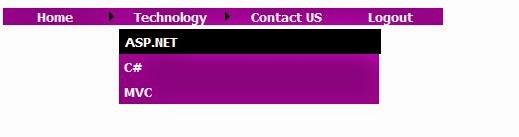
The output of the above code as shown in the below figure.
Best ASP.NET Core 1.0 Hosting Recommendation

ASPHostPortal.com provides its customers with Plesk Panel, one of the most popular and stable control panels for Windows hosting, as free. You could also see the latest .NET framework, a crazy amount of functionality as well as Large disk space, bandwidth, MSSQL databases and more. All those give people the convenience to build up a powerful site in Windows server. ASPHostPortal.com offers ASP.NET hosting starts from $1/month only. They also guarantees 30 days money back and guarantee 99.9% uptime. If you need a reliable affordable ASP.NET Hosting, ASPHostPortal.com should be your best choice.


ASPHostPortal.com Announces ASP.NET Core RTM Hosting Solution

clock July 26, 2016 21:57 by author Dan

ASPHostPortal.com is set up with an aim to serve customers in an excellent manner by providing them quality service. They strongly believe in high quality standards and hence, you’ll always find their services better than every other host in this industry. They understand the value of time and hence their ordering process is very simple. Customers can choose servers from multiple price levels to suit their business model. Today, they offer ASP.NET Core RTM host with expert team support.

ASP.NET is an acronym for the Active Server Pages. NET, is a brilliant framework developed by Microsoft. ASP.NET is extremely useful for creation of web applications, and web pages, and forms an essential part of the web goodies developed for any online content. ASP.NET not only facilitates usage of scripting languages, but also allows you to incorporate usage of extremely efficient next-generation programming languages like Java, VB, C+and the likes of them.

Looking at the historical perspective, in the earlier days, the development of well-designed webpages were a tedious task, and the developers had to put in rigorous efforts due to lack of efficient technology and a complete framework. As a result, soon after the release of IIS, a powerful technology like ASP.NET was in high demand for developing proficient web-based applications within a short time without putting-in too much of human labor.

ASPHostPortal.com offers ASP.NET Core RTM Hosting with expert team support. They support this new technology with affordable price, a lot of ASP.NET features, 99.99% uptime guarantee, 24/7 support, and 30 days money back guarantee. They strive to make sure that all customers have the finest web-hosting experience as possible. To learn more about their ASP.NET Core RTM Hosting, please visit http://asphostportal.com/ASPNET-Core-1-0-Hosting

About ASPHostPortal.com:

ASPHostPortal.com is The Best, Cheap and Recommended ASP.NET & Linux Hosting. ASPHostPortal.com has ability to support the latest Microsoft, ASP.NET, and Linux technology, such as: such as: WebMatrix, Web Deploy, Visual Studio, Latest ASP.NET Version, Latest ASP.NET MVC Version, Silverlight and Visual Studio Light Switch, Latest MySql version, Latest PHPMyAdmin, Support PHP, etc. Their service includes shared hosting, reseller hosting, and Sharepoint hosting, with speciality in ASP.NET, SQL Server, and Linux solutions. Protection, trustworthiness, and performance are at the core of hosting operations to make certain every website and software hosted is so secured and performs at the best possible level.


ASP.NET Core 1.0 Hosting - ASPHostPortal.com :: Easy Steps to Add Numeric String in ASP.NET

clock July 25, 2016 20:20 by author Dan

Must Know Issue: Basics of String Format in .Net

Numeric Format

double dValue = 55000.54987D;

//displaying number in different formats

Response.Write("Currency Format: " + dValue.ToString("C") + "
");

Response.Write("Scientific Format: " + dValue.ToString("E") + "
");

Response.Write("Percentage Format: " + dValue.ToString("P") + "
");

/* OUTPUT */

Currency Format: $55,000.55
Scientific Format: 5.500055E+004
Percentage Format: 5,500,054.99 %

Getting Culture Specific String


double dValue = 55000.54987D;

//You can Remove this line

Thread.CurrentThread.CurrentCulture = new CultureInfo("de-DE");

//This line will automatically detect client culture

//and display data accordingly

//Here culture has forcefully changed to german to

//view difference in output

CultureInfo ci = Thread.CurrentThread.CurrentCulture;

//displaying number in different formats

Response.Write("Currency Format: " + dValue.ToString("C",ci) + "
");

Response.Write("Scientific Format: " + dValue.ToString("E",ci) + "
");

Response.Write("Percentage Format: " + dValue.ToString("P",ci) + "
");

/* OUTPUT */

Currency Format: 55.000,55 €
Scientific Format: 5,500055E+004
Percentage Format: 5.500.054,99%

Best ASP.NET Core 1.0 Hosting Recommendation

ASPHostPortal.com provides its customers with Plesk Panel, one of the most popular and stable control panels for Windows hosting, as free. You could also see the latest .NET framework, a crazy amount of functionality as well as Large disk space, bandwidth, MSSQL databases and more. All those give people the convenience to build up a powerful site in Windows server. ASPHostPortal.com offers ASP.NET hosting starts from $1/month only. They also guarantees 30 days money back and guarantee 99.9% uptime. If you need a reliable affordable ASP.NET Hosting, ASPHostPortal.com should be your best choice.


Cheap ASP.NET 4.5 Hosting

We’re a company that works differently to most. Value is what we output and help our customers achieve, not how much money we put in the bank. It’s not because we are altruistic. It’s based on an even simpler principle. "Do good things, and good things will come to you".

Success for us is something that is continually experienced, not something that is reached. For us it is all about the experience – more than the journey. Life is a continual experience. We see the Internet as being an incredible amplifier to the experience of life for all of us. It can help humanity come together to explode in knowledge exploration and discussion. It is continual enlightenment of new ideas, experiences, and passions


Author Link

 photo ahp banner aspnet-01_zps87l92lcl.png


Corporate Address (Location)

ASPHostPortal
170 W 56th Street, Suite 121
New York, NY 10019
United States

Tag cloud

Sign in