All About ASP.NET and ASP.NET Core 2 Hosting BLOG

Tutorial and Articles about ASP.NET and the latest ASP.NET Core

ASP.NET 4.5 Hosting - ASPHostPortal :: Supporting Asynchronous IO Operations with .NET Framework 4.5

clock October 11, 2012 07:30 by author Jervis

In the earlier versions of .NET framework, writing code to perform asynchronous IO operations was not possible and hence the IO operations had to be synchronous. The problems that the developers were encountering with the synchronous approach were:

1. Unresponsiveness of UI - if the application is a thick client and had to perform file IO operations based on the user actions.

2. Performance issue - In case of back ground process, where it has to process large files.

In .NET Framework 4.0 asynchronous IO provisions were given for classes like StreamReader, StreamWriter, etc. through the methods BeginRead, BeginWrite, etc., involving callbacks. Though it provided a way to write asynchronous code there was yet another drawback--the code complexity!


In .NET Framework 4.5 the IO classes are packed with new Async methods using await and async keywords, which can be used to write straight-forward and clean asynchronous IO code. Below are the advantages of using these new async IO methods.


1. Responsive UI - In Windows apps, the user will be able to perform other operations while the IO operation is in progress.

2. Optimized performance due to concurrent work.
3. Less complexity - as simple as synchronous code.

In this article we look at a few examples of async IO operations in .NET Framework 4.5.


StreamReader and StreamWriter

StreamReader and StreamWriter are the widely used file IO classes in order to process flat files (text, csv, etc). The 4.5 version of .NET Framework provides many async methods in these classes. Below are some of them.


1.ReadToEndAsync
2.ReadAsync
3.ReadLineAsync
4.FlushAsync – Reader
5.WriteAsync
6.WriteLineAsync
7.FlushAsync – Writer

The code below reads the content from a given list of files asynchronously.

namespace AsyncIOSamples
{
class Program
{
static void Main(string[] args)
{
List<string> fileList = new List<string>()
{
"DataFlatFile1.txt",
"DataFlatFile2.txt"
};
foreach (var file in fileList)
{
ReadFileAsync(file);
}
Console.ReadLine();
}
private static async void ReadFileAsync(string file)
{
using (StreamReader reader = new StreamReader(file))
{
//Does not block the main thread
string content = await reader.ReadToEndAsync();
//Gets called after the async call is done.
Console.WriteLine(content);
}
}
}
}


Now let us try with the ReadLineAsync and read the content from a single file asynchronously.

namespace AsyncIOSamples
{
class Program
{
static void Main(string[] args)
{
ReadFileLineByLineAsync("DataFlatFile1.txt");
Console.WriteLine("Continue with some other process!");
Console.ReadLine();
}
private static async void ReadFileLineByLineAsync(string file)
{
using (StreamReader reader = new StreamReader(file))
{
string line;
while (!String.IsNullOrEmpty(line = await reader.ReadLineAsync()))
{
Console.WriteLine(line);
}
}
}
}
}


In these examples the main point to note is that these asynchronous operations do not block the main thread and are able to utilize the concurrency factor.

A similar example holds good for StreamWriter as well. Here is the sample code, which reads the content from a list of files and writes it to the output files without blocking the main thread execution.

namespace AsyncIOSamples
{
class Program
{
static void Main(string[] args)
{
ProcessFilesAsync();
//Main thread is not blocked during the read/write operations in the above method
Console.WriteLine("Do something else in the main thread mean while!!!");
Console.ReadLine();
}
private static async Task ProcessFilesAsync()
{
List<string> fileList = new List<string>()
{
"DataFlatFile1.txt",
"DataFlatFile2.txt"
};
foreach (var fileName in fileList)
{
string content = await ReadFileAsync(fileName);
WriteFileAsync(content, "Output" + fileName);
}
}
private static async void WriteFileAsync(string content, string outputFileName)
{
using (StreamWriter writer = new StreamWriter(outputFileName))
{
await writer.WriteAsync(content);
}
}
private static async Task<string> ReadFileAsync(string fileName)
{
using (StreamReader reader = new StreamReader(fileName))
{
return await reader.ReadToEndAsync();
}
}
}
}


WebClient

This class is used for data request operations over protocols like HTTP, FTP, etc. This class is also bundled with a bunch of Async methods like DownloadStringTaskAsync, DownloadDataTaskAsync and more.

It doesn't end here but extends to classes like XmlReader, TextReader and many more. I will leave it to the readers to explore them.

Happy reading!


ASPHostPortal.com Announces Newest Service Windows Server 2012 Hosting

clock October 10, 2012 07:26 by author Jervis

ASPHostPortal is a premiere web hosting company that specialized in Windows and ASP.NET-based hosting, proudly announces new Microsoft product, Windows Server 2012 hosting to all new and existing customers. The newly released server operating system offers a number of features that can be utilized to benefit developers, resellers and businesses.

Windows Server 2012 offers new and improved features which enable multi-user infrastructure where storage resources, networking and compute are completely remote from other users. There are a number of key features that customers will find useful, including support for asp.net 4.5, Internet Information Services 8.0 (IIS), compatibility with Visual Studio 2012, Visual Studio Express 2012, support for ASP.NET MVC 4, and Entity Framework 5. Other key new features include dynamic IP restriction to help prevent DoS attacks, support WebSockets and node.js, and also CPU Throttling to ensure isolated each client's server usage and Application Initialization to improve user experience of first requests.

“We have always had a great appreciation for the products that Microsoft Offers. With the launched of Windows Server 2012 hosting services, entrepreneurs and organization will be able to build their impressive website to be on the top of the competition.” Said Dean Thomas, Manager at ASPHostPortal. “Within Windows Server 2012 hosting packages, users will have the ability to use Hyper-V in assorted configurations, improved isolation and security, fortified access controls to files and processes and the capability of managing servers as a group.”

ASPHostPortal is one of the Microsoft recommended hosting partner that provide most stable and reliable web hosting platform. With the new launch of Windows Server 2012 into its feature, it will continue to keep ASPHostPortal as one of the front runners in the web hosting market. For more information about new Windows Server 2012 hosting, please visit http://www.asphostportal.com.

About ASPHostPortal.com:

ASPHostPortal.com is a hosting company that best support in Windows and ASP.NET-based hosting. Services include shared hosting, reseller hosting, and sharepoint hosting, with specialty in ASP.NET, SQL Server, and architecting highly scalable solutions. As a leading small to mid-sized business web hosting provider, ASPHostPortal strive to offer the most technologically advanced hosting solutions available to all customers across the world. Security, reliability, and performance are at the core of hosting operations to ensure each site and/or application hosted is highly secured and performs at optimum level.


ASP.NET Hosting - ASPHostPortal :: How to Speed up Your Development Time

clock October 9, 2012 08:41 by author Jervis

In this article we will learn that how you can speed up your development time if you have many projects in your solution. It is very simple.

Introduction

Suppose we have many projects in our solution and we want to build only one project at a time so that our development time will be minimised. You all will think that it can be done simply by making one of your project as the start project. But my friends you cannot do it by that. This article is based on to show "How to speed up build time".


Procedure

Suppose you have two Projects in our Solution Explorer.


First we will configure Visual Studio to set one of the two project as "Start Project" as the Current Selection in the "Solution Explorer" window using the properties of one of your projects.


Now if you will build it then both the project will be builded like....


Here in the above picture you can see that both of your project is going to build. Now you can imagine the time it will take if you have hundreds of project in your one solution.


In your Visual Studio just click on "Tools" then "Options". In that click on "Projects and Solutions" and then click on "Build and Run".Like the picture given below....


You just have to check the checkBox "Only build startup projects and dependencies on Run." Now if you will return to your application and then start the startup project you will get like this


Hope this helps


ASP.NET Hosting - ASPHostPortal :: How to Fix - Operation is not valid due to the current state of the object

clock September 27, 2012 07:59 by author Jervis

ASP.NET requests that have lots of form keys, files, or JSON payload receive an error response from the server. The Application log on the server has a Warning entry with a Source that is a specific version of ASP.NET, and an Event ID of 1309. The event log contains one of the following messages:

Message 1:


Application information:

     Application domain: /LM/W3SVC/1/ROOT/<App Domain>
     Trust level: Medium
     Application Virtual Path: <VDIR Path>
     Application Path: <App Path>
     Machine name: <Machine Name>
Process information:
     Process ID: 0001
     Process name: w3wp.exe
     Account name: IIS APPPOOL\DefaultAppPool
Exception information:
     Exception type: HttpException
     Exception message: The URL-encoded form data is not valid.
     at System.Web.HttpRequest.FillInFormCollection()
     at System.Web.HttpRequest.get_Form()
     at System.Web.HttpRequest.get_HasForm()
     at System.Web.UI.Page.GetCollectionBasedOnMethod(Boolean dontReturnNull)
     at System.Web.UI.Page.DeterminePostBackMode()
     at System.Web.UI.Page.ProcessRequestMain(Boolean includeStagesBeforeAsyncPoint, Boolean includeStagesAfterAsyncPoint)

Message 2:

Application information:

      Application domain: /LM/W3SVC/1/ROOT/<App Domain>
      Trust level: Medium
      Application Virtual Path: <VDIR Path>
      Application Path: <App Path>
      Machine name: <Machine Name>
Process information:
      Process ID: 0001
      Process name: w3wp.exe
      Account name: IIS APPPOOL\DefaultAppPool
Exception information:
      Exception type: InvalidOperationException
      Exception message: Operation is not valid due to the current state of the object.
      at System.Web.HttpRequest.FillInFilesCollection()
      at System.Web.HttpRequest.get_Files()
      at FileUpload.Page_Load(Object sender, EventArgs e)
      at System.Web.Util.CalliHelper.EventArgFunctionCaller(IntPtr fp, Object o, Object t, EventArgs e)
      at System.Web.Util.CalliEventHandlerDelegateProxy.Callback(Object sender, EventArgs e)
      at System.Web.UI.Control.OnLoad(EventArgs e)
      at System.Web.UI.Control.LoadRecursive()
      at System.Web.UI.Page.ProcessRequestMain(Boolean includeStagesBeforeAsyncPoint

to resolve this problem, you should change your web.config

<configuration>
  <appSettings>
    <add key="aspnet:MaxHttpCollectionKeys" value="5000" />
  </appSettings>
</configuration>

Reasons why you must trust ASPHostPortal.com

Every provider will tell you how they treat their support, uptime, expertise, guarantees, etc., are. Take a close look. What they’re really offering you is nothing close to what ASPHostPortal does. You will be treated with respect and provided the courtesy and service you would expect from a world-class web hosting business.

You’ll have highly trained, skilled professional technical support people ready, willing, and wanting to help you 24 hours a day. Your web hosting account servers are monitored from three monitoring points, with two alert points, every minute, 24 hours a day, 7 days a week, 365 days a year. The followings are the list of other added- benefits you can find when hosting with us:


-
DELL Hardware
Dell hardware is engineered to keep critical enterprise applications running around the clock with clustered solutions fully tested and certified by Dell and other leading operating system and application providers.
- Recovery Systems
Recovery becomes easy and seamless with our fully managed backup services. We monitor your server to ensure your data is properly backed up and recoverable so when the time comes, you can easily repair or recover your data.

- Control Panel
We provide one of the most comprehensive customer control panels available. Providing maximum control and ease of use, our Control Panel serves as the central management point for your ASPHostPortal account. You’ll use a flexible, powerful hosting control panel that will give you direct control over your web hosting account. Our control panel and systems configuration is fully automated and this means your settings are configured automatically and instantly.

- Excellent Expertise in Technology
The reason we can provide you with a great amount of power, flexibility, and simplicity at such a discounted price is due to incredible efficiencies within our business. We have not just been providing hosting for many clients for years, we have also been researching, developing, and innovating every aspect of our operations, systems, procedures, strategy, management, and teams. Our operations are based on a continual improvement program where we review thousands of systems, operational and management metrics in real-time, to fine-tune every aspect of our operation and activities. We continually train and retrain all people in our teams. We provide all people in our teams with the time, space, and inspiration to research, understand, and explore the Internet in search of greater knowledge. We do this while providing you with the best hosting services for the lowest possible price.

- Data Center

ASPHostPortal modular Tier-3 data center was specifically designed to be a world-class web hosting facility totally dedicated to uncompromised performance and security
- Monitoring Services
From the moment your server is connected to our network it is monitored for connectivity, disk, memory and CPU utilization – as well as hardware failures. Our engineers are alerted to potential issues before they become critical.

- Network
ASPHostPortal has architected its network like no other hosting company. Every facet of our network infrastructure scales to gigabit speeds with no single point of failure.

- Security
Network security and the security of your server are ASPHostPortal’s top priorities. Our security team is constantly monitoring the entire network for unusual or suspicious behavior so that when it is detected we can address the issue before our network or your server is affected.

- Support Services
Engineers staff our data center 24 hours a day, 7 days a week, 365 days a year to manage the network infrastructure and oversee top-of-the-line servers that host our clients’ critical sites and services.


ASP.NET 4.5 Hosting - ASPHostPortal :: Custom Caching Provider in ASP.NET 4.0/4.5

clock September 24, 2012 08:09 by author Jervis

In this article I am trying to explain Custom Caching Provider in ASP.NET 4.0 or 4.5. I have created a sample in Visual Studio 2011.

Purpose


Caching enables you to store data in memory for rapid access. When the data is accessed again, applications can get the data from the cache instead of retrieving it from the original source. This can improve performance and scalability. In addition, caching makes data available when the data source is temporarily unavailable.


Code:

Step 1: Create two new projects; one is Web Application and the other is Class Library.


Step 2: Now open the Class Library project and add a reference for System.Web assembly.

Step 3: Now inherit your class from OutputCacheProvider Class.

Step 4: Now override all Add, Get, Set and Remove Methods.

Here is sample Code.

public class FileCacheProvider : OutputCacheProvider
    {
        private string _filecachePath;

        public string FilecachePath
        {
            get
            {
                if (!string.IsNullOrEmpty(_filecachePath))
                    return _filecachePath;
                _filecachePath = System.Configuration.ConfigurationManager.AppSettings["OutputCachePath"];

                var context = HttpContext.Current;

                if (context != null)
                {
                    _filecachePath = context.Server.MapPath(_filecachePath);
                    if (!_filecachePath.EndsWith("\\"))
                        _filecachePath += "\\";
                }

                return _filecachePath;
            }
        }
        public override object Add(string key, object entry, DateTime utcExpiry)
        {
            Debug.WriteLine("Cache.Add(" + key + ", " + entry + ", " + utcExpiry + ")");

            var path = GetPathFromKey(key);

            if (File.Exists(path))
                return entry;

            using (var file = File.OpenWrite(path))
            {
                var item = new CacheItem { Expires = utcExpiry, Item = entry };
                var formatter = new BinaryFormatter();
                formatter.Serialize(file, item);
            }

            return entry;
        }
        public override object Get(string key)
        {
            Debug.WriteLine("Cache.Get(" + key + ")");

            var path = GetPathFromKey(key);

            if (!File.Exists(path))
                return null;

            CacheItem item = null;

            using (var file = File.OpenRead(path))
            {
                var formatter = new BinaryFormatter();
                item = (CacheItem)formatter.Deserialize(file);
            }

            if (item == null || item.Expires <= DateTime.Now.ToUniversalTime())
            {
                Remove(key);
                return null;
            }

            return item.Item;
        }
        public override void Remove(string key)
        {
            Debug.WriteLine("Cache.Remove(" + key + ")");

            var path = GetPathFromKey(key);

            if (File.Exists(path))
                File.Delete(path);
        }

        public override void Set(string key, object entry, DateTime utcExpiry)
        {
            Debug.WriteLine("Cache.Set(" + key + ", " + entry + ", " + utcExpiry + ")");

            var item = new CacheItem { Expires = utcExpiry, Item = entry };
            var path = GetPathFromKey(key);

            using (var file = File.OpenWrite(path))
            {
                var formatter = new BinaryFormatter();
                formatter.Serialize(file, item);
            }
        }
        private string GetPathFromKey(string key)
        {
            return FilecachePath + MD5(key) + ".txt";
        }

        private string MD5(string s)
        {
            var provider = new MD5CryptoServiceProvider();
            var bytes = Encoding.UTF8.GetBytes(s);
            var builder = new StringBuilder();

            bytes = provider.ComputeHash(bytes);
 
            foreach (var b in bytes)
                builder.Append(b.ToString("x2").ToLower());

            return builder.ToString();
        }
    }


Step 5: Now add the class library project reference to your web application and add the following attribute to your web.config file:

  <caching>
      <outputCache defaultProvider="FileCacheProvider">
        <providers>
         <add name="FileCacheProvider" type="CustomCacheProviderLib4_5.FileCacheProvider"/>
        </providers>
      </outputCache>
    </caching>

Step 6: Now add an OutputCache Directive to your page (Default.aspx).

<%@ OutputCache VaryByParam="ID" Duration="300" %>

Step 7: Now run your web application and see that your page is loading from the Cache:


Step 8: Here is the output window:


Reasons why you must trust ASPHostPortal.com

Every provider will tell you how they treat their support, uptime, expertise, guarantees, etc., are. Take a close look. What they’re really offering you is nothing close to what ASPHostPortal does. You will be treated with respect and provided the courtesy and service you would expect from a world-class web hosting business.

You’ll have highly trained, skilled professional technical support people ready, willing, and wanting to help you 24 hours a day. Your web hosting account servers are monitored from three monitoring points, with two alert points, every minute, 24 hours a day, 7 days a week, 365 days a year. The followings are the list of other added- benefits you can find when hosting with us:


-
DELL Hardware
Dell hardware is engineered to keep critical enterprise applications running around the clock with clustered solutions fully tested and certified by Dell and other leading operating system and application providers.
- Recovery Systems
Recovery becomes easy and seamless with our fully managed backup services. We monitor your server to ensure your data is properly backed up and recoverable so when the time comes, you can easily repair or recover your data.

- Control Panel
We provide one of the most comprehensive customer control panels available. Providing maximum control and ease of use, our Control Panel serves as the central management point for your ASPHostPortal account. You’ll use a flexible, powerful hosting control panel that will give you direct control over your web hosting account. Our control panel and systems configuration is fully automated and this means your settings are configured automatically and instantly.

- Excellent Expertise in Technology
The reason we can provide you with a great amount of power, flexibility, and simplicity at such a discounted price is due to incredible efficiencies within our business. We have not just been providing hosting for many clients for years, we have also been researching, developing, and innovating every aspect of our operations, systems, procedures, strategy, management, and teams. Our operations are based on a continual improvement program where we review thousands of systems, operational and management metrics in real-time, to fine-tune every aspect of our operation and activities. We continually train and retrain all people in our teams. We provide all people in our teams with the time, space, and inspiration to research, understand, and explore the Internet in search of greater knowledge. We do this while providing you with the best hosting services for the lowest possible price.

- Data Center

ASPHostPortal modular Tier-3 data center was specifically designed to be a world-class web hosting facility totally dedicated to uncompromised performance and security
- Monitoring Services
From the moment your server is connected to our network it is monitored for connectivity, disk, memory and CPU utilization – as well as hardware failures. Our engineers are alerted to potential issues before they become critical.

- Network
ASPHostPortal has architected its network like no other hosting company. Every facet of our network infrastructure scales to gigabit speeds with no single point of failure.

- Security
Network security and the security of your server are ASPHostPortal’s top priorities. Our security team is constantly monitoring the entire network for unusual or suspicious behavior so that when it is detected we can address the issue before our network or your server is affected.

- Support Services
Engineers staff our data center 24 hours a day, 7 days a week, 365 days a year to manage the network infrastructure and oversee top-of-the-line servers that host our clients’ critical sites and services.


ASP.NET Hosting - ASPHostPortal :: Making HTML5 Video work with IIS Express

clock September 11, 2012 07:14 by author Jervis

One of the cool things about HTML5 is the ability to play audio/video files out of the box without the dependency on plugins.

Visual Studio 2010 SP1 has decent support for HTML5, in terms of intellisense, validation etc., But, one issue that is constantly faced when using the HTML5 Video tag in an ASP.NET Application (Web/MVC) built using Visual Studio is that, the videos doesn’t play when running the application from Visual Studio on IE9.


Taking a step back, Visual Studio uses ASP.NET Development Server as the default setting when debugging and running applications on the local machine. The ASP.NET Development Server (also called as Cassini) has been there ever since Visual Studio 2005 days.


So, I created a simple MVC Application with “File – New - Project – ASP.NET MVC 3 Web Application” and left the defaults to create an Application. I added a videos folder and added a H.264 encoded mp4 video (one of the supported HTML5 Video formats) inside the folder.


Then, I added the following line of code in the “Index.cshtml” file.


<video src="@Url.Content("~/Videos/video.mp4")" id="myVideo" controls ></video>


All I got was the above. Basically a broken link. I verified that the path is right and the video is indeed playable on Windows Media Player etc.,


The issue was that, since by default Visual Studio uses the ASP.NET Development Server and the ASP.NET Development Server doesn’t have the flexibility to configure MIME types, It doesn’t understand the video format and hence could not play. When I ran the application on IE9 and checked the Network Tab of the Developer Toolbar, all I got was what you see below


I switched the Project to use IIS Express using “ProjectName” – Right Click – Properties – Web Tab


Still had the same result. Since IIS Express also doesn’t have the MIME Type to play video, configured by default, it couldn’t recognize the video and couldn’t play it.


The simple option is to configure it to use the “Actual IIS” (in the above screen, remove the check from “Use IISExpress”) which can play the video.


But, thankfully
this blog post has steps on how to configure MIME types for IIS Express. Only thing is, I had to change it for configuring the MIME type for playing MP4 video.

So, the steps are


1. Click on Start button


2. Type CMD


3. Right click on the CMD that is listed and choose “Run as Administrator”


4. Do a cd to navigate to the IIS Express directory CD “Program Files (x86)”\”IIS Express”


5. And then run the following command


appcmd set config /section:staticContent /+[fileExtension='.mp4',mimeType='vieo/mp4']

That’s it. When I re-ran the application, it could play the video.


Please note, I was unable to configure or figure out how to do it for the ASP.NET Development Server. So, if we need to play HTML5 Video from Visual Studio we either need to use IIS Express or use the full fledged IIS. And from the performance and configuration perspective IIS Express offers a lot more than ASP.NET Development Server and hence it makes more sense to use IIS Express for local development.


Reasons why you must trust ASPHostPortal.com

Every provider will tell you how they treat their support, uptime, expertise, guarantees, etc., are. Take a close look. What they’re really offering you is nothing close to what
ASPHostPortal does. You will be treated with respect and provided the courtesy and service you would expect from a world-class web hosting business.

You’ll have highly trained, skilled professional technical support people ready, willing, and wanting to help you 24 hours a day. Your web hosting account servers are monitored from three monitoring points, with two alert points, every minute, 24 hours a day, 7 days a week, 365 days a year. The followings are the list of other added- benefits you can find when hosting with us:


- DELL Hardware
Dell hardware is engineered to keep critical enterprise applications running around the clock with clustered solutions fully tested and certified by Dell and other leading operating system and application providers.
- Recovery Systems
Recovery becomes easy and seamless with our fully managed backup services. We monitor your server to ensure your data is properly backed up and recoverable so when the time comes, you can easily repair or recover your data.

- Control Panel
We provide one of the most comprehensive customer control panels available. Providing maximum control and ease of use, our Control Panel serves as the central management point for your ASPHostPortal account. You’ll use a flexible, powerful hosting control panel that will give you direct control over your web hosting account. Our control panel and systems configuration is fully automated and this means your settings are configured automatically and instantly.

- Excellent Expertise in Technology
The reason we can provide you with a great amount of power, flexibility, and simplicity at such a discounted price is due to incredible efficiencies within our business. We have not just been providing hosting for many clients for years, we have also been researching, developing, and innovating every aspect of our operations, systems, procedures, strategy, management, and teams. Our operations are based on a continual improvement program where we review thousands of systems, operational and management metrics in real-time, to fine-tune every aspect of our operation and activities. We continually train and retrain all people in our teams. We provide all people in our teams with the time, space, and inspiration to research, understand, and explore the Internet in search of greater knowledge. We do this while providing you with the best hosting services for the lowest possible price.

- Data Center

ASPHostPortal modular Tier-3 data center was specifically designed to be a world-class web hosting facility totally dedicated to uncompromised performance and security
- Monitoring Services
From the moment your server is connected to our network it is monitored for connectivity, disk, memory and CPU utilization – as well as hardware failures. Our engineers are alerted to potential issues before they become critical.

- Network
ASPHostPortal has architected its network like no other hosting company. Every facet of our network infrastructure scales to gigabit speeds with no single point of failure.

- Security
Network security and the security of your server are ASPHostPortal’s top priorities. Our security team is constantly monitoring the entire network for unusual or suspicious behavior so that when it is detected we can address the issue before our network or your server is affected.

- Support Services
Engineers staff our data center 24 hours a day, 7 days a week, 365 days a year to manage the network infrastructure and oversee top-of-the-line servers that host our clients’ critical sites and services.


ASP.NET Hosting - ASPHostPortal :: How solve Report viewer issue in IIS 7 and higher versions

clock August 14, 2012 05:43 by author Jervis

Today, I will show you how to solve ReportViewer issue is IIS 7.

Symptoms:


- Unable to render ReportViewer on ASP.NET Web pages while running on IIS7.


- You have no problem viewing your reports when running on debug mode with your Visual Studio 2005.


- You are able to view your reports on Report Manager but not able to view them on IIS7.


- You encounter JavaScript error when loading your report page with ReportViewer. Image buttons such as calendar appear as red 'X'.


Solving:

1. Go to IIS Manager


2. Select your virtual directly and then go to features area and click Hander mappings


3. Click Add Handler Mappings


4. Fill the following information as shown below,

Path = Reserved.ReportViewerWebControl.axd,
Type = Microsoft.Reporting.WebForms.HttpHandler, Microsoft.ReportViewer.WebForms, Version=9.0.0.0, Culture=neutral, PublicKeyToken=b03f5f7f11d50a3a
Name= Reserved.ReportViewerWebControl.axd


5. Restart iis by typing iss reset in command prompt


6. Run your report again.


Reasons why you must trust ASPHostPortal.com

Every provider will tell you how they treat their support, uptime, expertise, guarantees, etc., are. Take a close look. What they’re really offering you is nothing close to what
ASPHostPortal does. You will be treated with respect and provided the courtesy and service you would expect from a world-class web hosting business.

You’ll have highly trained, skilled professional technical support people ready, willing, and wanting to help you 24 hours a day. Your web hosting account servers are monitored from three monitoring points, with two alert points, every minute, 24 hours a day, 7 days a week, 365 days a year. The followings are the list of other added- benefits you can find when hosting with us:


-
DELL Hardware
Dell hardware is engineered to keep critical enterprise applications running around the clock with clustered solutions fully tested and certified by Dell and other leading operating system and application providers.
- Recovery Systems
Recovery becomes easy and seamless with our fully managed backup services. We monitor your server to ensure your data is properly backed up and recoverable so when the time comes, you can easily repair or recover your data.

- Control Panel
We provide one of the most comprehensive customer control panels available. Providing maximum control and ease of use, our Control Panel serves as the central management point for your ASPHostPortal account. You’ll use a flexible, powerful hosting control panel that will give you direct control over your web hosting account. Our control panel and systems configuration is fully automated and this means your settings are configured automatically and instantly.

- Excellent Expertise in Technology
The reason we can provide you with a great amount of power, flexibility, and simplicity at such a discounted price is due to incredible efficiencies within our business. We have not just been providing hosting for many clients for years, we have also been researching, developing, and innovating every aspect of our operations, systems, procedures, strategy, management, and teams. Our operations are based on a continual improvement program where we review thousands of systems, operational and management metrics in real-time, to fine-tune every aspect of our operation and activities. We continually train and retrain all people in our teams. We provide all people in our teams with the time, space, and inspiration to research, understand, and explore the Internet in search of greater knowledge. We do this while providing you with the best hosting services for the lowest possible price.

- Data Center

ASPHostPortal modular Tier-3 data center was specifically designed to be a world-class web hosting facility totally dedicated to uncompromised performance and security
- Monitoring Services
From the moment your server is connected to our network it is monitored for connectivity, disk, memory and CPU utilization – as well as hardware failures. Our engineers are alerted to potential issues before they become critical.

- Network
ASPHostPortal has architected its network like no other hosting company. Every facet of our network infrastructure scales to gigabit speeds with no single point of failure.

- Security
Network security and the security of your server are ASPHostPortal’s top priorities. Our security team is constantly monitoring the entire network for unusual or suspicious behavior so that when it is detected we can address the issue before our network or your server is affected.

- Support Services
Engineers staff our data center 24 hours a day, 7 days a week, 365 days a year to manage the network infrastructure and oversee top-of-the-line servers that host our clients’ critical sites and services.


Press Release – ASPHostPortal Launches ASP.NET 4.5 Hosting

clock August 10, 2012 09:01 by author Jervis

ASPHostPortal is a premiere web hosting company that specialized in Windows and ASP.NET-based hosting. Today, we are proud to introduce our new Microsoft product, ASP.NET 4.5 Hosting to all our new and existing customer. For more information about this new product, please visit ASPHostPortal official website at http://www.asphostportal.com.

As a response to today's technology development, ASPHostPortal.com provides customers with the option of the ASP.NET 4.5 hosting service. This newest version of .NET framework wills able users to manage and design web application faster. There are various features added such as, Page Meta Keyword and Description that will be very helpful for deploying SEO, AJAX, Visual Studio 2010 Support, IIS7 URL Rewrite, New ListView and DataPager Controls and WCF Support for RSS, JSON, POX and Partial Trust.

"This release is exciting as not only does it open the door for developers to stay ahead of the curve; it shows once again how ASPHostPortal.com is committed to being an industry leader,” said ASPHostPortal CEO, Robert Kruger. "You can get this new features on our shared hosting and also our reseller hosting."

“I’m very excited to see the latest Microsoft .NET Framework implemented on our infrastructure and to give our customers the opportunity to learn and experiment with the new features on our hosting environment." said Dean Thomas, General Manager of ASPHostPortal.com.

As a leading small to mid-sized business web hosting provider, we strive to offer the most technologically advanced hosting solutions available to our customers across the world. Security, reliability, and performance are at the core of our hosting operations to ensure each site and/or application hosted on our servers is highly secured and performs at optimum level.

For more details about this product, please visit http://asphostportal.com/Cheap-ASPNET-45-Hosting.aspx.


ASP.NET Hosting - ASPHostPortal :: How to Host ASP.NET Application in IIS

clock August 8, 2012 06:28 by author Jervis

Introduction

In general hosting part of the application is not done by developer however in some scenario where the team size is small or we need to host the application on the local server, we developer does all the work. In this article, I am going to show how to host an asp.net application on IIS 7.5 in Windows 7 Home Premium Operating System.

Step 1

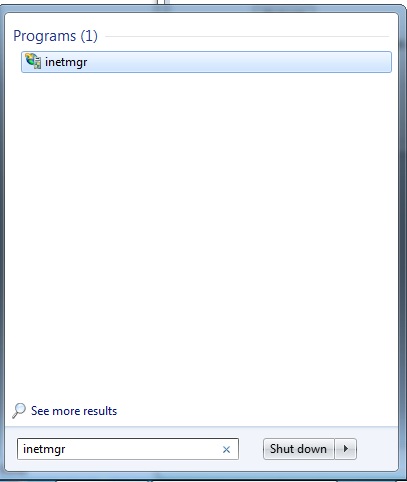
Open the IIS either from the Start Menu by writing the "inetmgr" command in the search box or at the command window (you must have the administrative priviledge).
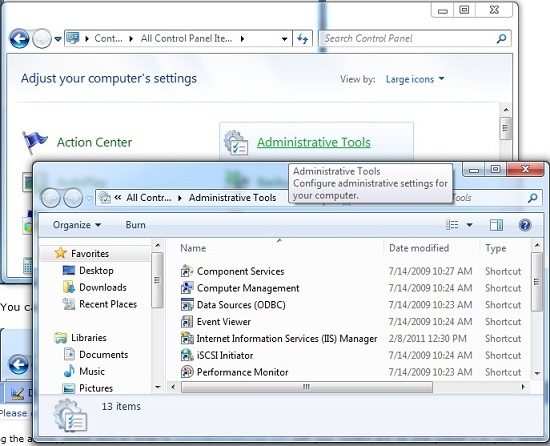
You can also achieve the same by going to Control Panel and clicking on Administrative Tools > Internet Information Services (IIS) Manager as displayed in the picture below.
 
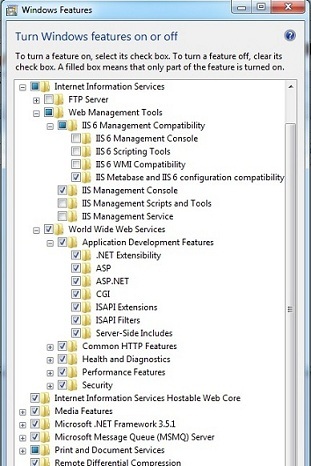
If you are not able to see the Internet Information Service (IIS) Manager, your computer might not have IIS installed. You need to install it first on your computer.


Step 2

Once you have opened the Internet Information Service (IIS) Manager, your screen should look like below (displayed the left panel in the below picture).
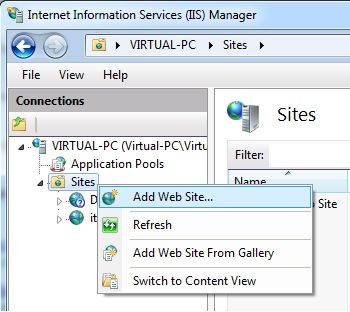
Now, right click the Sites and select Add Web Site ... and your screen should look like below


Enter the Site Name (in my case its SampleWebSite), select the physical folder where you have kept your website files (this may be your Visual Studio solution folder if you are setting it up at your local machine or the unpackaged folder path or the root folder of the website or web application). Now you can click on the OK button.
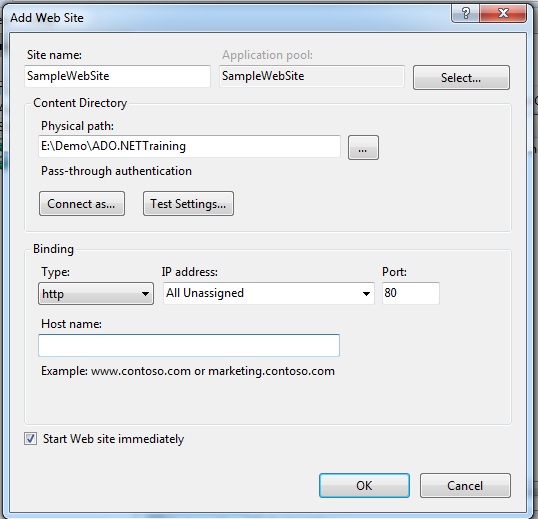
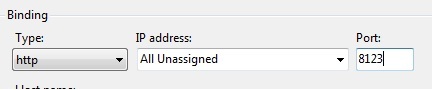
Clicking OK button may give you above alert box, complaining about the port you are going to use as by default port 80 is used for the default website of your IIS so you might want to change it. Click on No button at above alert box and change the port. I have changed the port to 8123 as displayed below and clicked on OK button.

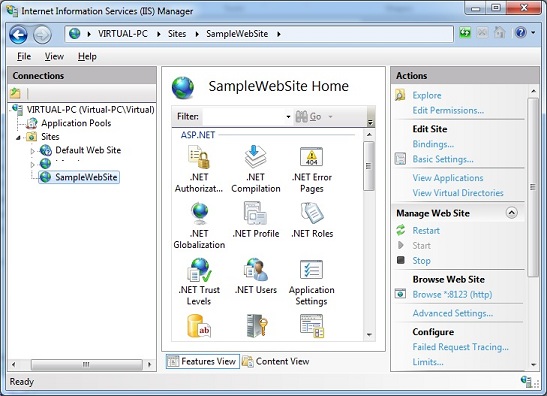
Clicking OK should give you a screen something similar to below picture where you will have a SampleWebSite created (notice at the left panel).


Step 3

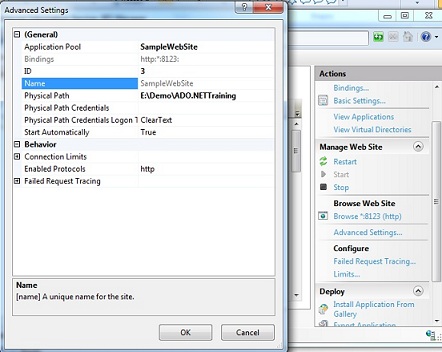
Now, you may click on the Advance Settings ... from the right panel and modify some settings that you want to modify. In general it is not needed and you can keep it default.
Step 4

Now, your website is ready to be browsed, you can right click on the website name (SampleWebSite in my case) and go to Manage Web Site > Browse and you should have an Internet Explorer window open displaying the default page of your website or web application.


Step 5 (Optional)

Notice: Your website may not work if you have developed your it Visual Studio 2010 as your web.config file may have some tags that is not identified by the IIS. This is becuase creating the website the way we created just now will host your website in its own application pool that will have .NET Framework version 2 as target version. So you will need to change to the .NET Framework 4.0 version.
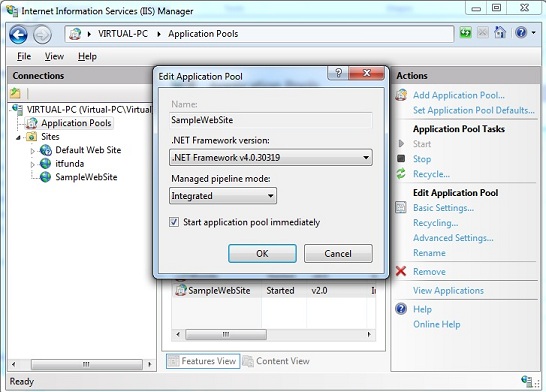
Click on Application Pools from the left panel and double click the Application pool for your webiste (generally application pool for your website is your website name so in my case SampleWebSite) and you should see a dialogue box similar to above. Select .NET Framework v4.xxx from the .NET Framework version dropdown and click OK. Now follow the Step 4 above again and your should see the default page.

Reasons why you must trust ASPHostPortal.com

Every provider will tell you how they treat their support, uptime, expertise, guarantees, etc., are. Take a close look. What they’re really offering you is nothing close to what
ASPHostPortal does. You will be treated with respect and provided the courtesy and service you would expect from a world-class web hosting business.

You’ll have highly trained, skilled professional technical support people ready, willing, and wanting to help you 24 hours a day. Your web hosting account servers are monitored from three monitoring points, with two alert points, every minute, 24 hours a day, 7 days a week, 365 days a year. The followings are the list of other added- benefits you can find when hosting with us:

- DELL Hardware
Dell hardware is engineered to keep critical enterprise applications running around the clock with clustered solutions fully tested and certified by Dell and other leading operating system and application providers.
- Recovery Systems
Recovery becomes easy and seamless with our fully managed backup services. We monitor your server to ensure your data is properly backed up and recoverable so when the time comes, you can easily repair or recover your data.

- Control Panel
We provide one of the most comprehensive customer control panels available. Providing maximum control and ease of use, our Control Panel serves as the central management point for your ASPHostPortal account. You’ll use a flexible, powerful hosting control panel that will give you direct control over your web hosting account. Our control panel and systems configuration is fully automated and this means your settings are configured automatically and instantly.

- Excellent Expertise in Technology
The reason we can provide you with a great amount of power, flexibility, and simplicity at such a discounted price is due to incredible efficiencies within our business. We have not just been providing hosting for many clients for years, we have also been researching, developing, and innovating every aspect of our operations, systems, procedures, strategy, management, and teams. Our operations are based on a continual improvement program where we review thousands of systems, operational and management metrics in real-time, to fine-tune every aspect of our operation and activities. We continually train and retrain all people in our teams. We provide all people in our teams with the time, space, and inspiration to research, understand, and explore the Internet in search of greater knowledge. We do this while providing you with the best hosting services for the lowest possible price.

- Data Center

ASPHostPortal modular Tier-3 data center was specifically designed to be a world-class web hosting facility totally dedicated to uncompromised performance and security
- Monitoring Services
From the moment your server is connected to our network it is monitored for connectivity, disk, memory and CPU utilization – as well as hardware failures. Our engineers are alerted to potential issues before they become critical.

- Network
ASPHostPortal has architected its network like no other hosting company. Every facet of our network infrastructure scales to gigabit speeds with no single point of failure.

- Security
Network security and the security of your server are ASPHostPortal’s top priorities. Our security team is constantly monitoring the entire network for unusual or suspicious behavior so that when it is detected we can address the issue before our network or your server is affected.

- Support Services
Engineers staff our data center 24 hours a day, 7 days a week, 365 days a year to manage the network infrastructure and oversee top-of-the-line servers that host our clients’ critical sites and services.


ASP.NET 4.5 Hosting :: Strongly Typed Data Controls Value Provider ASP.NET 4.5

clock July 18, 2012 10:24 by author Jervis

Microsoft introduce new librarySystem.web.Binding. There are lots of new things. One of them isQueryStringAttribute class. With the help of this class we can send directly query string value to method.

Code


Step 1:
First we will create new Web Application in VS 2011.

Step 2:
Now we'll create public method which will return list of objects.

public IQueryable<Employee> GetEmployees([QueryString("id")]int id = 0)


{

     IList<Employee> custlist = new List<Employee>();
     custlist.Add(new Employee { ID = 1, Name = "Employee 1", Salary = 1000 });
     custlist.Add(new Employee { ID = 2, Name = "Employee 2", Salary = 2000 });
     custlist.Add(new Employee { ID = 3, Name = "Employee 3", Salary = 3000 });
     custlist.Add(new Employee { ID = 4, Name = "Employee 4", Salary = 4000 });
     custlist.Add(new Employee { ID = 5, Name = "Employee 5", Salary = 5000 });
     custlist.Add(new Employee { ID = 6, Name = "Employee 6", Salary = 6000 });
     custlist.Add(new Employee { ID = 7, Name = "Employee 7", Salary = 7000 });
     return custlist.AsQueryable<Employee>().Where(c => c.ID == id);
 }
 public class Employee

{

     public int ID { get; set; }
     public string Name { get; set; }
     public int Salary { get; set; }
 }

Step 3: Now we'll add Data control in aspx page. I have added GridView Control.

  <asp:GridView ID="GridView1" SelectMethod="GetEmployees" AutoGenerateColumns="true"
         PageSize="3" AllowPaging="true" AllowSorting="true" runat="server">
     </asp:GridView>

Step 4: Now we'll run our application and see the output.


Reasons why you must trust ASPHostPortal.com

Every provider will tell you how they treat their support, uptime, expertise, guarantees, etc., are. Take a close look. What they’re really offering you is nothing close to what
ASPHostPortal does. You will be treated with respect and provided the courtesy and service you would expect from a world-class web hosting business.

You’ll have highly trained, skilled professional technical support people ready, willing, and wanting to help you 24 hours a day. Your web hosting account servers are monitored from three monitoring points, with two alert points, every minute, 24 hours a day, 7 days a week, 365 days a year. The followings are the list of other added- benefits you can find when hosting with us:

- DELL Hardware
Dell hardware is engineered to keep critical enterprise applications running around the clock with clustered solutions fully tested and certified by Dell and other leading operating system and application providers.
- Recovery Systems
Recovery becomes easy and seamless with our fully managed backup services. We monitor your server to ensure your data is properly backed up and recoverable so when the time comes, you can easily repair or recover your data.

- Control Panel
We provide one of the most comprehensive customer control panels available. Providing maximum control and ease of use, our Control Panel serves as the central management point for your ASPHostPortal account. You’ll use a flexible, powerful hosting control panel that will give you direct control over your web hosting account. Our control panel and systems configuration is fully automated and this means your settings are configured automatically and instantly.

- Excellent Expertise in Technology
The reason we can provide you with a great amount of power, flexibility, and simplicity at such a discounted price is due to incredible efficiencies within our business. We have not just been providing hosting for many clients for years, we have also been researching, developing, and innovating every aspect of our operations, systems, procedures, strategy, management, and teams. Our operations are based on a continual improvement program where we review thousands of systems, operational and management metrics in real-time, to fine-tune every aspect of our operation and activities. We continually train and retrain all people in our teams. We provide all people in our teams with the time, space, and inspiration to research, understand, and explore the Internet in search of greater knowledge. We do this while providing you with the best hosting services for the lowest possible price.

- Data Center

ASPHostPortal modular Tier-3 data center was specifically designed to be a world-class web hosting facility totally dedicated to uncompromised performance and security
- Monitoring Services
From the moment your server is connected to our network it is monitored for connectivity, disk, memory and CPU utilization – as well as hardware failures. Our engineers are alerted to potential issues before they become critical.

- Network
ASPHostPortal has architected its network like no other hosting company. Every facet of our network infrastructure scales to gigabit speeds with no single point of failure.

- Security
Network security and the security of your server are ASPHostPortal’s top priorities. Our security team is constantly monitoring the entire network for unusual or suspicious behavior so that when it is detected we can address the issue before our network or your server is affected.

- Support Services
Engineers staff our data center 24 hours a day, 7 days a week, 365 days a year to manage the network infrastructure and oversee top-of-the-line servers that host our clients’ critical sites and services.


Cheap ASP.NET 4.5 Hosting

We’re a company that works differently to most. Value is what we output and help our customers achieve, not how much money we put in the bank. It’s not because we are altruistic. It’s based on an even simpler principle. "Do good things, and good things will come to you".

Success for us is something that is continually experienced, not something that is reached. For us it is all about the experience – more than the journey. Life is a continual experience. We see the Internet as being an incredible amplifier to the experience of life for all of us. It can help humanity come together to explode in knowledge exploration and discussion. It is continual enlightenment of new ideas, experiences, and passions


Author Link

 photo ahp banner aspnet-01_zps87l92lcl.png


Corporate Address (Location)

ASPHostPortal
170 W 56th Street, Suite 121
New York, NY 10019
United States

Tag cloud

Sign in