
June 6, 2014 07:24 by
 Kenny
Kenny
ASP.NET launches new version for ASP.NET MVC. That is ASP.NET MVC 5.2. The Model-View-Controller (MVC) pattern is an architectural design principle that separates the components of a Web application. This separation gives you more control over the individual parts of the application, which lets you more easily develop, modify, and test them.

What’s new in ASP.NET MVC 5.2? Well, they offer new feature from Attribute Routing. Attribute Routing now provides an extensibility point called IDirectRouteProvider, which allows full control over how attribute routes are discovered and configured.
The good news for developer ASP.NET MVC 5.2 is the new IDirectRouteProvider is responsible for providing a list of actions and controllers along with associated route information to specify exactly what routing configuration is desired for those actions. An IDirectRouteProvider implementation may be specified when calling MapAttributes/MapHttpAttributeRoutes.
There is syntax for MapAttributes/MapHttpAttributeRoutes
public static void MapHttpAttributeRoutes(
this HttpConfiguration configuration
)
Extending the default implementation with DefaultDirectRouteProvider will be easier for customizing IDirectRouteProvider. Because this class provides separate overridable virtual methods to change the logic for discovering attributes, creating route entries, and discovering route prefix and area prefix.
IDirectRouteProvider.cs
 using System.Collections.Generic;
 #if ASPNETWEBAPI
 using System.Web.Http.Controllers;
 #endif

 #if ASPNETWEBAPI
 namespace System.Web.Http.Routing
 #else
 namespace System.Web.Mvc.Routing
 #endif
 {
     /// <summary>
     /// Defines a provider for routes that directly target action descriptors (attribute routes).
     /// </summary>
     public interface IDirectRouteProvider
     {
         /// <summary>Gets the direct routes for a controller.</summary>
         /// <param name="controllerDescriptor">The controller descriptor.</param>
         /// <param name="actionDescriptors">The action descriptors.</param>
         /// <param name="constraintResolver">The inline constraint resolver.</param>
         /// <returns>A set of route entries for the controller.</returns>
 #if ASPNETWEBAPI
         IReadOnlyList<RouteEntry> GetDirectRoutes(
             HttpControllerDescriptor controllerDescriptor,
             IReadOnlyList<HttpActionDescriptor> actionDescriptors,
             IInlineConstraintResolver constraintResolver);
 #else
         IReadOnlyList<RouteEntry> GetDirectRoutes(
             ControllerDescriptor controllerDescriptor,
             IReadOnlyList<ActionDescriptor> actionDescriptors,
             IInlineConstraintResolver constraintResolver);
 #endif
     }
 }
278a1083-e0d9-45fb-bf2d-17aa6a580d8b|2|5.0
June 5, 2014 06:36 by
Kenny
ASP.NET 4.5.2 is the latest ASP.NET version; it is a highly compatible, in-place update to the .NET Framework 4, 4.5 and 4.5.1. The new ASP.NET 4.5.2 some new features that very useful for ASP.NET developer. What's new in this release of .NET 4.5.2 Framework?
- New APIs for ASP.NET apps;
- Resizing in Windows Forms controls;
- New workflow features;
- Profiling improvements;
- Debugging improvements;
- Event tracing changes.

Well, now I will be talking about one of them. It is about “Event tracing”. As you know that Event Tracing for Windows or ETW is an efficient kernel-level tracing facility that lets you log kernel or application-defined events to a log file. It makes you can consume the events in real time or from a log file and use them to debug an application or to determine where performance issues are occurring in the application.
And not only that, ETW has more function again. ETW lets you enable or disable event tracing dynamically, allowing you to perform detailed tracing in a production environment without requiring computer or application restarts. Use ETW when you want to instrument your application, log user or kernel events to a log file, and consume events from a log file or in real time.
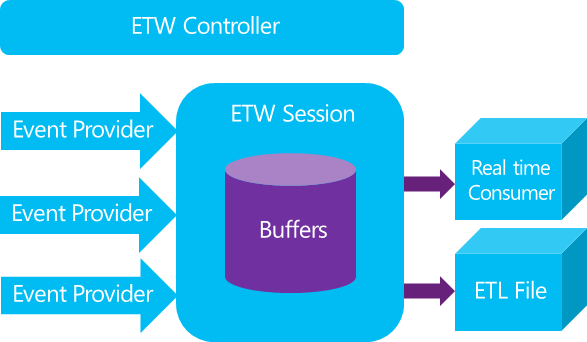
In the new ASP.NET 4.5.2 Event Tracing has great change. The new .NET Framework 4.5.2 enables out-of-process, Event Tracing for Windows based activity tracing for a larger surface area. Not only that, this enables Advanced Power Management (APM) vendors to provide lightweight tools that accurately track the costs of individual requests and activities that cross threads. These events are raised only when ETW controllers enable them; therefore, the changes don’t affect previously written ETW code or code that runs with ETW disabled.
Are you interest with other new features in ASP.NET 4.5.2? So just stay tune in this blog. We will always give you up to date news about ASP.NET.
fe85d2aa-f72d-4b11-8946-b1109ae5f98b|5|5.0
June 3, 2014 07:30 by
BenPlesk 12.0 was released and is already available for deployment. The general availability mark will be set a little bit later, but now this release is in the “early adopter” stage. This means that you can install it right now and start using the new features.
Like any technology, especially in the current day and age, it has to have an emphasis here, especially if its primary focus, or location, is the internet. Parallels Plesk 12 is no exception.

Gladly, version 12 comes with a raft of changes and new features which ensure it has security firmly at the core of the latest release, including:
- ModSecurity - One of the key additions to Plesk 12 is ModSecurity, which is a free, web application firewall, designed to help detecting and preventing attacks on web applications, such as Wordpress and Joomla.
- Fail2ban - Fail2Ban is used to update firewall rules to reject the IP addresses for a specified amount of time, along with other, configurable, actions.
- Outbound Email Limiting - This was implemented in Plesk 12, as a way for systems administrators to protect their server’s IP addresses from being put into spam blacklist, due to outgoing spam.
- WordPress installation - Now customers can update several WordPress installations at the same time. Several WordPress plugins and themes can also be updated at the same time, as well as individually.
- Setup button - Users can now add custom buttons to the website tools area in Websites & Domains.
- New Plesk Interface - Links, buttons and menu items on the Plesk UI that lead to new functionality are now marked with a red arrow. Red arrows disappear after the user proceeds to the pages containing new functionality.
- Secure - Extended security restrictions for file permissions and configuration files are now applied to new WordPress installations.
- IIS performance - The performance of IIS-based servers with large numbers of subscriptions was improved.
Cheap and Best Plesk 12 Hosting with ASPHostPortal.com
What makes ASPHostPortal.com the premier place to host Plesk 12 ? Here are some reasons why we are the best:
Excellent Uptime Rate
Our key strength in delivering the service to you is to maintain our server uptime rate. We never ever happy to see your site goes down and we truly understand that it will hurt your onlines business. If your service is down, it will certainly become our pain and we will certainly look for the right pill to kill the pain ASAP.
High Quality Hardware
We love quality and for good reason. Putting together a bunch of hardware isn't good enough these days. High Quality hardware is specifically designed and engineered to work fast, efficiently and reliably. When you host with ASPHostPortal.com, you can be sure that we're using the best in technology.
Dedicated Application Pool
With us, your site will be hosted using isolated application pool in order to meet maximum security standard and reliability.
ecbeac59-dea2-4fb1-a29a-c7fb36c6afa8|2|5.0
May 30, 2014 08:32 by
BenSelect one of our hosting packages to start your MonoX site. All of our hosting packages fully support the ability to host MonoX sites. Why you wait longer?
MonoX is a free content management and social networking platform built on ASP.NET framework. it has intuitive, user-friendly interface that supports Web parts framework, drag and drop, WYSIWYG interface, content versioning, advanced security model, cross-browser support, advanced templating engine and multi-level personalization. MonoX provides tools for quick and intuitive construction of dynamic and fully editable ASP.NET portals, social networks and similar Web applications.
MonoX includes very powerful content management functionality.

This CMS comes with everything you need to build fully-featured social environments, including: user profiles, OpenID support, friendship modules, scalable multi-user blog engine with automatic anti-spam protection, photo albums, customizable group architecture with support for public and private groups, discussion boards, file galleries, support for activity streams (event logs), messaging, video conversion and sharing, wall and comments.
Here is the best features of MonoX:
- User friendly Web 2.0 interface - MonoX provides modern and uncluttered Ajax-based user interface with intuitive look and feel. Web parts can be moved and edited using a convinient drag and drop interface.
- Search infrastructure - MonoX comes with numerous search providers that give you a total control over the portal search engine behavior and performance. Included are providers that search pages, news, blog posts, groups, user profiles and file system.
- Browser-based administration - All aspects of a portal can be managed through an online, browser-based interface.
- Friendship modules - Different terms describe the "friendship" or "connection" concept for different community types, but in all cases it is the fundamental feature of all social networks. MonoX provides a flexible set of modules for displaying and managing user friend lists.
- Blog engine - MonoX now includes a fully featured multi-user blog engine with support for comments, ratings, tagging and automatic anti-spam protection. Each user can have unlimited number of blogs, blog posts, tags and categories.
- Support for localization - All content and user interface elements can be localized at run time using only browser-based administrative tools. In addition to the standard .NET localization infrastructure, MonoX can store all localization resources in a portal database.
- Advanced module communication - Developers can design sophisticated and elaborate Web part communication scenarios using the module communication support.
- Search Engine Optimization (SEO) - MonoX includes powerful Search Engine Optimization (SEO) techniques that can help users place their portals very high on all major search engines: ViewState optimization, URL rewriting, HTTP compression, SiteMap generation, automatic META keywords generation, integration with Google Analytics, compact and standards-compliant output.
- WYSIWYG approach - A unique editor interface allows administrators to enter and update content "in-place" and to immediatelly see the results of their actions.
- Windows Live Writer support - Microsoft Windows Live Writer is a free desktop application that makes it easier to compose compelling blog posts using numerous blog services. It features true offline WYSIWYG blog authoring and photo/map publishing. MonoX fully supports Windows Live Writer and other similar editing tools that recognize standard MetaWeblog API, not only for the blog publishing tasks, but also for more general portal editing and configuration actions.
Best MonoX CMS Hosting Performance on our Shared Servers:
- 24/7 World-Class Qualified and Experienced Support - Technical support staff with years of in-depth hosting experience!
- World Class Control Panel - We use World Class Plesk Control Panel that support one-click installation.
- Uptime & Support Guarantees - We are so confident in our hosting services we will not only provide you with a 30 days money back guarantee, but also we give you a 99.9% uptime guarantee.
- Fast and Secure Server - We have best data centers on three continent, unique account isolation for security, and 24/7 proactive uptime monitoring.
- Dedicated Application Pool - With us, your site will be hosted using isolated application pool in order to meet maximum security standard and reliability.
e470a906-0e49-423f-b8b5-83337bd27adc|2|5.0
May 21, 2014 11:51 by
Kenny
Knockout.js is a javascript library that allows us to bind html elements against any data model. It provides a simple two-way data binding mechanism between your data model and UI means any changes to data model are automatically reflected in the DOM(UI) and any changes to the DOM are automatically reflected to the data model.

Based on ASP.NET, ASP.NET MVC allows software developers to build a web application as a composition of three roles: Model, View and Controller. The MVC model defines web applications with 3 logic layers: The business layer (Model logic),The display layer (View logic),The input control (Controller logic).
This article will demonstrate how to load a KnockoutJS view model from a C# controller using ajax in an ASP.NET MVC project. I’m just going to jump straight into the code for this sample. To get started we need to create a new action in the controller. For the purposes of this sample this action will return a randomly populated Person object (see the previous articles for the definition) so that we can see the content changing. Here is the action:
public class SampleController : Controller
{
public ActionResult AjaxModelLoading()
{
Person model = CreateRandomModel();
if (Request.IsAjaxRequest())
{
return new JsonNetResult(model);
}
return View(model);
}
private static Person CreateRandomModel()
{
Random random = new Random();
string[] firstNames = { "Billy", "Kevin", "Michael", "Steve" };
string[] lastNames = { "Jordan", "Smith", "Wild", "Walker" };
string firstName = firstNames[random.Next(firstNames.Length)];
string lastName = lastNames[random.Next(lastNames.Length)];
return new Person
{
FirstName = firstName,
LastName = lastName,
EmailAddress = string.Format("{0}@{1}.com", firstName, lastName),
PhoneNumber = random.Next(int.MaxValue).ToString("D10"),
DateOfBirth = DateTime.Today.AddYears(random.Next(-50, -10))
};
}
}
This action creates the Person object and then detects if the HTTP request was made using ajax. If it was then it serializes the model as JSON and if it is a standard HTTP request it returns the view. This is a handy technique for implementing a simple refresh of data in the view without retrieving all the HTML from the server again.
On line 9 you can see that I have not used the standard ASP.NET JSON serializer. Instead I went with my own ActionResult which makes use of JSON.NET to give myself more control over the generated JSON. For reference the code for my JsonNetResult class is below: public class JsonNetResult : ActionResult
{
private const string ContentType = "application/json";
private readonly object data;
private readonly Formatting formatting;
private readonly JsonSerializerSettings serializerSettings;
public JsonNetResult(object data)
{
this.data = data;
formatting = Formatting.None;
serializerSettings = new JsonSerializerSettings
{
ContractResolver = new CamelCasePropertyNamesContractResolver()
};
}
public override void ExecuteResult(ControllerContext context)
{
HttpResponseBase response = context.HttpContext.Response;
response.ContentType = ContentType;
if (data != null)
{
JsonTextWriter writer = new JsonTextWriter(response.Output) { Formatting = formatting };
JsonSerializer serializer = JsonSerializer.Create(serializerSettings);
serializer.Serialize(writer, data);
writer.Flush();
}
}
public object Data
{
get { return data; }
}
}
Next we need to create the KnockoutJS view model to bind to the view.
var AjaxModelLoading = function(url) {
var self = this;
self.isLoaded = ko.observable(false);
self.isLoading = ko.observable(false);
self.getRandomModel = function () {
self.isLoading(true);
self.isLoaded(false);
// Setting a timeout so the loading text is visible in the sample
setTimeout(function() {
$.ajax(url, {
type: "GET",
cache: false,
}).done(function(data) {
ko.mapping.fromJS(data, {}, self);
self.isLoaded(true);
self.isLoading(false);
});
}, 1000);
};
};
This view model defines a function which will be used to handle a click event from the view in order to refresh the data. It also does some basic state management to determine if the content has been loaded or is in the process of loading. I have put in a short delay between the click in the view and executing the ajax request in order to make the loading state management more apparent for the sample.
Lastly we need to create the view.
@model Quickstart.Web.Models.Person
@section scripts
{
<script type="text/javascript" src="/Scripts/ViewModels/AjaxModelLoading.js"></script>
<script type="text/javascript">
var viewModel = new AjaxModelLoading("@Url.Action("AjaxModelLoading")");
ko.applyBindings(viewModel);
viewModel.getRandomModel();
</script>
}
<h2>Ajax Model Loading Sample</h2>
<div data-bind="if: isLoading()">
Loading...
</div>
<div data-bind="if: isLoaded()">
<div>
<label>First Name:</label>
<input type="text" data-bind="value: firstName"/>
</div>
<div>
<label>Last Name:</label>
<input type="text" data-bind="value: lastName"/>
</div>
<div>
<label>Email Address:</label>
<input type="text" data-bind="value: emailAddress"/>
</div>
<div>
<label>Phone Number:</label>
<input type="text" data-bind="value: phoneNumber"/>
</div>
<div>
<label>Date of Birth:</label>
<input type="text" data-bind="value: dateOfBirth"/>
</div>
</div>
<a href="#" data-bind="click: getRandomModel">Get random person</a>
bdedaa3a-6a5a-4872-bf43-707a58ab473d|0|.0
May 16, 2014 07:42 by
Ben
Finally, the long awaited release of ASP.NET 4.5.2, ASPHostPortal are happy to announce the availability of the .NET Framework 4.5.2 for all our hosting packages. It is a highly compatible, in-place update to the .NET Framework 4, 4.5 and 4.5.1.
The Microsoft .NET Framework 4.5.2 is a highly compatible, in-place update to the Microsoft .NET Framework 4, Microsoft .NET Framework 4.5 and Microsoft .NET Framework 4.5.1.
The .NET Framework 4.5.2 Preview is the first update of .NET Framework 4.5. It contains critical fixes, improvements, and opt-in features and is part of the Visual Studio 2013 and Windows 8.1 Previews. But it is also available as direct download without the requirement of having an existing .NET Framework 4.5 installation.

The .NET 4.5.2 Preview Framework update provides some fixes and multiple performance enhancements. There are no major language features, but nonetheless those upgrades become very handy and will allow for a more seamless and productive software development experience.
The .NET Framework 4.5.2 contains a variety of new features, such as:
- ASP.NET improvements
- High DPI Improvements - As part of recently released .NET 4.5.2, Windows Forms is seeing some improvements for its high DPI support.
- Distributed transactions enhancement - This service provides applications with a way to support transactions that span multiple processes or even multiple machines.
- More robust profiling
- Improved activity tracing support in runtime and framework - The .NET Framework 4.5.2 enables out-of-process, Event Tracing for Windows (ETW)-based activity tracing for a larger surface area.
- Event tracing changes - The ASP.NET Framework 4.5.2 enables out-of-process, Event Tracing for Windows (ETW)-based activity tracing for a larger surface area. This enables Advanced Power Management (APM) vendors to provide lightweight tools that accurately track the costs of individual requests and activities that cross threads.
Unique ASP.NET 4.5.2 Hosting Performance on our Shared Servers:
Build Your Website
Use ASPHostPortal.com's website building tools to get that special, customized look for your website. A nifty wizard will walk you through the process.
All-inclusive prices unbeatable value
Other companies promise cheap hosting, but then charge extra for setup fees, higher renewal rates, or promotional services. With ASPHostPortal.com, the listed price is the number you’ll pay, and you can expect a fully loaded, comprehensive suite of web services.
Fast and Secure Server
Our powerfull servers are especially optimized and ensure the best ASP.NET 4.5.2 performance. We have best data centers on three continent and unique account isolation for security.
Easy to Use and ManageASPHostPortal.com webspace explorer lets you manage your website files with a browser. A control panel lets you set up and control your server functions with ease.
b68d0b69-642a-4938-9fd0-fb38dc6f9e3d|0|.0
May 12, 2014 11:27 by
BenIn this article I’m going to explain how to integrate ASP.NET applications in facebook.
Facebook has provided functionality that extends the Facebook Platform to any website that wants to integrate Facebook APIs for user authentication, sharing website content with friends, and publishing feed stories to generate traffic.
Here I’ll show you how to integrate ASP.NET Apps in Facebook. Please follow the steps given below.

Setting up Facebook App
- To create facebook app click on Developer section
- Click on Set up New App button.
- Agree Facebook terms and click on Create App
- Put Security Check keywords.
- Click on Submit.
- Fill basic information about app
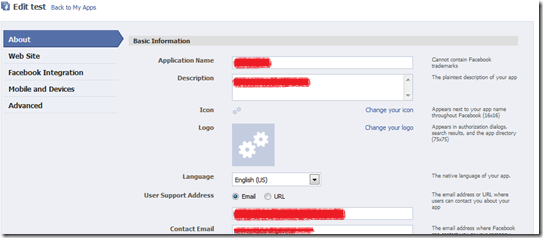
- Click on Facebook Integration tab.
- Put Name of Canvas page.
- Before putting URL of webpage of your website, I want to show how your page can get callback from facebook app. So first we create webpage in our website:
- Create asp.net website in Visual studio.
- Add reference of Facebook.dll from “C:\Program Files\Coding4Fun\Facebook\Binaries”. This dll will be placed after installing Facebook Developer kit on your machine.
- Create instance of FacebookService object. you can copy facebook app api key and secret key from application page on facebook in source code.
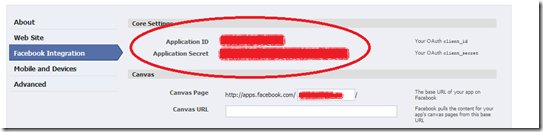
put above values in FACEBOOK_API_KEY and FACEBOOK_SECRET constants respectively.
you can get user_id of facebook who requested this application by calling
string userId = Session["Facebook_userId"] as String;
you can also get many information about user like name, sex, location,friends etc.
User usr=_fbService.GetUserInfo();
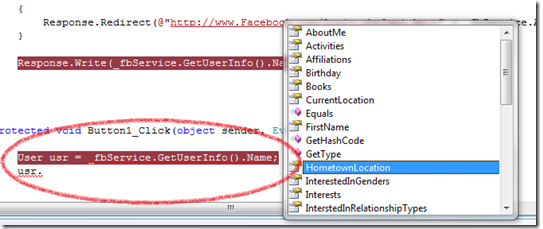
Source Code:
using System;
using Facebook;
public partial class Facebook_ConnectFacebook : System.Web.UI.Page
{
Facebook.Components.FacebookService _fbService = new Facebook.Components.FacebookService();
private const string FACEBOOK_API_KEY = "191856207506775";
private const string FACEBOOK_SECRET = "820c0b05b14a09365e072c8d37a8c49f";
protected void Page_Load(object sender, EventArgs e)
{
_fbService.ApplicationKey = FACEBOOK_API_KEY; _fbService.Secret = FACEBOOK_SECRET;
_fbService.IsDesktopApplication = false;
string sessionKey = Session["Facebook_session_key"] as String;
string userId = Session["Facebook_userId"] as String;
// When the user uses the Facebook login page, the redirect back here
// will will have the auth_token in the query params
string authToken = Request.QueryString["auth_token"];
// We have already established a session on behalf of this user
if (!String.IsNullOrEmpty(sessionKey))
{
_fbService.SessionKey = sessionKey; _fbService.UserId = userId;
}
// This will be executed when Facebook login redirects to our page
else if (!String.IsNullOrEmpty(authToken))
{
_fbService.CreateSession(authToken);
Session["Facebook_session_key"] = _fbService.SessionKey;
Session["Facebook_userId"] = _fbService.UserId;
Session["Facebook_session_expires"] = _fbService.SessionExpires;
}
// Need to login
else
{
Response.Redirect(@"http://www.Facebook.com/login.php?api_key=" + _fbService.ApplicationKey + @"&v=1.0\");
}
User usr = _fbService.GetUserInfo();
string t = string.Format("User Name:{0}, Sex:{1}, Location: {2}", usr.Name, usr.Sex, usr.CurrentLocation.City);
Response.Write(t);
}
}
Best and Recommended ASP.NET 4.5.1 Hosting Solution
The next version of the .NET Framework is .NET 4.5.1. It has been published as Preview version as announced yesterday during the BUILD conference. The new update builds on top of .NET 4.5 and includes new features such as async-aware debugging, ADO.NET idle connection resiliency, and ASP.NET app suspension. ASPHostPortal.com, a leading innovator in Windows Server hosting, announces a Free Trial ASP.NET 4.5.1 hosting on Windows Server 2012 R2 for the developer community.
f717054d-dc2b-4765-a8fa-e938abd4ff70|0|.0
May 6, 2014 08:33 by
BenMicrosoft Visual Studio 2012 is loaded with new capabilities for Windows 8, the web, SharePoint, mobile, and cloud development—as well as the application management lifecycle tools you need to break down team barriers and reduce cycle times to deliver value continuously.
Visual Studio 2012 is New versions of Visual Studio usually coincide with updates to the .NET Framework and one of our biggest releases yet. It comes purpose-built to help you thrive in an environment in which ideas are at a premium and speed is of the essence.

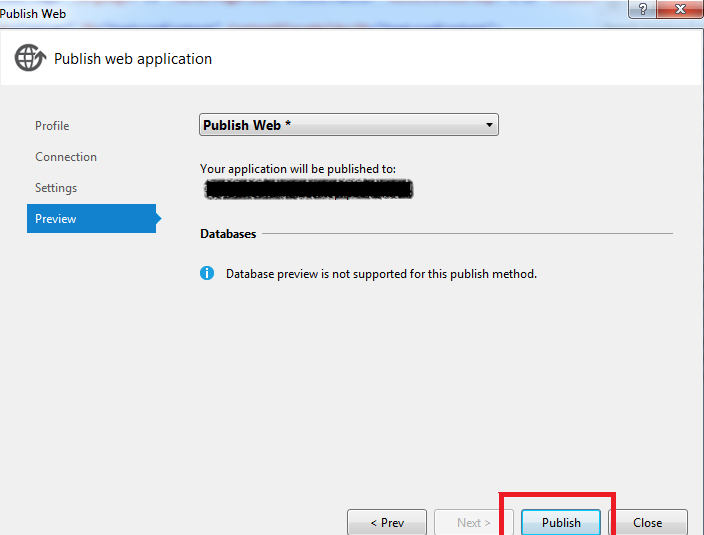
This Article can tell you how to publish your asp.net 4.5 site in vistul studio 2012.
Steps to Publish Web Application in Visual Studio 2012:
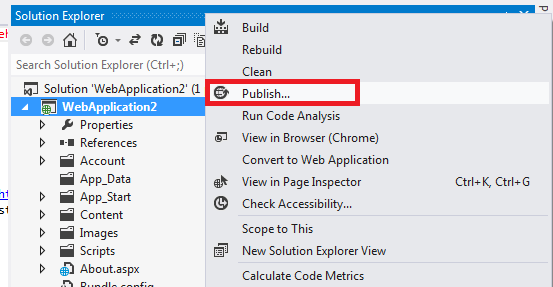
Step 1: Right click on the web project in the solution explorer window and then select the option Publish.
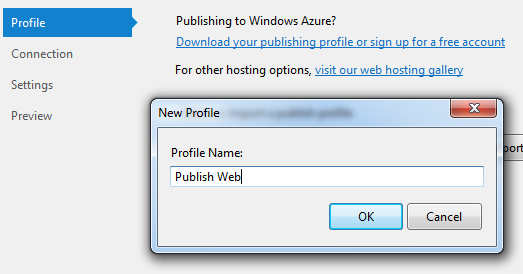
Step 2: Publish Web Application Window will open .Here under the option Select or Import a publish profile Select the option New in the drop down.

Step 3: In New Profile Window give any name to Profile and then click on Ok.
Step 4: Next in Connection Select the Publish method File System.
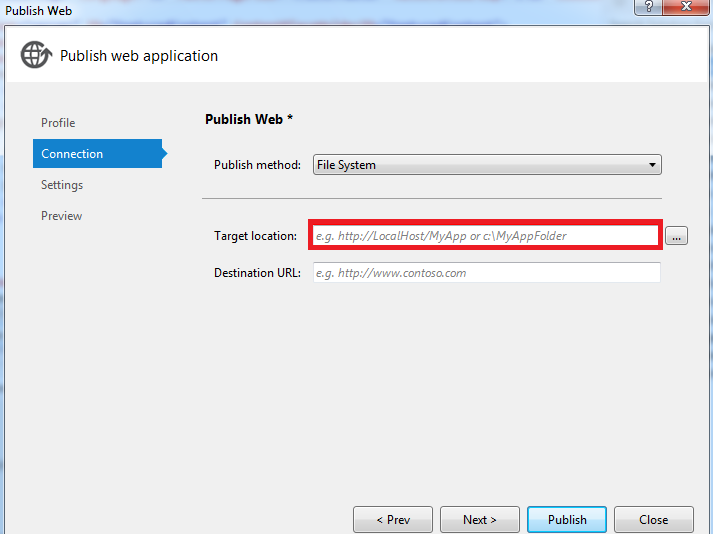
Step 5: Again in Connection for Target location select the folder on your computer where you want to publish the web application and then click on Next Button.
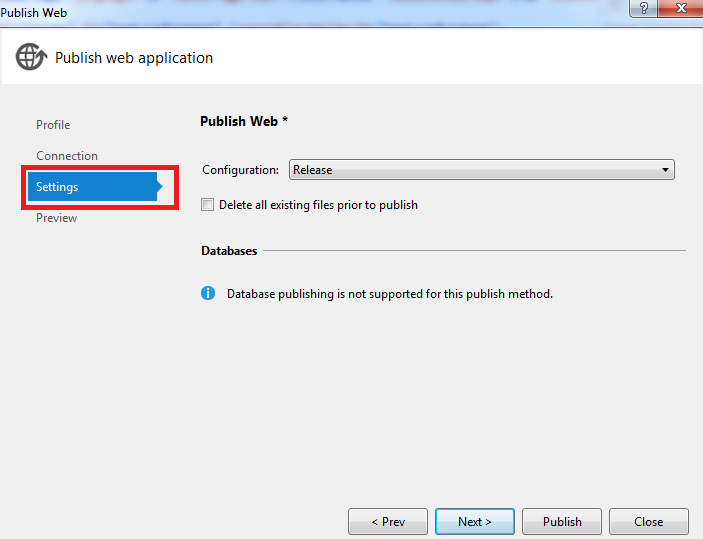
Step 6: In Settings Select the Configuration Release in the drop down and then click on Next Button.
Step 7: Finally in the Preview Click on Publish to Publish the web Project to folder selected in the Step 5 above.
Best and Affordable Visual Studio 2012 Hosting with ASPHostPortal.com
We have supported site developed with Visual Studio 2012 Hosting. Host your site on our Windows Server 2012 today. Visual Studio 2012 is New versions of Visual Studio usually coincide with updates to the .NET Framework and one of our biggest releases yet. It comes purpose-built to help you thrive in an environment in which ideas are at a premium and speed is of the essence.
For fast, secure and reliable Visual Studio 2012 Hosting, look no further than ASPHostPortal.com for all your web hosting related needs. Microsoft Visual Studio 2012 provides many new capabilities to support development on the latest platforms with modern lifecycle tools to make it easier for teams to deliver value continuously.
Visual Studio Updates help ensure you always have the best solution for building modern applications and for managing the modern application lifecycle. New to Windows Extensions, Modules, and Libraries? Ready to try out? Sign up for a FREE Trial Hosting account from ASPHostPortal.com with absolutely no cost and get going in minutes. Our Windows Server is also compatible with Visual Studio 2005, Visual Studio 2008, and Visual Studio 2010.
244423e3-98b3-4c43-9fbc-26f08c790ddd|0|.0
May 5, 2014 13:26 by
Kenny-- Highly affordable Windows Cloud Server, Provisioned in just 5-10 minutes Start from $18.00/month! --

ASPHostPortal.com, a leading Windows web hosting provider, proudly announces the most affordable Windows Dedicated Cloud Server. With Windows Dedicated Cloud Server Services from ASPHostPortal.com, you’ll find the perfect Cloud Server solution for your business. Web pages will load faster for ecommerce customers, databases will get higher IOPS and applications streaming large volumes of video and media files will experience low latency when customers run their applications. With cloud servers, you have the ability to upgrade and downgrade your servers on the fly. In some cases depending on the Operating System running on the cloud server it may still require a reboot. Migrating your cloud server to a different physical server can usually be accomplished with no downtime via hot migration.
ASPHostPortal.com offer Windows Dedicated Cloud Server with the following features:
- Windows 2008R2/2012
- Data Center OS Version
- 1 x vCPU
- 1 GB RAM
- 40 GB Storage (SSD)
- 1000 GB Bandwidth
- 1000 Mbps Connection
- 1 Static IP
- SAN Storage
"An scalable and flexible cloud servers account costs $18.00 per month and gives you 40 GB Storage (SSD), SSD might make the server boot faster, it is now up to 100 times faster than a hard drive" said Dean Thomas, Manager at ASPHostPortal.com.
Cloud hosting systems are run on systems with very powerful processors with SAN Storage which is typically faster for most applications. A storage area network can be easier to manage than other storage systems. By consolidating information into one easily accessible place, it becomes easier to access information while also making it simple to increase capacity as and when required.
Windows Cloud server probably holds the best stability / cost ratio performance. They do not suffer from the usual server hardware problems and they have all Cloud computing, benefits, i.e. they are stable, fast and secure.
Where to look for the best Windows cloud server service? How to know more about the different types of hosting services? Read more about it on http://www.asphostportal.com.
About ASPHostPortal.com:
 ASPHostPortal.com is a hosting company that best support in Windows and ASP.NET-based hosting. Services include shared hosting, reseller hosting, and SharePoint hosting, with specialty in ASP.NET, SQL Server, and architecting highly scalable solutions. As a leading small to mid-sized business web hosting provider, ASPHostPortal.com strive to offer the most technologically advanced hosting solutions available to all customers across the world. Security, reliability, and performance are at the core of hosting operations to ensure each site and/or application hosted is highly secured and performs at optimum level.
4fe0cad4-3453-4437-86e6-e0d47b5a5a7d|0|.0
April 30, 2014 05:58 by
BenDesigners need a solid foundation that gives us almost everything a typical website would require but is flexible enough for customization. Thanks to hundreds of hours spent by some developers and companies, we now have dozens of CSS Frameworks to choose from. Among all the available CSS frameworks out there, Bootstrap is my favorite and also one of the most widely used.
Bootstrap is the new technology that is integrated with the ASP.NET web project templates. It is builtin with the projects that provides responsive design and theming capabilities. Bootstrap is a sleek and powerful front-end framework for faster web development. The project templates based on bootstrap technology provides attractive themes for the web development. Bootstrap is front-end framework for easy and faster web development. This post explains how to use Bootstrap in ASP.NET applications and outlines some of the features of this framework. Create a new ASP.NET project in Visual Studio 2013 and execute it then you will see the look and feel of the page as below.

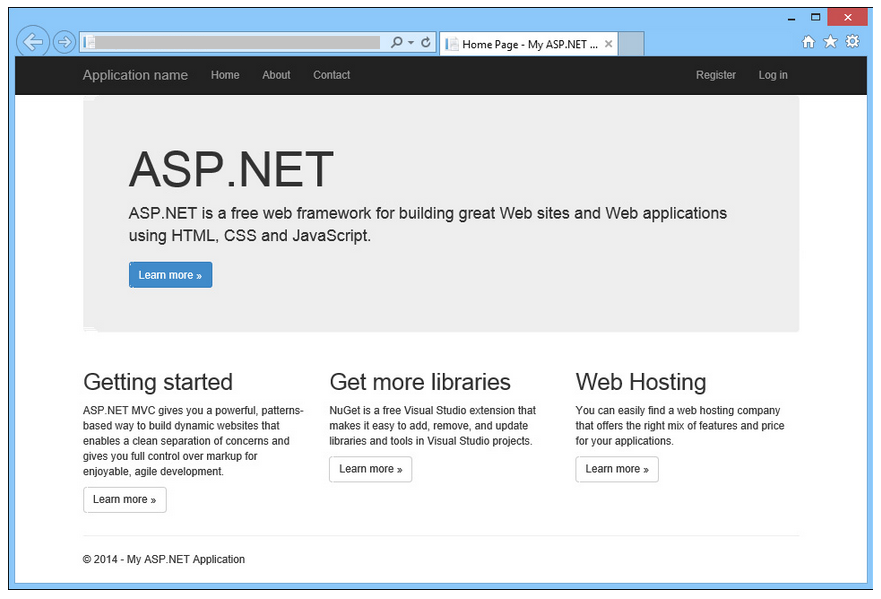
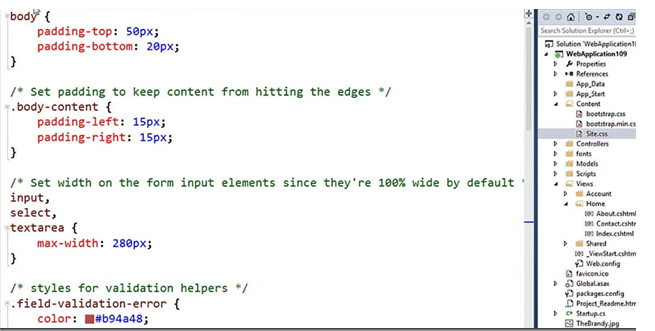
If you want to get the above look without using Bootstrap then you have to write lot of custom CSS. Now all ASP.NET default templates like MVC, Web forms, Single Page applications and Web API are using Bootstrap framework. Bootstrap version 3 is integrated in Visual Studio 2013. The above screen scales well on different devices. If you look at the CSS code to achieve is very few lines as shown below
In order to get the Bootstrap into your project, go to Manage NuGet packages window and type Bootstrap in search box then you will find the package
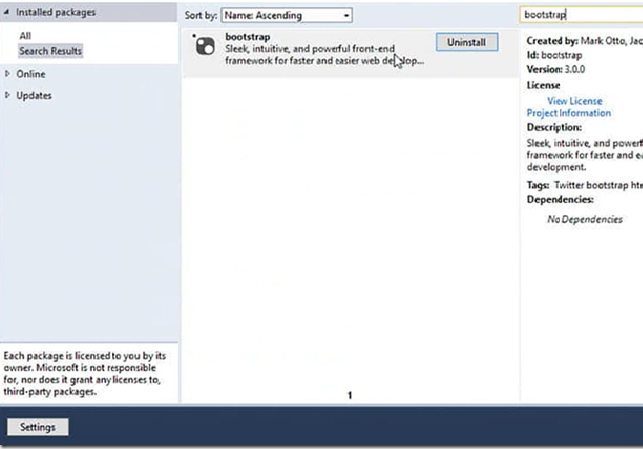
Once you install the package then it brings the following files into your project, All the CSS and JavaScript files related Bootstrap framework are bundled for you to get you better performance.
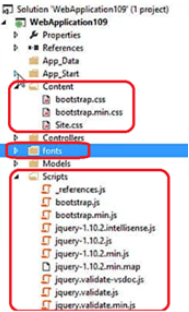
Another integration feature for Bootstrap is Bootswatch, which helps you to theme your site. To apply theme to your site go to Bootswatch site and choose the theme which you like and download and copy the CSS and overwrite the Bootstrap.css in your project. After applying one of the sample free theme then the site looks as below, In matter of seconds you can quickly change the theme of your site.
Another key feature of Bootstrap is dealing with the images, it makes the image experience as responsive without writing any code! just use the class name img-responsive.

It adds the responsive behaviour to the image and it make sure to render nicely in your site.
Reasons to trust your ASP.NET website to us
- Server and performance - We're proud to host all of our sites in Amsterdams, USA and Singapore. We use special server technology on our web servers to offer the fastest loading time for your websites. Stable, Secure and Reliable ASP.NET hosting service.
- 24/7-based Support - We never fall asleep and we run a service that is operating 24/7 a year. Even everyone is on holiday during Easter or Christmas/New Year, we are always behind our desk serving our customers.
- Excellent Uptime Rate - Our key strength in delivering the service to you is to maintain our server uptime rate. We never ever happy to see your site goes down and we truly understand that it will hurt your onlines business. If your service is down, it will certainly become our pain and we will certainly look for the right pill to kill the pain ASAP.
- High Performance and Reliable Server - We never ever overload our server with tons of clients. We always load balance our server to make sure we can deliver an excellent service, coupling with the high performance and reliable server.
- Experts in ASP.NET Hosting - Given the scale of our environment, we have recruited and developed some of the best talent in the hosting technology that you are using. Our team is strong because of the experience and talents of the individuals who make up ASPHostPortal.com.
- Daily Backup Service - We realise that your website is very important to your business and hence, we never ever forget to create a daily backup. Your database and website are backup every night into a permanent remote tape drive to ensure that they are always safe and secure. The backup is always ready and available anytime you need it.
About ASPHostPortal.com:
ASPHostPortal.com is a hosting company that best support in Windows and ASP.NET-based hosting. Services include shared hosting, reseller hosting, and sharepoint hosting, with specialty in ASP.NET, SQL Server, and architecting highly scalable solutions. As a leading small to mid-sized business web hosting provider, ASPHostPortal.com strive to offer the most technologically advanced hosting solutions available to all customers across the world. Security, reliability, and performance are at the core of hosting operations to ensure each site and/or application hosted is highly secured and performs at optimum level.
24205aaf-5cca-4462-9f85-f34061f7b37c|0|.0