
May 12, 2014 11:27 by
 Ben
BenIn this article I’m going to explain how to integrate ASP.NET applications in facebook.
Facebook has provided functionality that extends the Facebook Platform to any website that wants to integrate Facebook APIs for user authentication, sharing website content with friends, and publishing feed stories to generate traffic.
Here I’ll show you how to integrate ASP.NET Apps in Facebook. Please follow the steps given below.

Setting up Facebook App
- To create facebook app click on Developer section
- Click on Set up New App button.
- Agree Facebook terms and click on Create App
- Put Security Check keywords.
- Click on Submit.
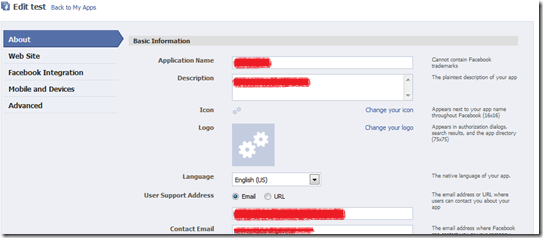
- Fill basic information about app
- Click on Facebook Integration tab.
- Put Name of Canvas page.
- Before putting URL of webpage of your website, I want to show how your page can get callback from facebook app. So first we create webpage in our website:
- Create asp.net website in Visual studio.
- Add reference of Facebook.dll from “C:\Program Files\Coding4Fun\Facebook\Binaries”. This dll will be placed after installing Facebook Developer kit on your machine.
- Create instance of FacebookService object. you can copy facebook app api key and secret key from application page on facebook in source code.
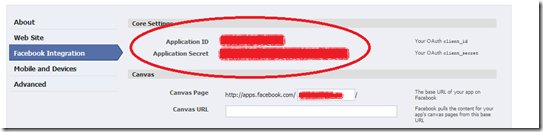
put above values in FACEBOOK_API_KEY and FACEBOOK_SECRET constants respectively.
you can get user_id of facebook who requested this application by calling
string userId = Session["Facebook_userId"] as String;
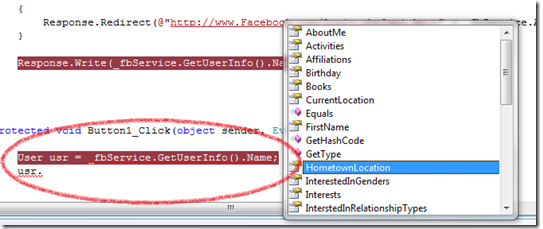
you can also get many information about user like name, sex, location,friends etc.
User usr=_fbService.GetUserInfo();
Source Code:
using System;
using Facebook;
public partial class Facebook_ConnectFacebook : System.Web.UI.Page
{
Facebook.Components.FacebookService _fbService = new Facebook.Components.FacebookService();
private const string FACEBOOK_API_KEY = "191856207506775";
private const string FACEBOOK_SECRET = "820c0b05b14a09365e072c8d37a8c49f";
protected void Page_Load(object sender, EventArgs e)
{
_fbService.ApplicationKey = FACEBOOK_API_KEY; _fbService.Secret = FACEBOOK_SECRET;
_fbService.IsDesktopApplication = false;
string sessionKey = Session["Facebook_session_key"] as String;
string userId = Session["Facebook_userId"] as String;
// When the user uses the Facebook login page, the redirect back here
// will will have the auth_token in the query params
string authToken = Request.QueryString["auth_token"];
// We have already established a session on behalf of this user
if (!String.IsNullOrEmpty(sessionKey))
{
_fbService.SessionKey = sessionKey; _fbService.UserId = userId;
}
// This will be executed when Facebook login redirects to our page
else if (!String.IsNullOrEmpty(authToken))
{
_fbService.CreateSession(authToken);
Session["Facebook_session_key"] = _fbService.SessionKey;
Session["Facebook_userId"] = _fbService.UserId;
Session["Facebook_session_expires"] = _fbService.SessionExpires;
}
// Need to login
else
{
Response.Redirect(@"http://www.Facebook.com/login.php?api_key=" + _fbService.ApplicationKey + @"&v=1.0\");
}
User usr = _fbService.GetUserInfo();
string t = string.Format("User Name:{0}, Sex:{1}, Location: {2}", usr.Name, usr.Sex, usr.CurrentLocation.City);
Response.Write(t);
}
}
Best and Recommended ASP.NET 4.5.1 Hosting Solution
The next version of the .NET Framework is .NET 4.5.1. It has been published as Preview version as announced yesterday during the BUILD conference. The new update builds on top of .NET 4.5 and includes new features such as async-aware debugging, ADO.NET idle connection resiliency, and ASP.NET app suspension. ASPHostPortal.com, a leading innovator in Windows Server hosting, announces a Free Trial ASP.NET 4.5.1 hosting on Windows Server 2012 R2 for the developer community.
f717054d-dc2b-4765-a8fa-e938abd4ff70|0|.0