
September 4, 2013 05:46 by
 Mike
Mike
A handler is associated with a particular type resource. It may be mapped to only a given resource. Handler mappings may also be restricted by a Http verb which means you may want to only work with GET requests ( for example if you Http handler is only supposed to send back images) or a POST request ( for example if you collect some data on the given handler).
We should code a custom Http handler if and only if the resource type to be accessed is fairly customized and is a separate entity on you system The Http response generation logic weather visible or not is very different from a regular aspx pages. In these cases it should be observed that the request should not be part of a page lifecycle.
With IIS 7.5 and beyond it is being tried that as far as possible the config definition should be available in the web.config file of an ASP.NET web site. Handlers can be configured using the IIS wizard or by directly editing the web.config file.
This article describes how handlers are to be written and configured in IIS 7.5.
Any managed http handler implements the IHTTPHandler interface.
public class TextHandler :IHttpHandler
The Http handler has a very important property IsReusable. The purpose of this property is to define if the instance of the Http handler can be shared or not. The IsReusable property should return true if and only is there is no field in the handler which can define the state. If we make IsReusable as false then the performance is slower.
bool IHttpHandler.IsReusable{
get { return true; }
}
The other method of interest is Process request, the objective of this method is to generate any valid Http response (not html response).
void IHttpHandler.ProcessRequest(HttpContext context)
{
StringBuilder htmlText = new StringBuilder();
htmlText.Append("<html>");
htmlText.Append("<title>");
htmlText.Append("</title>");
htmlText.Append("<body>");
htmlText.Append("<h1>");
htmlText.Append("Sample Text");
htmlText.Append("</h1>");
htmlText.Append("</body>");
htmlText.Append("</html>");
context.Response.Write(htmlText.ToString());
}
Configuration of Http handlers follows similar mechanism as modules. Handlers can be configured by using web.config or using the IIS manager. If you use web.config, you can use listing below.
<system.webServer>
<handlers>
<add name="TextHandler" path="*.Text" verb="*" type="TextHandler" resourceType="Unspecified" preCondition="integratedMode" />
</handlers>
</system.webServer>
In the system.webServer section add a handlers section. In this add a new handler. The name is a unique name for the handler. The path contains the path on the server. It can be wild card or an absolute path. In this example the value can be *.Text or Static.Text. The value of verb can be * or a comma separated set of verbs such as GET, POST, PUT, DELETE or any verbs used for this handler.
The type is the fully qualified name of the class in which the handler code is written. It should be noted that a precondition here is integratedMode.
If you use IIS Manager, follow steps below.
1. Open IIS Manager
2. Expand the node of your web application
3. Open the Handler Mapping feature

4. Click on Add managed handler

5. Add the various values

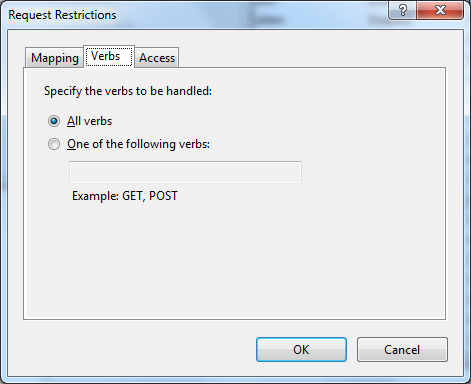
6. Click on request restrictions and add values for verbs
Some pitfalls
- Session is not available: The HttpSessionState is a module in itself hence we should ensure that when creating a module we will not have access to Http Session.
- Http request is read only: The various elements of the Http request such as query strings in modules are readonly. It should be noted that the url is not read only and you can create modules for Url rewrite.
- Http handler IsReusable: The IsReusable property is a death trap for the novice programmer. Great care should be taken to decide the value of IsReusable. It should be noted that as far as possible we should try to keep our handler stateless in interest of performance.
61a595ab-ec6b-45be-b593-631747e0e023|0|.0